


Participating Frequently
October 24, 2018
Question

no "apply during import panel" in auto import dialog

  • October 24, 2018
  • 9 replies
  • 2729 views

Windows 10 64bit

Lightroom classic cc 8.0

since version 8.0 there is no "apply during import" in auto import mode

Lightromm was started after inserting a sd-card into the PC:
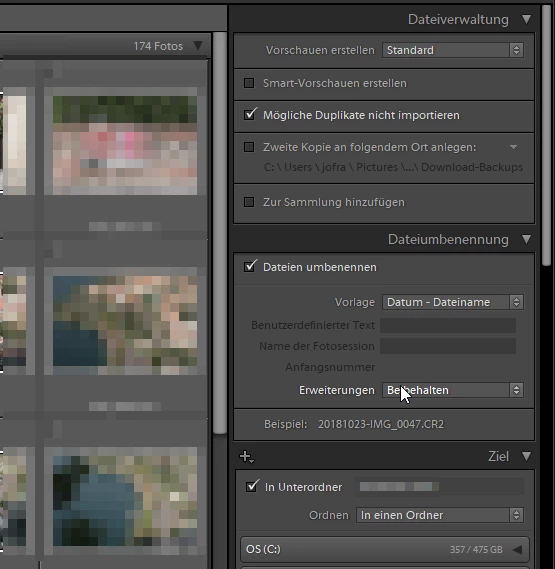
Even if i right-click in a black area in the right panel, I don't see the line "apply during import" to set the checkmark". It is simply not there.

When Lightroom respectively the import dialog is started manually by clicking on the import button in the library module the "apply during import" panel is there.
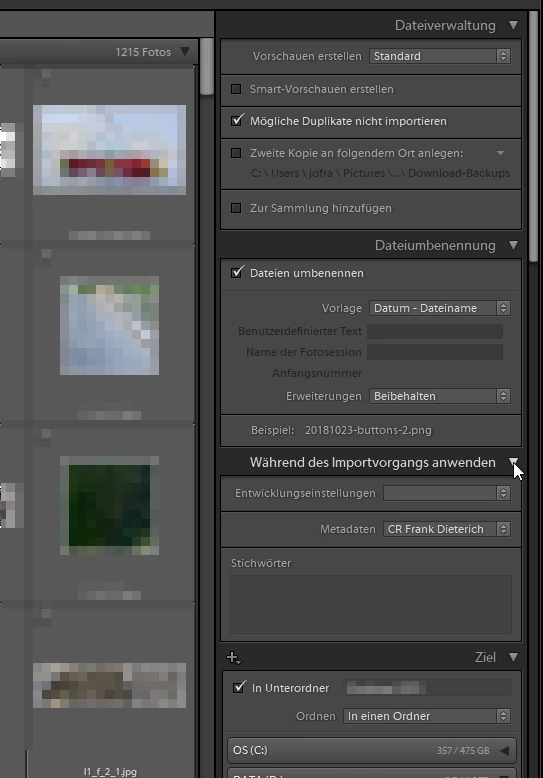
"apply during import" in german is "während des Importvorgangs anwenden" where the cursor is placed in the 2nd screenshot above.

I'm used to the workflow to insert my sd card and give keywords, apply development settings and add metadata during the import.

I do not understand why the same dialog behaves different depending on the method how it was started.

kind regards

Frank

This topic has been closed for replies.

9 replies

GoldingD
Legend
December 16, 2018

Looks like this calls for a reset preferences.

links on how below, note some gotchas mentioned, specifically all the work you may want to do before resetting (record what your defaults have been changed to) and possibility that the wrong catalog might launch (don't panic, just a matter of selecting the correct one)

Preference file and other file locations | Lightroom Classic CC and Lightroom 6

Resolving Buggy Behavior in Lightroom: How to Reset Preferences - YouTube

Replacing the Lightroom Preference File – Lightroomers

max1979l
Inspiring
December 16, 2018

Hi David, in my case even reinstalling Lightroom didn't help.

I had this issues already a while back. Due to other reasons (sync getting corrupted constantly for no apparent reason), I actually rebuilt my system from scratch (OS an' all). It didn't help with this problem.

As in my case it's not a big issue (as I wrote, Lr still applies anything you might have set using an import preset) I'm keeping the problem, as for 2018 I have done enough trouble shooting with Lr for which no one pays me.

GoldingD
Legend
December 16, 2018

Actually I recommended a reset of the preferences, re-installing might not re-wright the preferences file, thats might not

GoldingD
Legend
December 16, 2018

Hmmm, on my PC still working on getting LR to bring up import when a SD card is in, on the PC import screen includes apply during import

on my MAC no matter what, no apply during import, with or without automatically bringing import up when SD cad inserted. And no right click to bring up hidden panels.

OK, on Win 10, had to adjust Auto Play (OS system) so that when a memory card is inserted Lightroom Import launches. It has, and I do get the apply during import panel

FOLLOWUP

On my MAC, I reset the Lightroom preferences. and now my import dialog works. All panels show up, LR brings up import when SD card inserted. One thing is in the import screen, right clciking to turn off panels does nothing.

GoldingD
Legend
December 16, 2018

So some confusion, I have never used this Auto Import, so had to experiment. Issue is, are we talking the same thing, so:

1) Are you referring to the Auto Import capability that is turned on via /File/Auto Import? ???

2) Or the "Show Import Dialog when a Memory Card is Detected" option via preferences/general?

Finlay setup (1),on my copy (8.1) and the import dialog does not come up, files in the watched folder just get moved to the destination folder, and added to the catalog.

One odd note, apparently my copy or my SD card setup does not allow me to set this up using the SD card as watched folder (probably user error), Also, when I setup (2) from above, nothing happens.

max1979l
Inspiring
December 16, 2018

I have been having this issue since a couple of months myself. On the left you see the panels when the auto import is triggered by inserting the memory card, on the right if I do it manually.

What's interesting is that if you like me use a preset, even if you do import when the apply during import panel is not shown, the images still have the develop setting and keywords applied. Since I only import with camera specific presets with generic keywords, this is not an issue for me. I'm just happy LR doesn't crash anymore when ejecting the card like it used to do few updates back.

Some system Info for reference:

Lightroom Classic version: 8.1 [ 1200465 ]

License: Creative Cloud

Language setting: en

Operating system: Windows 10 - Business Edition

Version: 10.0.17134

Application architecture: x64

System architecture: x64

Logical processor count: 8

Processor speed: 3.3 GHz

Built-in memory: 16341.9 MB

Real memory available to Lightroom: 16341.9 MB

Real memory used by Lightroom: 3046.3 MB (18.6%)

Virtual memory used by Lightroom: 4046.7 MB

Graphics Processor Info:

OpenGL: GeForce GTX 1060 6GB/PCIe/SSE2

Check

GoldingD
Legend
November 12, 2018

Another thread in this forum on this, now despite having German way back in what fourth grade? My German sucks, so I am probably missing a lot on your inquirys. One issue that the other members may have mentioned is that this tab can be turned off. Right click on one of the visable tabs and select the missing one to be on

Apply During Import - missing or not?

Participating Frequently
November 13, 2018

davidg36166309  schrieb

Another thread in this forum on this, now despite having German way back in what fourth grade? My German sucks, so I am probably missing a lot on your inquirys. One issue that the other members may have mentioned is that this tab can be turned off. Right click on one of the visable tabs and select the missing one to be on

Apply During Import - missing or not?

I already tried this right click thing witht he context menu, but the "apply during import"entry  is also missing in the context menu. There is no chance to set this checkmark.

See my screenshot in an earlier post:

Dateiverwaltung = file handling

Dateiumbenennung = file renaming

Ziel = destination

alles anzeigen = show all

Solomodus = solo

alle erweitern = expand all

alle minimieren = collapse all

I first posted in one of the other threads on this in this forum, but was told to make a new post.

GoldingD
Legend
November 12, 2018

Hmm, re-reading, your workflow is to insert SD card, then launch Lightroom? Pretty sure Adobe thnks people do this the other way around.

If starting Lightroom, then inserting the SD card, then telling Lightroom to import works, and the other way fails, alter your workflow. Yes Adobe should account for that, but dont you need to get your work done.

Participating Frequently
November 13, 2018

davidg36166309  schrieb

Hmm, re-reading, your workflow is to insert SD card, then launch Lightroom? Pretty sure Adobe thnks people do this the other way around.

If starting Lightroom, then inserting the SD card, then telling Lightroom to import works, and the other way fails, alter your workflow. Yes Adobe should account for that, but dont you need to get your work done.

This is exactly the workflow that was meant by Adobe when they put this switch for enabling autoimport into he preferences section. And Lightroom actually automatically launches in Import dialog when I insert a sd card into my PC but not with the same functionality. So I expect the same full functionality in the import dialog as if I go to the import dialog manually by pressing the import button in the library module. And it was working in version 7.5. Why should I alter my workflow when Adobe introduces a bug in their newer version.

I will alter my workflow, but this includes using other tools for the import and the rating of my photos before I bring them to Lightroom as this is the weakest part of LR.  Previewing photos in Lightroom is so slow.

GoldingD
Legend
November 12, 2018

When you are in the Develop module, do you see any presets in the presets panel?

Participating Frequently
November 13, 2018

davidg36166309  schrieb

When you are in the Develop module, do you see any presets in the presets panel?

yes I do:

Entwickeln = develop

Vorgaben  = presets

Schärfen = sharpen

Vigenttierung = vignette

Benutzervorgaben = user presets

But I don't understand whether these presets contribute to this issue here or not.

idahoblondephotochick
Participant
November 11, 2018

I have the exact same problem since my last update to version 8! On Windows 10 64bit.

Anyone else?

johnrellis
Legend
November 12, 2018

I have the exact same problem since my last update to version 8! On Windows 10 64bit.

Did you try right-clicking on the words "File Handling" and then selecting Apply During Import?

If you don't see Apply During Import in the context menu, then please file a bug report in the official Adobe feedback forum, where Adobe wants all bugs reported: Lightroom Classic CC | Photoshop Family Customer Community . Adobe product developers read everything there and sometimes reply. They don't participate in this forum and won't see your feedback.

Make sure to include details of your issue and include the first ten lines from the menu command Help > System Info. (Simply providing a link to this thread will ensure they won't pay attention, unfortunately.)

Participating Frequently
November 12, 2018

If you don't see Apply During Import in the context menu, then please file a bug report in the official Adobe feedback forum, where Adobe wants all bugs reported: Lightroom Classic CC | Photoshop Family Customer Community . Adobe product developers read everything there and sometimes reply. They don't participate in this forum and won't see your feedback.

done!

Lightroom Classic CC 8.0 no "apply during import" available with autostart on sd card event | Photoshop Family Customer …

Legend
October 24, 2018
Even if i right-click in a black area in the right panel, I don't see the line "apply during import" to set the checkmark". It is simply not there.

I'm guessing you are not doing it properly. If you point your mouse right in the middle of the word Dateiverwaltung, (Middle of the word, not a black are of the panel) and right-click, the menu should appear.

Participating Frequently
October 25, 2018

its not the problem that the menu doesn't apperar. It does. But there is no entry for "apply during import" in this context menu which I could checkmark.

Legend
October 25, 2018

Try deleting or renaming your preference file: https://www.lightroomqueen.com/how-do-i-reset-lightrooms-preferences/