Just to be clear:
@Walter34074127wlx0 said: I have is a file I call "all pictures" with all my pictures in it with a date on the folder when that group of picture(s) were taken. these picturse contain decesed relatives, family, their kids, friends, events. So when I stated Adobe Organizer an Album was created which for this explaination "Album A' .
It seems to me that what you have (in Windows Explorer) is a parent folder on your hard drive (named "all pictures"). You then have sub-folders named for the date that the photos were taken. When you started the Organizer, a catalog (not an Album) was created, and you imported the photos from the all pictures folder and its dated sub-folders.
@Walter34074127wlx0 said: So I made another file called "friend" in windows and copied all their pictures into it.
In other words, you created a new folder in Windows, named "friend". You then attempted to import the copied photos into the Organizer catalog. As discussed, this didn't work because the files have already been entered into the database.
Now, the Organzier has several different methods for creating sub-sets of the files. Here are a couple:
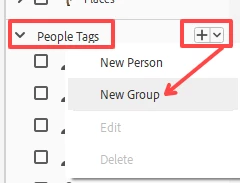
- If all of your friend's photos have People tags, you can create a Group called Friend's Photos. You do this by clicking on the down arrow next to the People tags in the Tags panel on the right of the Organizer window. Once you create the Group, you click and drag the named People tags to the Group name. If you click on the Group name the box will be checked and all of the Friends photos will be viewable in the grid.
- You can do essentially the same operation by using a keyword tag called friends. You would then have to select your friend's photos and tag them with the keyword tag. Again, if you check the box for the keyword tag, only the photos with that tag will be seen in the grid.
- You can create an Organizer Album (found in the panel on the left of the Organizer window), and tag the photos with the Album name. When you click on the Album name, only the files in that Album will be seen in the grid. Using Albums has the advantage of allowing you to sort the photos into any order you want (rather than the other sort orders such as newest and oldest). This is particularly useful for creating slideshows (which I understand is what you want to do with your friend's photos).
There are other options, and depending on your specific needs, you may want to create a separate catalog for your friend's photos. The advantage here is that a new catalog would allow you to import the photos that you have already sorted and copied into a separate folder of files. If you take this approach, any People tags that you have applied to the photos should transfer into the new catalog as Imported Keyword Tags (if you accept the option to do so when the files are imported).
I know we are throwing a lot of information at you. Let us know if you still have questions.



 AdChoices