EDBARSS
Participating Frequently
June 5, 2024
Answered

The properties of the video on the Timeline are missing

  • June 5, 2024
  • 8 replies
  • 7048 views

Where did the PROPERTIES item in Adobe Premiere BETA go?
Correct answer Trent Happel

One clip in the Timeline window


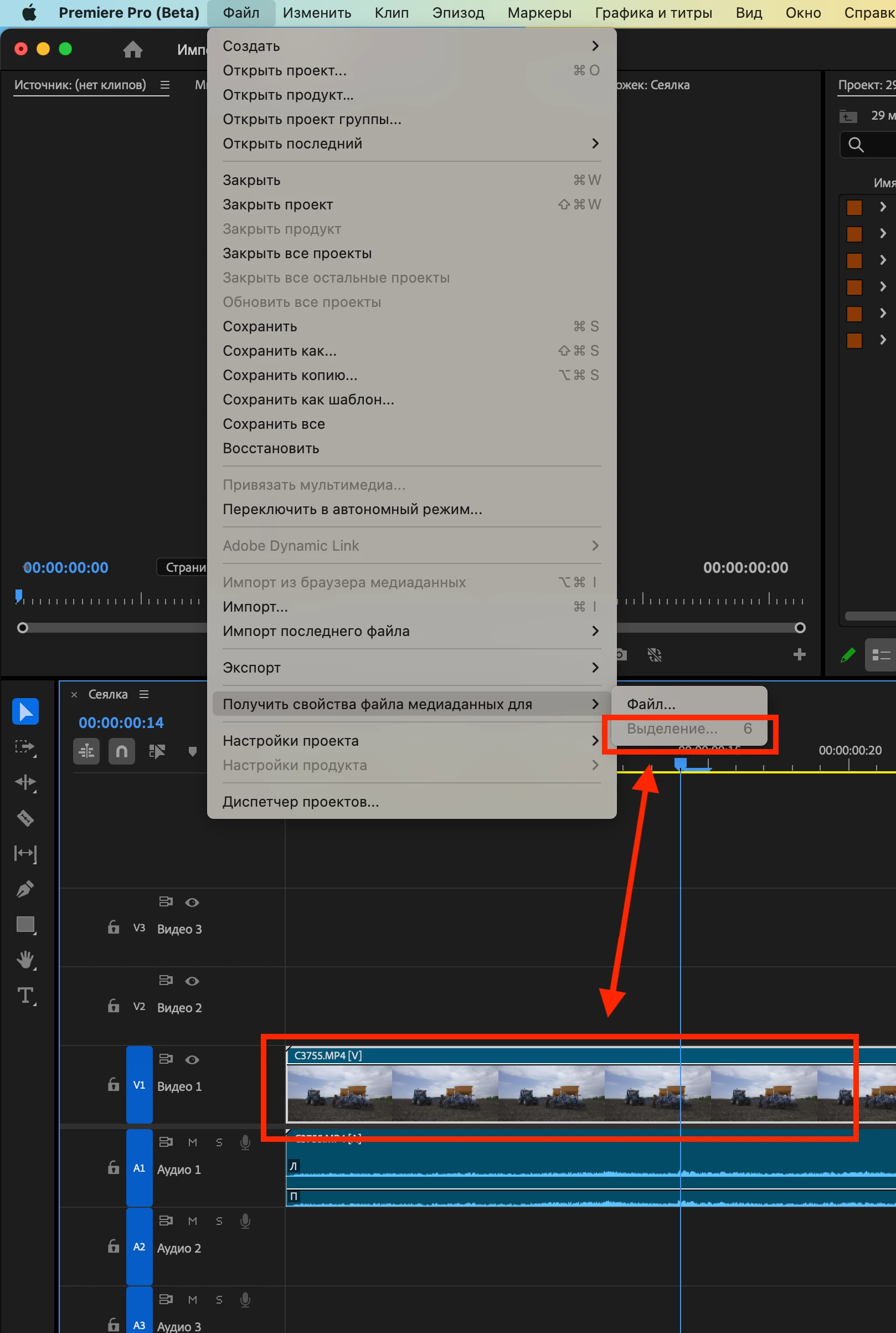
FYI. FIle menu> Get Media File Properties for > Selection is now enabled for Timeline clips along with the shortcut, as of 24.6 beta build 040 and later.

8 replies

MyerPj
Community Expert
Community Expert
July 21, 2024

That will be available with just one keypress, by default its ctrl+shift+H, you'll be able to set it to what you want:


Stan Jones
Community Expert
Community Expert
July 13, 2024

Summary/update on the current status. I was posting to another thread, and realized that just pointing to this thread could be confusing. This is in the Beta forum, but it is the best thread for users seeing this in 24.4.1 and 24.5.0.


The removal of Properties when you right-click a selection in the Timeline was intentional. And its name was changed to Media File Properties. The removal of the keyboard shortcut to do the same thing was not, and has already been fixed in Beta 24.6.0.40 or later.


@Mike-Berry explains this is an intentional change:

https://community.adobe.com/t5/premiere-pro-beta-discussions/the-properties-of-the-video-on-the-timeline-are-missing/m-p/14664351#M9415


@Trent Happel updates us that the keyboard shortcut to show Media File Properties from a selection in the timeline again works in the Beta version beginning with 24.6.0.40 - which means it will be in a future release version:

https://community.adobe.com/t5/premiere-pro-beta-discussions/the-properties-of-the-video-on-the-timeline-are-missing/m-p/14709141#M9626


And he gives a workaround to close multiple Media File Properties windows: "A possible workaround is to go to Window menu > Workspaces > Reset to Saved Layout. Just make sure you did not save your Workspace with the Properties panels open.":

https://community.adobe.com/t5/premiere-pro-beta-discussions/the-properties-of-the-video-on-the-timeline-are-missing/m-p/14735254#M9697


In Release versions 24.4.1 and 24.5.0, there is no keyboard shortcut to open the Media File Properties from the timeline. A workaround is to assign a keyboard shortcut to "Reveal in Project" (e.g. Ctrl+J). Then, select the clip you want in the timeline, Ctrl+J (selects the clip in the Project Panel), then Ctrl+Shft+H (the already assigned shortcut for "Get Media Properties Selection").


Stan

Participant
July 9, 2024

Removing 'Properties' from the right click menu has to be up there with one of the most ridiculous things the premiere team have done. Why?!

Remote Index
Inspiring
July 6, 2024

@Trent Happel 

@Mike-Berry 
@Kevin-Monahan 
(documentation issues)


“The track item context menu is way too long … and making that menu short enough to display on a standard laptop is a goal.”

This is very true, and I hope more work on cleaning up the interface is underway. Thanks.


“"Properties" is now called "Media File Properties””

I note this change has been made without updating the user guide documentation. Essentially this means that Adobe does not explain to users what changed or how to use its current software.


While the impact of this oversight is somewhat softened by the fact that Adobe never actually had any documentation on the Properties panel before, the shortcomings of this excuse should be apparent.


Is there a reason Adobe has chosen to communicate this functionality to users?


R.


Edit: @lslater including you too after your post.

AlexFX
Known Participant
July 8, 2024

Super F***ing frustrating...I always use the clip properties for reference in every project...now the "Media File Properties" returns a blank expression: "Unable to get properties for this file."

Thanks again Adobe.

Adobe Employee
July 8, 2024

Sorry the name change from “Properties” to “Media File Properties” was not communicated and we made a mistake in removing the  keyboard shortcut and “Selection…” option from the File menu. 

That mistake was corrected a week or so ago. You can assign a keyboard shortcut or use the top menu “File > Get Media File Properties for Selection…” to get the properties of the Timeline selection. Be sure to use the “Selection” option, not the “File” option.

CatTaker19344
Participant
June 25, 2024

In my opinion, this is a very bad decision in the state as it is now. I understand that it may have been rarely used, and I myself rarely use it, but there are times where it is crucial for me to know something quickly about a particular clip. As it stands now, it looks like I am not able to approach the properties of a particular clip at all without doing 2-3 additional steps which is very annoying because before it was just two clicks and I already knew everything. If it has to be in this form, at least do something so that when selecting a clip on the timeline I can call up the properties with a shortcut. Because the current form is very slow because first I have to find the clip in the project then call it with a shortcut, this is an unnecessary addition of extra steps to a simple action that may not be used too often but when it is used it gives quite important information.

Participating Frequently
July 15, 2024

Right? Adobe only knows how to make the worst decisions and I hope they pay dearly for it when people continue to unsubscribe in droves. 

MyerPj
Community Expert
Community Expert
June 8, 2024

<<The track item context menu is way too long>>

I agree with this... that context menu makes it hard to locate the item you want. And there is a lack of consistency with where the items are compared to other menus. Like "Properties" it's low on the timeline menu (which is 'near' where it is essentially on most Windows menus at the bottom. (Right-click an icon or a file in Windows)). But on the Project context menu (an equally LONGish menu itself) Properties is in the top section. That really makes things harder to find.


Inspiring
June 9, 2024

Agreed.  Common context items should be in the same place on each context menu.

Stan Jones
Community Expert
Community Expert
June 6, 2024

I am in PR Beta 24.6.0.8 comparing to PR 24.41.


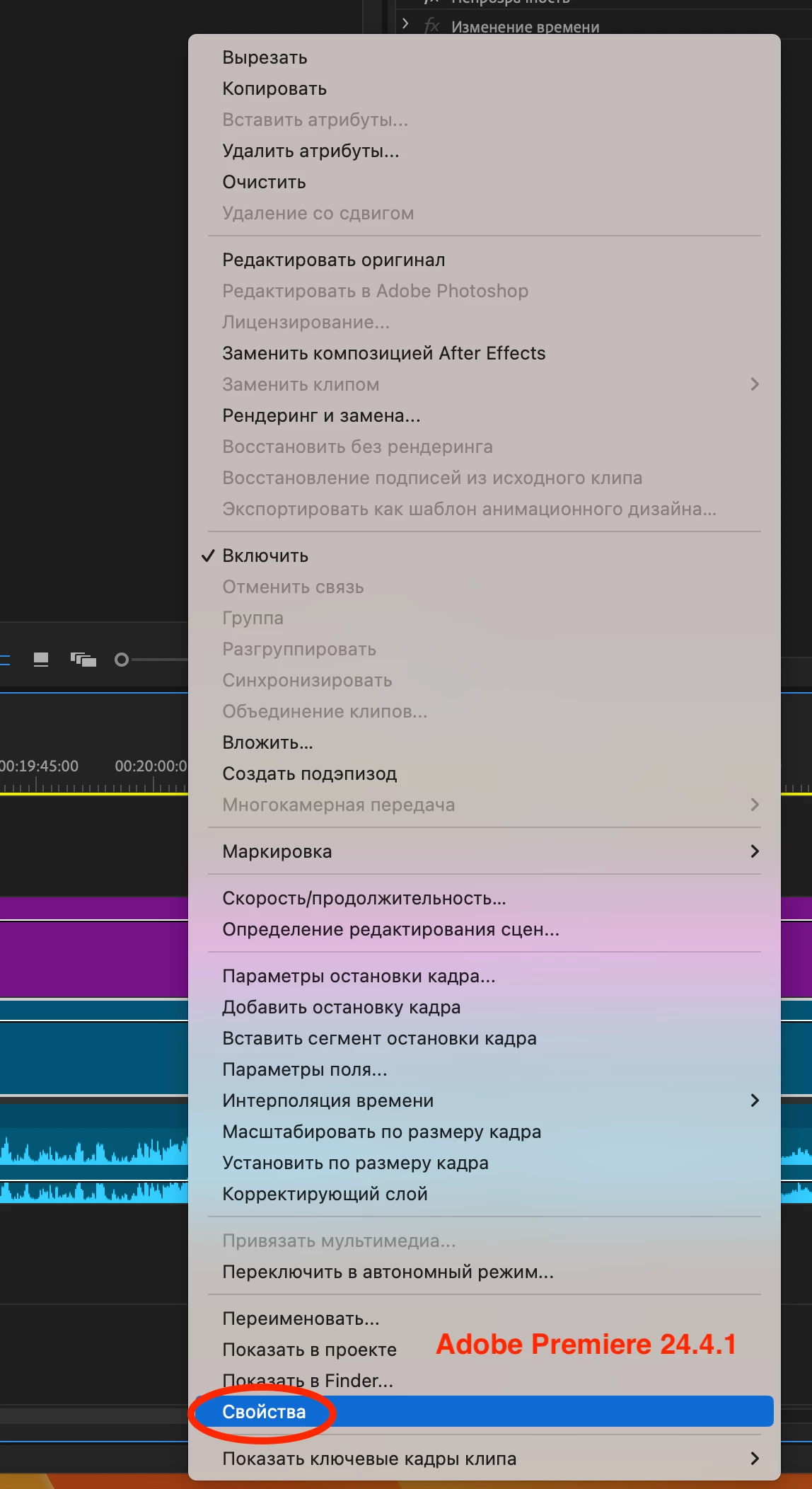
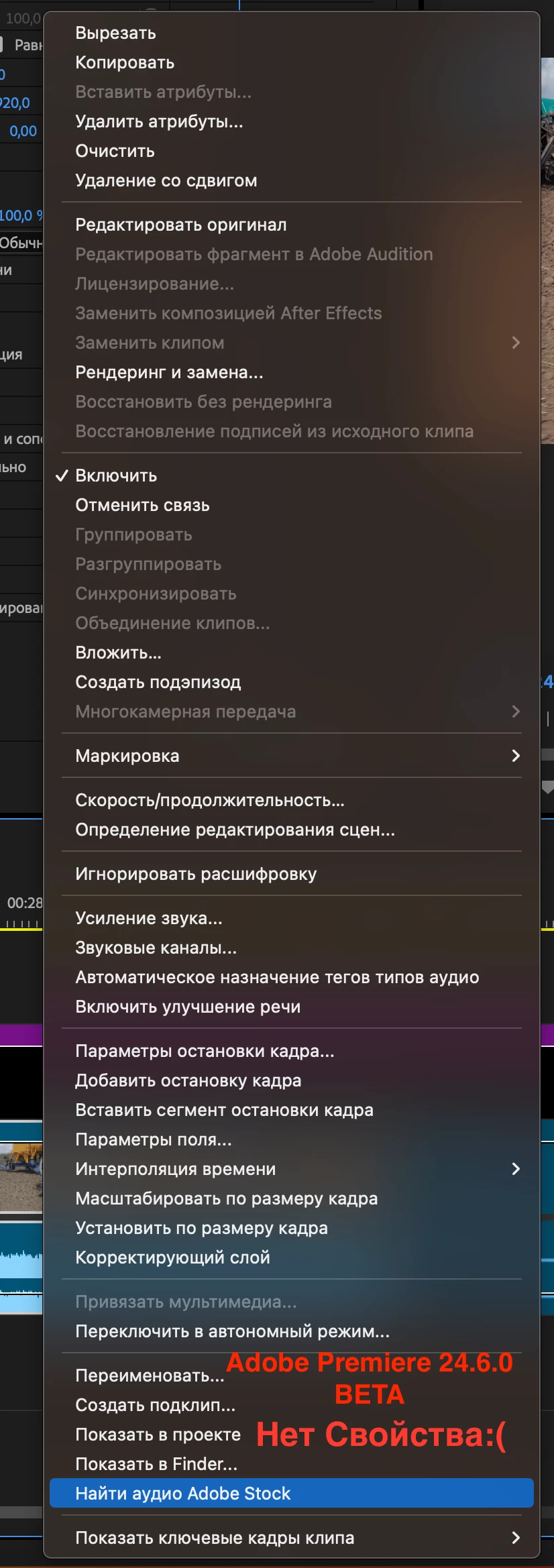
There are differences in function, and in the naming: "Properties" is now called "Media File Properties" and is missing from the right-click (context) menu in the Timeline. It is present for Project Panel selections, but, as the current Release version, only for single selections.


The current release allows selecting one or more clips (in Timeline) and using Right-Click -> Properties to get a properties window for each clip. You can also get the same result by selecting one or more clips in the Timeline, or one or more clips or sequences in the Project Panel and using File -> Get Properties for -> Selection.


You can only do this in the Beta, as Ann shows, from the Project Panel.


@Trent Happel Would you pass on to the right people. I assume the intent was to change names and keep all functionality.


Also needed is a way to close all properties windows at once. It appears to require closing them one at a time.


Stan


Community Manager
June 6, 2024

Thanks everyone. I have passed this on to the team.

Adobe Employee
June 6, 2024

Hi Stan.


This removal was intentional. The track item context menu is way too long, and the use of the Media File Properties is low. Having it in both menus was judged redundant, and making that menu short enough to display on a standard laptop is a goal.


Mike


Mike

Ann Bens
Community Expert
Community Expert
June 5, 2024


EDBARSS
EDBARSSAuthor
Participating Frequently
June 5, 2024

The properties of the selected video are not active:(


Ann Bens
Community Expert
Community Expert
June 5, 2024

You select multiple clips or the sequence from the Project Window.