


Participating Frequently
January 3, 2023
Question

Adobe Reader displays Wingdings-like characters for a single user only

  • January 3, 2023
  • 4 replies
  • 22040 views

Hello,

I have a real head-scratcher here. We have a single user who cannot properly see a PDF file that was sent to us by a customer. When she opens it, it displays Wingdings-like characters in place of the actual font used in the PDF:
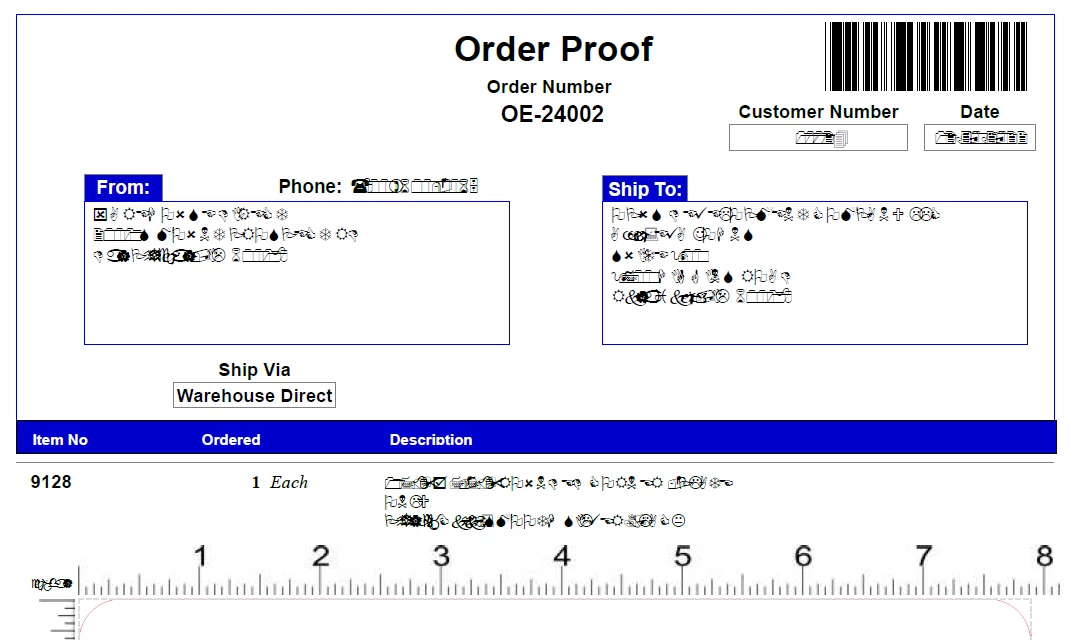
However, whenever anyone else in our company opens this same file, it displays normally. The PDF does not have embedded fonts, but the only fonts used in the document are Arial and Times New Roman. We are all using Windows 10 OS. I checked the user's installed fonts and Adobe Reader settings vs mine (I can see it properly), and they all match.
I've also attached the file.
Any help would be greatly appreciated. This seems to be the only problem file for this user but I don't want the issue to crop up repeatedly.

4 replies

Sil.C
Community Manager
Community Manager
January 11, 2023

Thread locked because OP @marshaw34119649 is acting against our Community Guidelines.

Please refrain going forward or we may have no choice but to ban you from the site.

Bevi Chagnon - PubCom.com
Brainiac
January 4, 2023

Looks like a common error: when the PDF was created, that particular font wasn't embedded into the PDF file.

When fonts aren't embedded into a PDF, then the file relies on finding a similar font on the end user's computer/device to display the text.


Seems that your end user doesn't have the correct font on their system, and Reader (or Acrobat, or any other PDF reading app) is swapping in Wingdings.


Solution #1: Re-export the PDF, this time checking the option to embed all fonts into the PDF.


Solution #2: You can attempt to force-embed the fonts into the PDF in Acrobat Pro. See instructions here: https://community.adobe.com/t5/acrobat-discussions/text-changes-to-special-symbols-with-saving-pdf-in-acrobat/m-p/10634321


|    Bevi Chagnon   |  Designer, Trainer, & Technologist for Accessible Documents ||    PubCom |    Classes & Books for Accessible InDesign, PDFs & MS Office |
Participating Frequently
January 4, 2023

I suggest you reread my post more carefully.
The fonts are not embedded in the PDF. However, the only fonts used are Arial and Times New Roman. These are present on both my and the affected user's computer.

JR Boulay
Community Expert
January 4, 2023

[MOVED TO THE ACROBAT READER DISCUSSIONS]

Acrobate du PDF, InDesigner et Photoshopographe
Amal.
Community Manager
Community Manager
January 3, 2023

Hi @marshaw34119649 


Hope you are doing well and sorry to hear that. It seems like the font is not properly embedded in the PDF file or not present on the user's computer or the user may not have the required permission to use the required font.


Open the Acrobat application go to Edit (Win), Adobe Acrobat (Mac) > Preferences > Page Display > under Rendering, select 'Use local fonts' > Click OK and check if that works. 


For more information about font embedding, please check the help page https://helpx.adobe.com/acrobat/using/pdf-fonts.html


Regards

Amal

Participating Frequently
January 3, 2023

Hi Amal,

Unfortunately I already tried everything you suggested. I suggest you reread my post more carefully.
The fonts are not embedded in the PDF. However, the only fonts used are Arial and Times New Roman. These are present on both my and the affected user's computer.
The settings are already set up so that Use local fonts is checked.

Bevi Chagnon - PubCom.com
Brainiac
January 4, 2023
quote

...the only fonts used are Arial and Times New Roman. These are present on both my and the affected user's computer.


There are many variations of these fonts, and the hidden font name must be identical for devices to recognize them as the same.


So it's risky to not embed fonts into a PDF, even if you think the end user will have such common fonts.


|    Bevi Chagnon   |  Designer, Trainer, & Technologist for Accessible Documents ||    PubCom |    Classes & Books for Accessible InDesign, PDFs & MS Office |