


Participant
July 8, 2016
質問

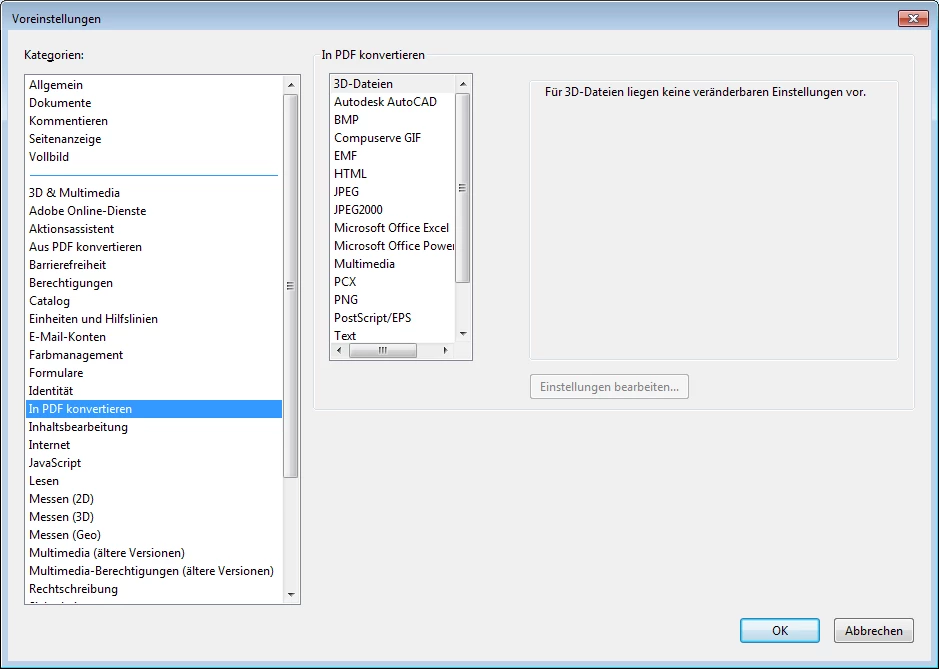
Voreinstellung "In PDF konvertieren" fehlt Microsoft Office Word

  • July 8, 2016
  • 返信数 1.
  • 1630 ビュー

Hallo

Wir nutzen seit heute Adobe Acrobat DC Version 2015.006.30174 mit Office 2016

Ich kann aber mit DC keine Word Dokumente öffnen. Unter Voreinstellungen fehlt auch Word. Excel und PowerPoint ist da. Wie bekomme ich Word dazu?
このトピックへの返信は締め切られました。

返信数 1

Adorobat
Participating Frequently
July 8, 2016

Hi stefane34739878 ,

Please perform the steps given below:

1 -Check if there is any update available for Word/Acrobat DC.

2- If installing updates doesn't fix issue, try to repair MS Office and check if the issue is fixed.

3- If repairing MS Office doesn't work, try to repair Acrobat DC.

Also check if you can see Acrobat tab in Word ribbon.

Let us know if you face any issue.

Thank You!

Shivam

Participant
August 8, 2016

Hallo

In Word war der TAB immer vorhanden. Es geht darum, dass ich mehrere Dateien zusammenführen möchte und in dem Kontext für das Zusammenführen keine Word Dateien eintragen kann. Siehe Fehlermeldung!

Adorobat
Participating Frequently
August 8, 2016

Hi ,

Check if the Word files you are trying to combine are not opened in Word. Also the files are not Secured or Signed.It might be because of one pdf document which is causing this error message to appear.

Try with a different set of Word files and check if you are still getting this error.

Let us know about the results.

Thank You!

Shivam