Participant
June 27, 2020
解決済み

Fill text field based on entry of another

  • June 27, 2020
  • 返信数 2.
  • 824 ビュー

Using acrobat x pro

I'm using a bubble like sheet where on top is a box to enter 0-9 then underneath are bubbles(text fields. I am try to say if enter 1 in the box then bubble field 1 is black filled.  If 2 then bubble field 2 is black filled.... so on and on...  can anyone help?

このトピックへの返信は締め切られました。
解決に役立った回答 ls_rbls

+++MODIFIED REPLY --fixed typos in the javascript example as observed by Bernd 


Hey Joseph,


I will use checkboxes for my example. You can use the script below to handle the fillColor  execution of the text fields.


I have to admit though, that my script below is as rookie as I can get my hands on javascript and is not very elegant or concise, but it works. 


var a = getField("A");
var b = getField("B");
var c = getField("C");
var d = getField("D");
var e = getField("E");
var f = getField("F");
var g = getField("G");
var h = getField("H");
var i = getField("I");


if (event.value !=="") {

if (event.value =="1") {a.checkThisBox(0,true); a.fillColor = color.black;}
else if (event.value !="1") {a.checkThisBox(0,false); a.fillColor = color.white;}

if (event.value =="2") {b.checkThisBox(0,true); b.fillColor = color.black;}
else if (event.value !="2") {b.checkThisBox(0,false); b.fillColor = color.white;}

if (event.value =="3") {c.checkThisBox(0,true); c.fillColor = color.black;}
else if (event.value !="3") {c.checkThisBox(0,false); c.fillColor = color.white;}

if (event.value =="4") {d.checkThisBox(0,true); d.fillColor = color.black;}
else if (event.value !="4") {d.checkThisBox(0,false); d.fillColor = color.white;}

if (event.value =="5") {e.checkThisBox(0,true); e.fillColor = color.black;}
else if (event.value !="5") {e.checkThisBox(0,false); e.fillColor = color.white;}

if (event.value =="6") {f.checkThisBox(0,true); f.fillColor = color.black;}
else if (event.value !="6") {f.checkThisBox(0,false); f.fillColor = color.white;}

if (event.value =="7") {g.checkThisBox(0,true); g.fillColor = color.black;}
else if (event.value !="7") {g.checkThisBox(0,false); g.fillColor = color.white;}

if (event.value =="8") {h.checkThisBox(0,true); h.fillColor = color.black;}
else if (event.value !="8") {h.checkThisBox(0,false); h.fillColor = color.white;}

if (event.value =="9") {i.checkThisBox(0,true); i.fillColor = color.black;}
else if (event.value !="9") {i.checkThisBox(0,false); i.fillColor = color.white;}

} else {

if (event.value =="") {

a.checkThisBox(0,false); a.fillColor = color.white;
b.checkThisBox(0,false); b.fillColor = color.white;
c.checkThisBox(0,false); c.fillColor = color.white;
d.checkThisBox(0,false); d.fillColor = color.white;
e.checkThisBox(0,false); e.fillColor = color.white;
f.checkThisBox(0,false); f.fillColor = color.white;
g.checkThisBox(0,false); g.fillColor = color.white;
h.checkThisBox(0,false); h.fillColor = color.white;
i.checkThisBox(0,false); i.fillColor = color.white;

  }

}


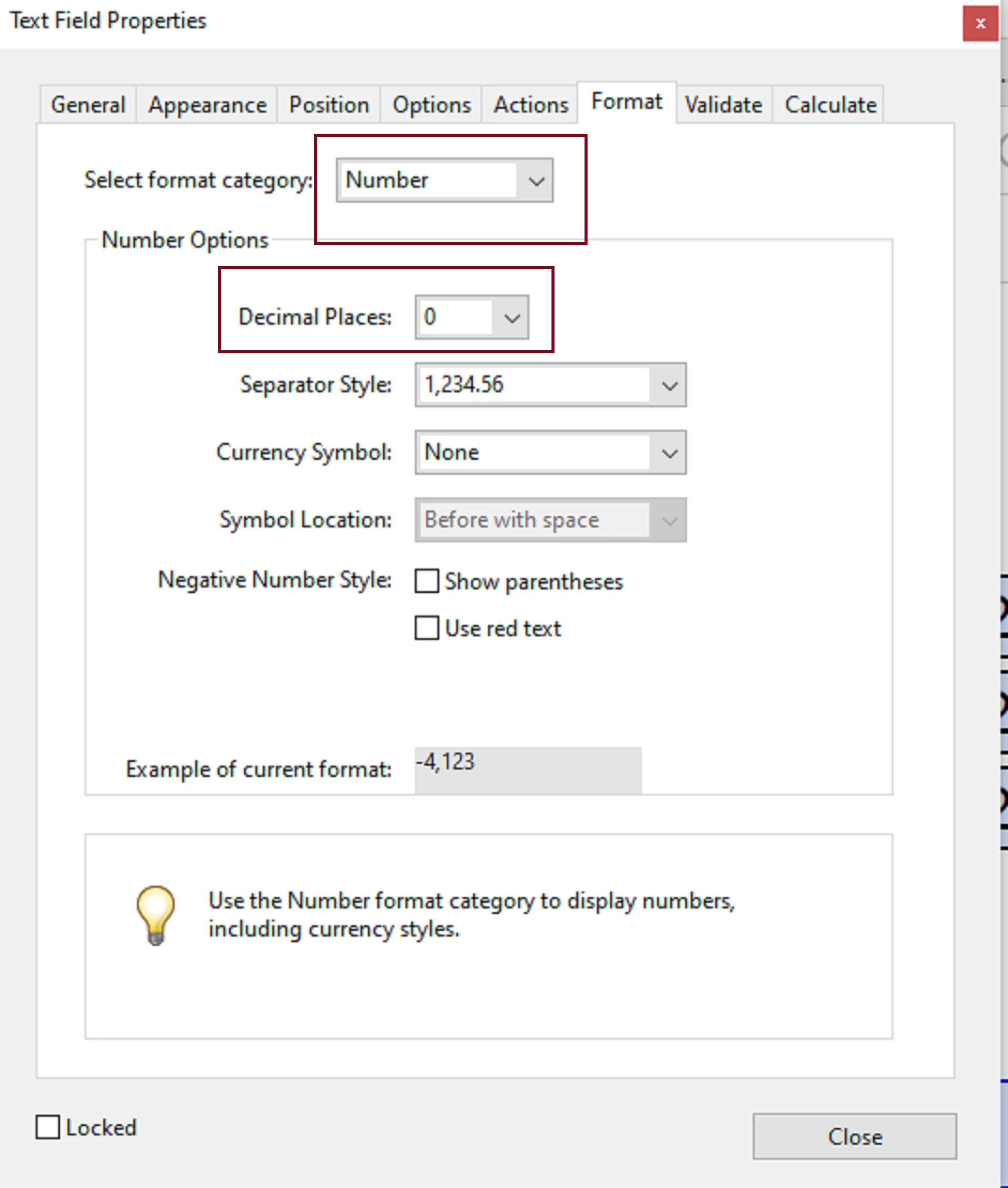
Also make sure that in the text field that your users ill input a number is formatted as number with 0 decimal spaces and limit to one charachter only. This will avoid user typos.


NOTE: I 've also made this work before in my PDFs using a mix of combobox and checkboxes, where the user selects an item from the dropdown menu . As you can see there is a variety of ways that you can achieve this using javascript.


See slides below:


返信数 2

Joseph Good 作成者
Participant
July 5, 2020

Ok where do I put what? Forgive my ignorance I'm new and learning 

ls_rbls
Community Expert
Community Expert
July 5, 2020

Hi Joseph,


You can copy the script that I posted above for you and paste it as custom calcultaion scriptin the text field that the users will be entering the numbers.


See slide:


ls_rbls
Community Expert
ls_rblsCommunity Expert解決!
Community Expert
June 27, 2020

+++MODIFIED REPLY --fixed typos in the javascript example as observed by Bernd 


Hey Joseph,


I will use checkboxes for my example. You can use the script below to handle the fillColor  execution of the text fields.


I have to admit though, that my script below is as rookie as I can get my hands on javascript and is not very elegant or concise, but it works. 


var a = getField("A");
var b = getField("B");
var c = getField("C");
var d = getField("D");
var e = getField("E");
var f = getField("F");
var g = getField("G");
var h = getField("H");
var i = getField("I");


if (event.value !=="") {

if (event.value =="1") {a.checkThisBox(0,true); a.fillColor = color.black;}
else if (event.value !="1") {a.checkThisBox(0,false); a.fillColor = color.white;}

if (event.value =="2") {b.checkThisBox(0,true); b.fillColor = color.black;}
else if (event.value !="2") {b.checkThisBox(0,false); b.fillColor = color.white;}

if (event.value =="3") {c.checkThisBox(0,true); c.fillColor = color.black;}
else if (event.value !="3") {c.checkThisBox(0,false); c.fillColor = color.white;}

if (event.value =="4") {d.checkThisBox(0,true); d.fillColor = color.black;}
else if (event.value !="4") {d.checkThisBox(0,false); d.fillColor = color.white;}

if (event.value =="5") {e.checkThisBox(0,true); e.fillColor = color.black;}
else if (event.value !="5") {e.checkThisBox(0,false); e.fillColor = color.white;}

if (event.value =="6") {f.checkThisBox(0,true); f.fillColor = color.black;}
else if (event.value !="6") {f.checkThisBox(0,false); f.fillColor = color.white;}

if (event.value =="7") {g.checkThisBox(0,true); g.fillColor = color.black;}
else if (event.value !="7") {g.checkThisBox(0,false); g.fillColor = color.white;}

if (event.value =="8") {h.checkThisBox(0,true); h.fillColor = color.black;}
else if (event.value !="8") {h.checkThisBox(0,false); h.fillColor = color.white;}

if (event.value =="9") {i.checkThisBox(0,true); i.fillColor = color.black;}
else if (event.value !="9") {i.checkThisBox(0,false); i.fillColor = color.white;}

} else {

if (event.value =="") {

a.checkThisBox(0,false); a.fillColor = color.white;
b.checkThisBox(0,false); b.fillColor = color.white;
c.checkThisBox(0,false); c.fillColor = color.white;
d.checkThisBox(0,false); d.fillColor = color.white;
e.checkThisBox(0,false); e.fillColor = color.white;
f.checkThisBox(0,false); f.fillColor = color.white;
g.checkThisBox(0,false); g.fillColor = color.white;
h.checkThisBox(0,false); h.fillColor = color.white;
i.checkThisBox(0,false); i.fillColor = color.white;

  }

}


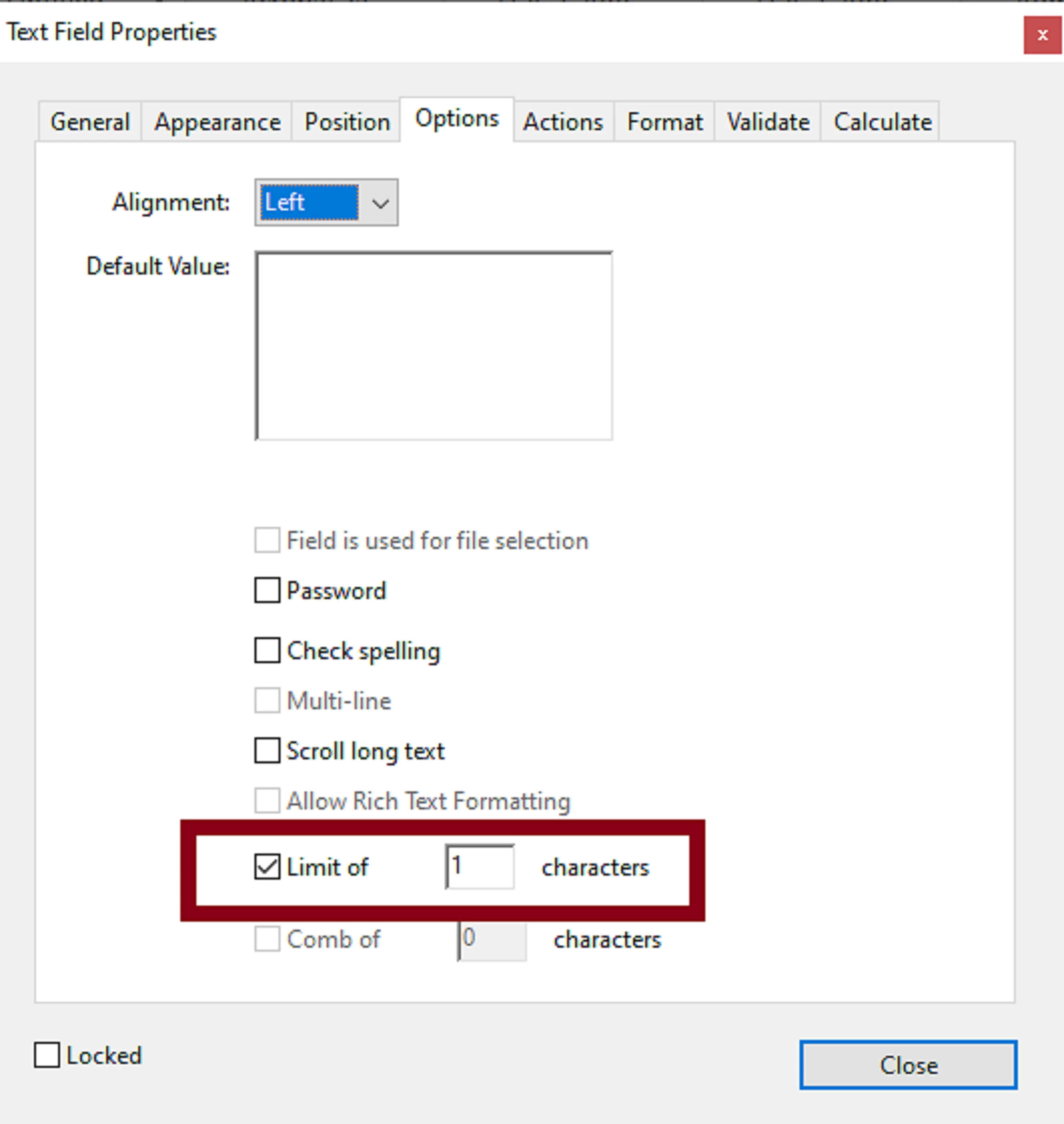
Also make sure that in the text field that your users ill input a number is formatted as number with 0 decimal spaces and limit to one charachter only. This will avoid user typos.


NOTE: I 've also made this work before in my PDFs using a mix of combobox and checkboxes, where the user selects an item from the dropdown menu . As you can see there is a variety of ways that you can achieve this using javascript.


See slides below:


Bernd Alheit
Community Expert
Community Expert
June 27, 2020

Why so many

if (event.value !="1") 

ls_rbls
Community Expert
Community Expert
June 27, 2020

That is  a typo , thanks for spotting that I will fix my reply

