

Error “Access Denied” on sending document for signature from Acrobat Pro DC.
Cannot send the document for signature from Acrobat Pro DC.
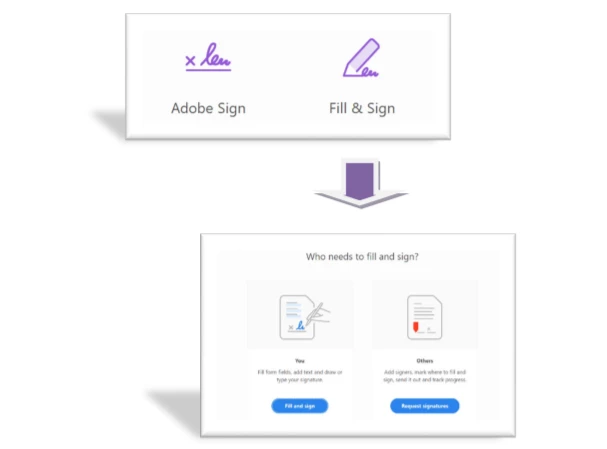
Acrobat DC includes tools to allow you to work with e-signatures. If you have the latest version, you will see Adobe Sign and Fill & Sign – and Fill & Sign has 2 options: Fill and sign (You) and Request signatures (Others)
The options for Adobe Sign & Request signatures (Others) are powered by Adobe Sign Individual (“Sign Pro”) and allow Acrobat users to send documents for signature.
If you are not able to send the document for signature when using Acrobat Pro DC and receive the following error message:
“Access Denied: You do not have access to this service. Please contact your IT Administrator to gain access.”
It may be due to two possible reasons:
- You are using the Acrobat Pro DC as a part of the End term license agreement provided by your organization. Recently, Adobe Sign individual has been removed from the Acrobat Pro DC in ETLA offers. In this case, we suggest you reach out to your IT administrator at your organization to check if they can provide you access to Adobe Sign enterprise. For more information on this, you may visit here.
- Your account is in an inactive state. It happens generally when the account has been deactivated by the account admin.
Hope you find this information helpful. If you have any questions in mind, join the conversation here. We are listening!
To discover a host of other great features – Go straight to: Share Adobe Sign templates with others in your group or organization | Types of Signature fields in Adobe Sign


 AdChoices