Exit
  • Global community
    • Language:
      • Deutsch
      • English
      • Español
      • Français
      • Português
  • 日本語コミュニティ
  • 한국 커뮤니티
1

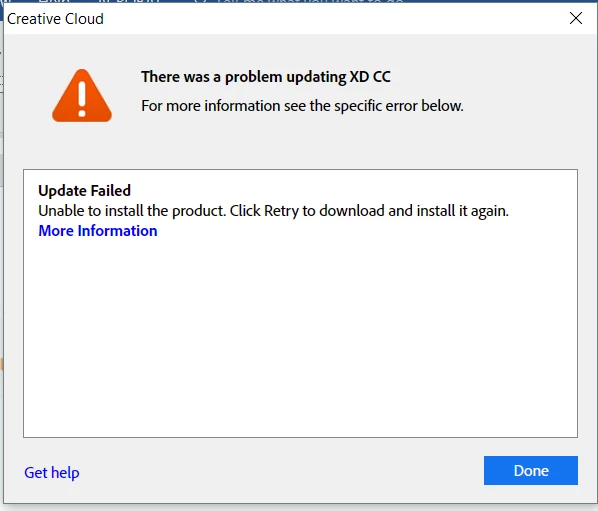
XD CC Update Failed - Code 191

Community Beginner ,
May 08, 2018 May 08, 2018

I am updated several apps in Creative Cloud and the XD CC keeps failing to update, all the others update without any problems.

I am using Windows 1 Home

Exit Code: 191 -------------------------------------- Summary -------------------------------------- - 2 fatal error(s), 2 error(s), 0 warnings(s) FATAL: Error (Code = 191) executing in command 'AddUWPAppxCommand' for package: 'UWPAssets', version:7.0.12.9 FATAL: Error occurred in install of package (Name: UWPAssets Version: 7.0.12.9). Error code: '191' ERROR: hdhelper exe at C:\Program Files (x86)\Common Files\Adobe\Adobe Desktop Common\HDBox\HDHelper.exe failed to install UWP app with xml Adobe.CC.XD C:\adobeTemp\ETR5131.tmp\1\SparklerApp\SparklerApp.appx 7.0.12.9 x64 CN=Adobe Systems Incorporated, OU=Adobe Systems, O=Adobe Systems Incorporated, L=San Jose, S=California, C=US, SERIALNUMBER=2748129, OID.2.5.4.15=Private Organization, OID.1.3.6.1.4.1.311.60.2.1.2=Delaware, OID.1.3.6.1.4.1.311.60.2.1.3=US adbxd: Microsoft.VCLibs.140.00 14.0.25426.0 x64 CN=Microsoft Corporation, O=Microsoft Corporation, L=Redmond, S=Washington, C=US C:\adobeTemp\ETR5131.tmp\1\SparklerApp\Dependencies\x64\Microsoft.VCLibs.x64.14.00.appx false with error code 1 ERROR: Failed to install UWP Appx Package -------------------------------------------------------------------------------------

4.6K
Translate
Report
Community guidelines
Be kind and respectful, give credit to the original source of content, and search for duplicates before posting. Learn more
community guidelines

correct answers 1 Correct answer

Adobe Employee , May 08, 2018 May 08, 2018

Can you try the solutions in this article and let us know if they helped?

Error code 191 when installing XD on Windows

Translate
Adobe Employee ,
May 08, 2018 May 08, 2018

Can you try the solutions in this article and let us know if they helped?

Error code 191 when installing XD on Windows

Translate
Report
Community guidelines
Be kind and respectful, give credit to the original source of content, and search for duplicates before posting. Learn more
community guidelines
New Here ,
May 16, 2018 May 16, 2018

Where is the solution?  I have the same problem.

Translate
Report
Community guidelines
Be kind and respectful, give credit to the original source of content, and search for duplicates before posting. Learn more
community guidelines
New Here ,
May 01, 2019 May 01, 2019

Recently I started having this same issue. All CC Apps are updating fine for me with the exception of XD. Hasn't updated in properly for about a month or so. I have checked "Secondary Logon Properties" and its already set to "Manual"

Please advise for a solution.

Thanks,

Exit Code: 191

-------------------------------------- Summary --------------------------------------

- 2 fatal error(s), 2 error(s), 0 warnings(s)

FATAL: Error (Code = 191) executing in command 'AddUWPAppxCommand' for package: 'UWPAssets', version:18.1.12.1

FATAL: Error occurred in install of package (Name: UWPAssets Version: 18.1.12.1). Error code: '191'

ERROR: hdhelper exe at C:\Program Files (x86)\Common Files\Adobe\Adobe Desktop Common\HDBox\HDHelper.exe failed to install UWP app with xml
Adobe.CC.XD
C:\adobeTemp\ETR79F8.tmp\1\SparklerApp\SparklerApp.appx
18.1.12.1
x64
CN=Adobe Systems Incorporated, OU=Adobe Systems, O=Adobe Systems Incorporated, L=San Jose, S=California, C=US, SERIALNUMBER=2748129, OID.2.5.4.15=Private Organization, OID.1.3.6.1.4.1.311.60.2.1.2=Delaware, OID.1.3.6.1.4.1.311.60.2.1.3=US
adbxd:


Microsoft.VCLibs.140.00
14.0.25426.0
x64
CN=Microsoft Corporation, O=Microsoft Corporation, L=Redmond, S=Washington, C=US
C:\adobeTemp\ETR79F8.tmp\1\SparklerApp\Dependencies\x64\Microsoft.VCLibs.x64.14.00.appx

Microsoft.VCLibs.Desktop.140.00
14.0.25426.0
x64
CN=Microsoft Corporation, O=Microsoft Corporation, L=Redmond, S=Washington, C=US
C:\adobeTemp\ETR79F8.tmp\1\SparklerApp\Dependencies\x64\Microsoft.VCLibs.x64.14.00.Desktop.appx


false

with error code 1

ERROR: Failed to install UWP Appx Package

-------------------------------------------------------------------------------------

Translate
Report
Community guidelines
Be kind and respectful, give credit to the original source of content, and search for duplicates before posting. Learn more
community guidelines
Adobe Employee ,
May 03, 2019 May 03, 2019
LATEST

Most issues of this nature have been resolved by following the solutions in this document

Error code 191 when installing XD on Windows

Can you let us know if you tried these solutions, and if you still need assistance?

Thanks,

Preran

Translate
Report
Community guidelines
Be kind and respectful, give credit to the original source of content, and search for duplicates before posting. Learn more
community guidelines
Community Beginner ,
May 08, 2018 May 08, 2018

Solutions in what post?

Translate
Report
Community guidelines
Be kind and respectful, give credit to the original source of content, and search for duplicates before posting. Learn more
community guidelines
Community Beginner ,
Jan 31, 2019 Jan 31, 2019

There is one service that runs with the Local System account that XD CC needs.

Make sure Secondary Logon service is in manual. You do not need to run it, just need to set it to manual. Then when CC installs XD CC, it will run it.

Translate
Report
Community guidelines
Be kind and respectful, give credit to the original source of content, and search for duplicates before posting. Learn more
community guidelines