




TeresaDemel
Adobe Employee
Adobe Employee
March 10, 2021
Question

Multi-Frame Rendering is here! (AKA The multithreading you’ve been asking for)

  • March 10, 2021
  • 147 replies
  • 167166 views

Multi-frame Rendering is here for After Effects beta users. Right now, you will have access to Multi-Frame Rendering for export only. Keep your eye on this forum, as we will be rolling out new features until we launch.


Internally, we have been testing a representative sample of projects with a suite of hardware configurations, and we are excited to finally put this feature in your hands and get your feedback. Test your unique projects on your own hardware so we can ensure that our performance updates benefit all of our customers and meet speed and quality metrics before we launch.


Beta testing of Multi-Frame Rendering will last a little longer than some of our other features because we currently do not support Multi-Frame Rendering in Preview, Motion Graphics templates, Dynamic Link, Adobe Media Encoder and AERender Command Line Interface.


Check out the blog and FAQ post to learn the following:

  • What is Multi-Frame Rendering?
  • What factors influence performance?
  • Which effects have been optimized for Multi-Frame Rendering?


Start Testing!
We want to hear from you! Share your thoughts and ideas in this forum.

  • How much faster is Multi-Frame Rendering compared to Single-Frame Rendering with your comps on your machine?
  • Does our benchmark project perform at the expected speed on your system?
  • If you run into specific speed or quality issues with your project, share your project with us at mfrbeta@adobe.com.


Test Your Comps
Test your comps in Multi-Frame Render mode vs. Single-Frame Render

  • Use Ae Render Queue to export your comp in Multi-Frame mode.
  • Purge both the disk and memory cache, then
  • Use Ae Render Queue to export your project in Single-Frame mode. Note: Use the same output module for Single-Frame and Multi-Frame mode. Go to Preferences -> Memory and Performance -> Enable Multi-Frame Rendering (beta) and uncheck the box to use Single-Frame Rendering Mode


Leave a comment and the following information in this forum:

  • Your hardware specs: # cores in your CPU, GB of memory, GPU model and amount of VRAM
  • Single-Frame render speed (Use “Render Time” noted in your status bar)
  • Multi-Frame render speed


If you detect any problems with render speed or quality, submit your projects

  • Open your After Effects project
  • File -> Dependencies -> Collect Files -> Collect -> Save As (Name Your Folder)
  • After Effects will store your .aep file, footage, and text report (file log)
  • Zip up your project and send it to us at mfrbeta@adobe.com (or send a link to it hosted on your creative cloud storage if it’s too large to email).


Share the following information in your comment:

  • Your hardware specs: # cores in your CPU, GB of memory, GPU model and amount of VRAM
  • Single-Frame render speed (Use “Render Time” noted in your status bar)
  • Multi-Frame render speed
  • Mercury CPU or GPU Mode used


Test our benchmark project and see how your hardware compares
We would love to know how your hardware compares to the results we have gathered from our test suite:
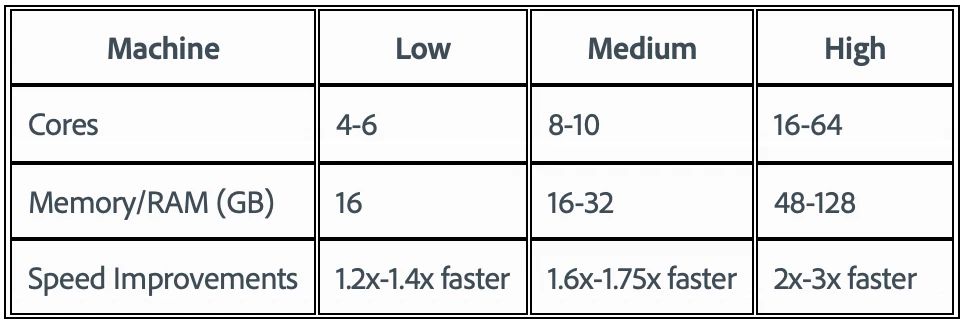
 

To test the benchmark project on your machine:

  • Download the benchmark project
  • Use Ae Render Queue to export the benchmark project in Multi-Frame mode.
  • Purge both the disk and memory cache, then
  • Go to Preferences -> Memory and Performance -> Enable Multi-Frame Rendering (beta) and uncheck the box to use Single-Frame Rendering Mode
  • Use Ae Render Queue to export the benchmark project in Single-Frame mode. Note: Use the same output module for Single-Frame and Multi-Frame mode.


Share the following information in this forum:

  • Your hardware specs: # cores in your CPU, GB of memory, GPU model and amount of VRAM
  • Single-Frame render speed
  • Multi-Frame render speed

147 replies

Community Manager
September 22, 2021

Hello All!


A round of updates for everyone using MFR.


  • Today's beta release version will switch to Version 22.1. Yes, this means we are in the process of wrapping up 22.0 and preparing that for future public release. So you know, if you have any other bugs you might be sitting on that are to do with MFR, please let us know because fixing those now might be important. 😉


  • As of 22.1x1, every effect shipped with AE except 1 (so 289 of 290!), now supports Multi-Frame Rendering. Particle Playground is just about done and should be in an upcoming beta build. Since the last update, Reshape, Smear, Rolling Shutter Repair, Foam, Rotobrush and Paint have been updated to support MFR. Note: there is a known crash in Rotobrush we are currently fixing, that fix should also be in an upcoming build.


  • In 22.1x1, there is also an update to the Cinema 4D/Cineware plugins. A little bit better performance with MFR and more stability fixes. We really need some more testing and feedback on this update, so if you have anything that utilizes C4D in your AE workflows, please let us know how it works for you.


  • Speculative Preview / Cache Frames When Idle change: We made a change that will stop speculative preview occuring while the focus is on the layer or footage panels. In the vast majority of cases if you're rotobrushing or painting or picking footage to drop into a comp, you really don't want speculative preview starting up. So for now, we've just turned it off while you're focused on those panels. As soon as you click back to the timeline window or just about any other panel, it'll re-enable (assuming you have it toggled on to begin with) and get back to caching again.


  • MFR Preview startup time: We continue to look at ways to optimize the time to the first frame showing up during a preview. We've taken more steps toward this in this build. Please let us know if it's noticeable in making MFR previews feel faster for you.


Please let us know if you have any questions!


Thanks

Sean

Participating Frequently
September 23, 2021

My first MFR Preview try was way snappier than it used to be.


But i'm running AE in english on a german windows 10 installation and at one point, waaaay back, there used to be a speculative preview option in the preview panel, but it's long gone and it hasn't reappeared for me with the latest release.


Maybe this is an issue with the AE-Settings? I do get unclean exits every time I've done real work (Debugger exception Window at the end).

I figure this is related to extensions or scripts that interacted with AE but i really don't have the time to investigate now.


But i'm happy with the snappy MFR preview!

Participating Frequently
September 23, 2021

Aaaaand i immediatly found a bug/feature.


I can no longer select a stroke or fill on a shapelayer without also selecting the shape itself. So deleting a fill/stroke without deleting the shape (not the layer but the rectangle/path/circle within the shapelayer) is not possible right now.

Ronny K
New Participant
September 22, 2021

Got a new PC for video rendering a while ago and just did a test run with the benchmark project on the latest beta

  • Hardware specs: AMD Ryzen 9 5950X - 16 cores CPU, 128GB GB of memory, AMD Radeon RX 6900 XT GPU  with 16GB of VRAM
  • Single-Frame render speed = 10 Min, 1 Sec (Mercury Software Only)
  • Multi-Frame render speed = 3 Min, 52 Sec (Mercury Software Only)
  • Multi-Frame render speed = 3 Min, 40 Sec (Mercury GPU Acceleration (OpenCL)


Great job!! Can't wait to use this in production 🙂

New Participant
September 22, 2021

Hi, really nice update!


Here's the result of the benchmark: 

- RYZEN 9 3900X 12 cores / 64gb Ram / Dual GPU : RTX 3090 24GB VRam (Not NVLink) / Windows 11 Pro Beta

- Single-Frame : 17 min 40 sec

- Multi-Frame : 9 min 33 sec

-  After Effect 18.4.1 : 15 min 28 sec

Community Manager
September 16, 2021

MFR Preview, C4D, More Effects and a Live Show!


Starting with build 22.0x98, the delay in starting up Multi-Frame Rendering Preview should be greatly improved. This change includes a significant update to the way projects are managed during a render so please be on the look out for unexpected error messages and let us know how this works for you.


A few things to be aware of with this improved start up time:

  •  Projects that contain audio tracks or audio effects may still have a delay in starting preview. We are actively investigating this.
  •  There is a bug in x98 (and x99) that can cause the Preview to take longer to stop playing back. This will be fixed in the next build.


In addition to this fix, we've integrated an update to Cinema 4D that includes support for Multi-Frame Rendering. This is hot-off-the-presses, so you may find some instability. More details and a place to discuss what's working and not working can be found here: https://community.adobe.com/t5/after-effects-beta-discussions/cineware-and-cinema-4d-comp-renderer-update/td-p/12386823


We also continue to update the remaining effects to support MFR. Through build x99 you should find Fractal, VR Converter, VR Plane to Sphere, VR Sphere to Plane, Cineware, Liquify, Shatter, Cineon Converter, Warp Stabilizer, Remove Grain, 3D Camera Tracker, Pixel Motion Blur, Timewarp, Refine Hard Matte, Refine Soft Matte and VR Denoise are now MFR enabled. We expect all included effects to have MFR support by early next week!


One other bug you should know about - Speculative Preview and the Layer Panel (with paint or rotobrushing) can lead to some application hangs. We are working on fixes for this and should have an update in builds later this week or early next week. 


If you want to learn more about any of this, please tune in to the School of Motion show on Friday September 17th at 9am (Pacific) at https://www.youtube.com/watch?v=6aVgvDlYvNQ&ab_channel=SchoolofMotion - a few of us from the team will be hanging out and discussing MFR and all it's features! We'd love to see you there.

New Participant
September 17, 2021

This looks great! Got a question. Is Essential Properties MFR supprted? If not, will it be supported in the near future? Essential properties is a great feature but it's obviously slower than normal comp especially when you have a lot of essential prop enabled precomps. It would be great if it can be faster.

Community Manager
September 20, 2021

Yes supported. It'll only improve the performance when previewing or exporting a group of frames, but no individually when interactively scrubbing around the composition.

Chris Metodiev
Participating Frequently
September 7, 2021

Here are my results:


AMD Ryzen 9 5900X - 12 cores/24 threads 

Nvidia RTX 3070 - 8 gb ram

64 GB RAM / 3600MHZ/

1 TB nvme drive


ProRes 422 Render

Single Core/Software only/: 2:28

Multi Core/Software only/: 4:50 (40gb cache)


Single Core/Cuda/: 10:16

Multi Core/Cuda/: 4:20 (5,6 gb cache)


This is with the latest beta builds. I haven't tryed rendering just straight avi files, as they are bit faster. But generally I render 422 quicktimes. I hope the upcoming code refactor will fix these issues. Looking forward to this update. Keep up the good work. 

New Participant
September 6, 2021

Incredible work - really loving seeing how quickly these improvements are rolling out.


Any update on the lag when starting previews? MFR remains switched off for me due to the lag 😢

Inspiring
September 6, 2021

So it's the "faster sometimes but only during exporting" situation again? We already had that a decade ago.

Community Manager
September 6, 2021

No, that's not the situation. You get the same lag during export and preview. 😉 


The fix is coming, should be this week. The fix wasn't simple. The team had to rewrite the entire way a project is managed during a render. Reviewing millions of lines of code. It's a massive undertaking. Anyway, almost there...

Roei Tzoref
Brainiac
September 4, 2021

please add "refine soft matte" and "refine hard matte" to the supported MFR effects. these are cruicial for many Roto/key tasks in After effects. thanks

Community Manager
September 4, 2021

Work on those 2 effects starts on Tuesday! 🙂

Community Manager
September 3, 2021

Hello Beta Users...


It's been a few weeks since we last posted, but with today's build we have some specific features and changes we want to make sure you know about. So here we go: 


  • Starting with build 22.0x81, there is a new optimization that should give a bit more rendering performance on all machine configurations. We've seen the best improvements on machines with 6-12 cores (30-45 seconds faster to render the Benchmark project), but higher end machines will also see some improvement.


  • Now that MFR can effectively use all your CPU cores and saturate your machine, we know there may be times you want AE to use less than 100% of your computer so you can still get other work done while rendering. With today's build, you can now request AE to use less of your machine. Yep, after 2+ years of trying to make AE use all of your system, the irony of an option to slow AE down isn't lost on us. Anyway... "Preferences -> Memory & Performance -> % CPU reserved for other applications" can be adjusted between 0% to 70% to do just that. By default, this preference is set to 10% meaning AE will try to remain under 90% of system CPU usage. If you're attempting to benchmark MFR, please set that to 0% to allow AE to use all of your system. Please note that this is really a soft request to AE and not a hard limit - to render any particular frame, AE may need to go into that reserved CPU % for some period of time.

  • aerender has a new flag, -mfr, that allows you to turn MFR on and off, and to pass in a maximum CPU % usage to use. This is essentially the reserved CPU % but flipped so you set the requested maximum CPU % usage. This follows the pattern in aerender with maximum memory to use. (Note: aerender for MacOS is almost back to working. There are still a few more things to fix but it should be working for all supported MacOS's next week). 

  • More effects are now supported by MFR including Sharpen, Corner Pin, Displacement Map, Turbulent Displace, Warp, Grid, Keylight, Simple Choker, Add Grain, 3D Glasses, Motion Tile, HDR Commander, VR Blur, VR Glow, VR Fractal Noise, VR Rotate Sphere, VR Chromatic Aberrations, VR Sharpen, VR Digital Glitch, VR Color Gradients, Color Balance, Invert, Color Stabilizer, Lumetri, Color Range, Lens Flare, Lightning, Camera Shake Deblur, Scribble, Extract, Color Profiler Converter, HDR Highlight Compression, Hue/Saturation, Mesh Warp, Vegas, Basic Text, Path Text, Numbers, Colorama, Radio Waves, Card Dance, Caustics, Wave World and Card Wipe. 25 or so more to go and everything bundled with AE will support MFR.


That’s a lot to digest, so please let us know if you have any questions or run into any issues. 


More updates soon!


Thanks

Sean


Nik Ska
Known Participant
September 4, 2021

Hi Sean,

Finally aerender works on macos, but I am running into the following issue:

When I start aerender with some default parameters on macos 11.5.2, the stdout is completely empty. Passing the -v ERRORS_AND_PROGRESS flag either does nothing when passed right after aerender, or doesn't even start the rener when passed at the end.

Community Manager
September 4, 2021

A fix for the stdout being blank should be in the next beta build we release on Monday. 

NK Films
New Participant
August 26, 2021

Loving the beta and the results from MF rendering!


I couldn't see this on the thread and know it's a bit cheeky to ask, but you never know. Would we have a rough ball-park 'gestimation' when MF will be ready in the main AE build? 


Thanks so much in advance! Appreciate all the hard work that is going into making this happen, been waiting for years for this and so excited to see it come to life. 

New Participant
August 23, 2021

AMD Ryzen Threadripper 3970x 32 core

128 GB RAM

2x ASUS ROG STRIX RTX 3090 24G OC (24 GB VRAM)

Windows 10 Pro, 64 bit (Build 19043)

PSD-Sequence
Single Frame: 2:10 

Multi-Frame:  3:20

New Participant
August 23, 2021

Dunno why, but mi rendertimes increased while in single frame mode. Maybe there something I forgot to uncheck? The only option thats was active was multiframe rendering in settings. There was no deactivate single frame rendering checkbox, but anyway, 2:10 is pretty fast when I see the other reults.