Beenden
  • Globale Community
    • Sprache:
      • Deutsch
      • English
      • Español
      • Français
      • Português
  • 日本語コミュニティ
  • 한국 커뮤니티

Resolve to After Effects issues: won’t display channels with multiple clips

Neu hier ,
Feb 24, 2024 Feb 24, 2024

Hey all!

I use DaVinci to colour and edit and I am looking to add some more effects within AE.   
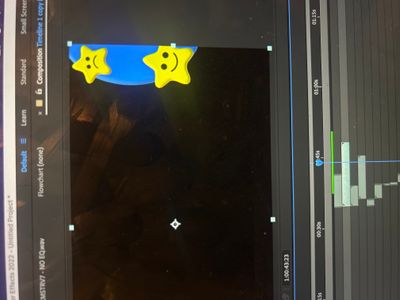
I primarily use a MacBook Pro to edit.  I have rendered my DaVinci project as a Premiere XML then saved the Premiere file so I could load to after effects.  For some reason both Premiere and AE does not recognize when I have layered multiple clips on top of eahother.  It ends up blacking out what ever clip is underneath. 


does anyone know what I can do to make Premiere/AE respect the layers and play them all together?


image.jpg

THEMEN
Fehler oder Problem , Anleitungen , Importieren und exportieren
1.2K
Übersetzen
Melden
Community-Richtlinien
Seien Sie freundlich und respektvoll, geben Sie die ursprüngliche Quelle der Inhalte an und suchen Sie vor dem Absenden Ihres Beitrags nach Duplikaten. Weitere Informationen
community guidelines

correct answers 1 richtige Antwort

Community Expert , Feb 25, 2024 Feb 25, 2024

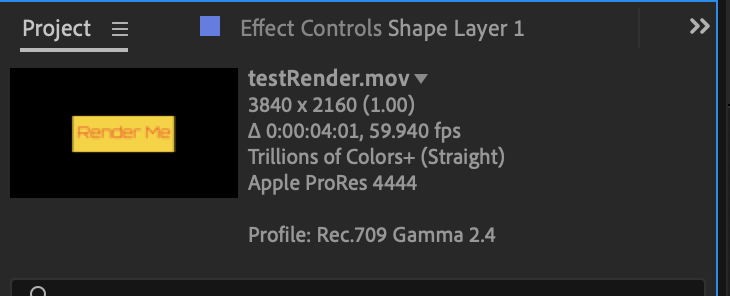
Check to make sure that the rendered footage has an alpha channel. Select the footage in the Project Panel and look at the info to the right of the preview thumbnail at the top of the panel. Your problem footage probably does not have an alpha channel. They should be showing something like this. 

info.png

Übersetzen
LEGENDE ,
Feb 25, 2024 Feb 25, 2024

Check your footage interpretation.


Mylenium

Übersetzen
Melden
Community-Richtlinien
Seien Sie freundlich und respektvoll, geben Sie die ursprüngliche Quelle der Inhalte an und suchen Sie vor dem Absenden Ihres Beitrags nach Duplikaten. Weitere Informationen
community guidelines
Neu hier ,
Feb 25, 2024 Feb 25, 2024

Hello,

thank you for your quick response.  I am a complete Adobe (premiere and AE) beginner.  My footage is a mixture of .png/jpegs, stock footage, and self-shot video footage.  All of the video footage ranged from 23.976 to 30fps and the Davinci Resolve timeline I imported was 24fps. I interpreted all the video footage as 24fps; however, it is still running into the same problem.  Any tips?

Übersetzen
Melden
Community-Richtlinien
Seien Sie freundlich und respektvoll, geben Sie die ursprüngliche Quelle der Inhalte an und suchen Sie vor dem Absenden Ihres Beitrags nach Duplikaten. Weitere Informationen
community guidelines
Community Expert ,
Feb 25, 2024 Feb 25, 2024

Check to make sure that the rendered footage has an alpha channel. Select the footage in the Project Panel and look at the info to the right of the preview thumbnail at the top of the panel. Your problem footage probably does not have an alpha channel. They should be showing something like this. 

info.png

Übersetzen
Melden
Community-Richtlinien
Seien Sie freundlich und respektvoll, geben Sie die ursprüngliche Quelle der Inhalte an und suchen Sie vor dem Absenden Ihres Beitrags nach Duplikaten. Weitere Informationen
community guidelines
Neu hier ,
Feb 25, 2024 Feb 25, 2024
AKTUELL

THANK YOU SO MUCH.  That did the trick.  I ended up having to re-bounce my Davinci renders in Quicktime - gopro cineform-rgb 16 bit.  Then it allowed me to choose an alpha out.  Unfortunately, it does not appear that Apple Prores allows for an alpha out in the free version of Davinci.  Now I see everything perfect.

Übersetzen
Melden
Community-Richtlinien
Seien Sie freundlich und respektvoll, geben Sie die ursprüngliche Quelle der Inhalte an und suchen Sie vor dem Absenden Ihres Beitrags nach Duplikaten. Weitere Informationen
community guidelines