


Participating Frequently
July 13, 2017
解決済み

When exporting as Animated GIF, is there a way to make animations that are within (graphic) symbols play?

  • July 13, 2017
  • 返信数 5.
  • 7327 ビュー

When exporting as Animated GIF, is there a way to make animations that are within (graphic) symbols play?

I created an animation on the main time line, and one part of it is a graphic symbol which has its own animation. However, when I export this as an Animated GIF, the symbol's animation doesn't play. Is there a way to export it in such a way that it does play? Or do I have to find a circuitous way of trying to replicate my animation on the main timeline?
このトピックへの返信は締め切られました。
解決に役立った回答 mark@headTrix

MOVIECLIPS will NOT export to an Animated GIF.... Graphic Symbols export just fine!

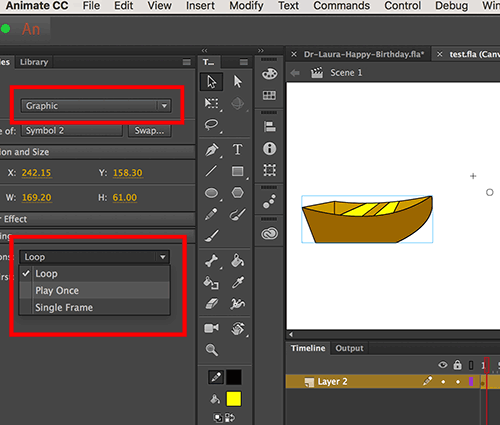
Just make sure it says "LOOP" or "Play Once" and that it has enough frames on the timeline to play"

If the animation inside of the Graphic Symbol is 30 frames... then you will have to give the graphic symbol 30 Frames on the MAIN timeline... they sync frame for frame.

Hope that helps!
mark

返信数 5

Known Participant
September 18, 2018

"MOVIECLIPS will NOT export to an Animated GIF.... Graphic Symbols export just fine!"

In Animate CC I have no problem exporting movieclips as a gif animation.

The problem I come across is when exporting gif animations it will only play the animation on the main timeline -- not embedded "nested" movie clips with their own timeline.

Has anyone else found this to be true and found a workaround?

Participating Frequently
June 11, 2021

Yes, unfortunately this still doesn't work with a nested movieclip. So you have to export a video and import e.g. into Photoshop and export a animated gif, thats not a good solution. In a newsletter you mostly still have no alternative to an animetd gif, so would be nice if nested movoe clips would work.

Participating Frequently
June 14, 2021

no, e. g. if you use a loop in a movieclip ( for example a bird that flaps it wings) and drag this clip on the stage and move from one point to another you get the illusion of a flying bird. Saves you a lot of work...That what is meant above with "nested". no code inside. You can export that as html5 or video, works, but not as animated gif or an image sequenz.


No, that doesn't work either. Doesn't make any difference whether graphic symol or movieclip, the "nested" clip isn't displayed. Effect is visible if the animation is outpout as a video but neither as a picture sequence nor as a animated gif. REimporting he video into photoshop is possibel and then putting out an animated gif, By the way it also seems that the compression capabilities of Photoshop regarding animated gifs is much better then that of Animate, roughly half the size with the same settings.

[PII removed by moderator]

mark@headTrixCommunity Expert解決!
Community Expert
July 13, 2017

MOVIECLIPS will NOT export to an Animated GIF.... Graphic Symbols export just fine!

Just make sure it says "LOOP" or "Play Once" and that it has enough frames on the timeline to play"

If the animation inside of the Graphic Symbol is 30 frames... then you will have to give the graphic symbol 30 Frames on the MAIN timeline... they sync frame for frame.

Hope that helps!
mark

headTrix, Inc. | Adobe Certified Training & Consulting
BrightAnna作成者
Participating Frequently
July 14, 2017

Thanks! I figured out I had a movie clip after all! I'm trying to get the timing fixed now because it messed up somehow. I will try to export it then.

Community Expert
July 13, 2017
Colin Holgate
Inspiring
July 13, 2017

I think that the symbol's animation wouldn't play only if it's a movieclip, or if it's a graphic that is set to only show one frame. If you have ti set to play once, or loop, I would have thought its animation would show up ok.

kglad
Community Expert
Community Expert
July 13, 2017

as long as there are enough frames on the main timeline, the graphics symbol's animation should be veiwable when checking the main timeline and in the exported gif.  ie, if you put a symbol (that contains animation over 30 frames) on a 1 frame main timeline, you'll see no animation.  if the main timeline has 15 frames, you'll see 1/2 the animation (assuming the graphic is on frame 1).