


DougB PDX
Known Participant
January 28, 2020

P: Camera Raw/Lightroom: Dehaze altering the color-balance/white-balance of photos

  • January 28, 2020
  • 返信数 42.
  • 5672 ビュー

As much as I love the Dehaze slider, there is one thing about it that I absolutely HATE and that is when it decides to go psycho in altering the color-balance/white-balance of photos.

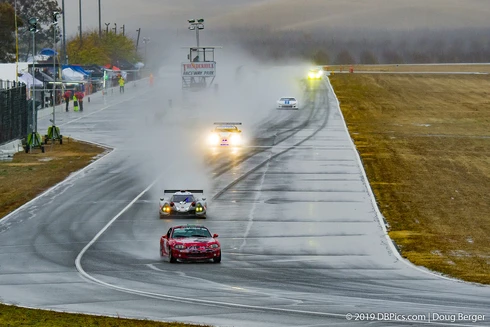
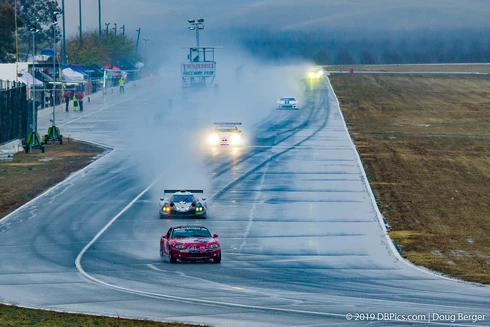
These example photos may not show up (I've had issues with photos disappearing from being uploaded), but here is one pair from earlier today... the tint setting on WB is just 50k apart, one click on the arrow key.. but the difference is HUGE.

All settings are identical between the 2 photos, the only change was hovering the mouse over the WB tint slider and pressing the up/down key once.. changing from 5850k to 5800k

I often get similar shifts going from consecutive, continuous-high photos from frame to frame with the exact same settings, no changes in wb settings, and it all seems related to the dehaze slider and the way it analyzes the photos.

Years ago, I thought I actually had a defective camera, as the photos would change biggly even using the same exact settings 0.1sec apart.  Eventually, I tracked down the cause.  The programming of the Dehaze feature.

So, the problem I wish they could figure out is some way to get Dehaze to not do massive shifts in WB


返信数 42

DougB PDX
DougB PDX作成者
Known Participant
June 18, 2025

The same problem still exists, 5 years later.  Here is an example from today.  (14.3.1.. I had to downgrade from 14.4 because that garbage worked 2x slower per photo due to the unwanted "denoise slider", "raw details" and "super resolution" added to the top, IN THE WAY of the settings I actually do use... Sharpening and Manual Noise Reduction.  Yet again, Adobe inserts stuff we don't want and can't turn off in the way of using the settings/values we do use.


Bob Somrak
Legend
November 20, 2024

This is another one of many long term bugs that will probably never be fixed.  Use the Local (Mask) Dehaze workaround mentioned above.

M4 Pro Mac Mini. 48GB
Participant
November 20, 2024

2024.11, this bug still exsits in lastest LRC, it's very bad for my timeslapse worlflow.

My camera is a7r3, use lossless araw files.

Bob Somrak
Legend
August 3, 2024

@cagrimertbakirci 


I doubt the Global Dehaze slider issue will ever be fixed. This will be another long term unfixed bug to add to the long list. Will the Local {masking) White Balance workaround work for you that i posted above?

M4 Pro Mac Mini. 48GB
Participant
August 3, 2024

As of today, it is still happening. I confirm that this bug exists in Lightroom Classic 13.4


I shot multiple RAW files for timelapse purposes, color graded one and used Dehaze effect, images start to vary in color.


This is very bad in timelapse because, no consistency between frames.


Adobe has yet to fix a bug that's been brought up 4 years ago and confirmed by many users since then. Despite asking for subscription from its userbase.


Very sad.

Bob Somrak
Legend
January 12, 2024

@davix1010 


This is still happening in LrC 13.  I tried it on the same photo I show in my above post and it is doing the exact same thing.  I seriously doubt this will EVER be fixed. 


A workaround if you use large values of Dehaze is to use the LOCAL (mask) Temperature sliders because on my test file there is not a large change in the appearance of the image when using the Local Temp as opposed to the Global Temp.  It may not be solution for all photos but it does work on my test file.

M4 Pro Mac Mini. 48GB
Participant
January 4, 2024

I have the same problem, can you tell me if it has been solved or if the development team is working on it?

Bob Somrak
Legend
February 24, 2023

Thanks @Rikk Flohr: Photography for the link.  That is the issue I was talking about.  


There was another thread but it is now gone which I was refering to in my answer to @DdeGannes 

https://feedback.photoshop.com/photoshop_family/topics/dehaze-love-it-and-hate-it?topic-reply-list[settings][filter_by]=all

M4 Pro Mac Mini. 48GB
Participant
February 24, 2023

Hello! I have recorded a time lapse in which I manually controlled all the settings. After I import the images into Lightroom, all images look exactly the same. However, as soon as I edit an image and synchronize the settings to all images, some images appear that differ in color from the others. I have already tried everything and I am getting annoyed. Does anyone have an explanation for this error?

Bob Somrak
Legend
February 24, 2023

Try zeroing Dehaze on all the photos.  There was a bug in dehaze that would cause this. 

M4 Pro Mac Mini. 48GB
DdeGannes
Community Expert
Community Expert
February 24, 2023

@Bob Somrak , do you know if there is a bug thread that is acknowledged by Adobe?


Regards, Denis: iMac 27” mid-2015, macOS 11.7.10 Big Sur; 2TB SSD, 24 GB Ram, GPU 2 GB; LrC 12.5,; Lr 6.5, PS 24.7,; ACR 15.5,; (also Laptop Win 11, ver 24H2, LrC 15.0.1, PS 27.0; ) Camera Oly OM-D E-M1.
Bob Somrak
Legend
January 28, 2022

@Earth Oliver 

Extremely frustrating to take the time to document repeatable bugs and then never get a fix

M4 Pro Mac Mini. 48GB