Participating Frequently
June 25, 2018
解決済み

Camera Raw profiles are missing (Matrix is shown instead)

  • June 25, 2018
  • 返信数 6.
  • 15996 ビュー

Hi all,

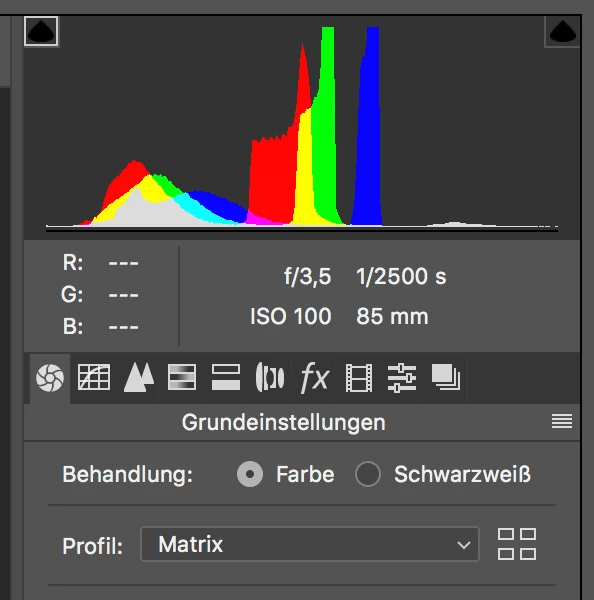
After todays Photoshop CC update, opening Raw files result in having "Matrix" displayed under profile in the Adobe Camera Raw window.

In the previous version, the available Adobe presets were correctly shown for my Canon EOS 5D Mark III and Sony A7 III raw files.

From what I see, the Adobe Application support "Camera Raw 7" folder contains the required profiles.

They are also instantly available and accessible, when opening these files via Lightroom CC.

Reinstallation of Photoshop CC as well as manual installation of the Camera Raw module and DNG Converter did not solve the issue.

Also trashing the CC preferences did not work to make them appear again.

Environment

- iMac Retina 5K, 27-inch, Late 2015

- macOS High Sierra 10.13.14

- Adobe Photoshop CC 2018 19.1.5

- Camera Raw 10.4

It would be great to find a solution, how to make them appear again.

Thanks for your help!

Best,

Lars
このトピックへの返信は締め切られました。
解決に役立った回答 ssprengel

That profile file path looks right for PS and Bridge not Lightroom.  It is analogous to what I have for Windows with my C:\ProgramData being replaced with Macintosh HD > Library > Application Support but otherwise the same.

"Matrix" for the camera profile instead of the correct list, means that the application expects certain profiles, but cannot find or perhaps access the profile files.  On a Mac (which I've never used) maybe this is a permissions issue, either for the file-folders the profiles are in (try Repair permissions or whatever it is now in the newer OSes) or something is wrong with the user-context the applications are running in.  On Windows you can right-click the shortcut and choose Run as Administrator to run the application with the highest permissions, but I don't know about a Mac.

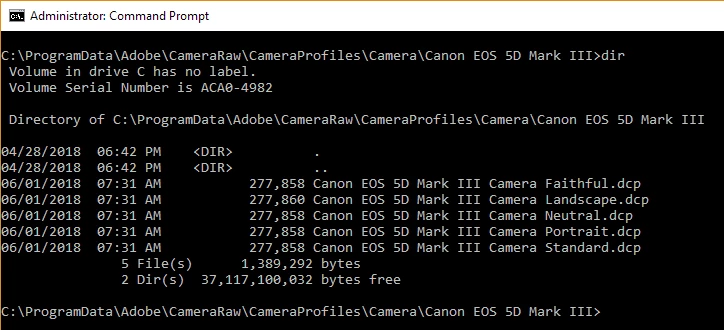
Just for completeness, you might show us a screenshot of the contents of the 5D.3 and A7III folders showing the list of .dcp files like you did above but for another camera, the A7RIII.  Here is what I have for the 5D.3:

One thing to try is to copy the relevant profiles to the third-party/user-supplied profiles area under your user-library and maybe PS will see them, there:  /Users/[your username]/Library/Application Support/Adobe/CameraRaw/CameraProfiles/ however there is a trick to getting into your /Users/[your username]/Library and I don't have that in front of me at the moment.  If you can figure that part out maybe I can find it, later.

返信数 6

TheDigitalDog
Inspiring
August 1, 2021

On my Mac (YMMV) I have two locations for DCP profiles. 

Custom (one's I've built): 

/Users/~/Library/Application Support/Adobe/CameraRaw/CameraProfiles

Adobe's: 

/Library/Application Support/Adobe/CameraRaw/CameraProfiles

Author “Color Management for Photographers" & "Photoshop CC Color Management/pluralsight"
Participant
January 2, 2019

Hi,

I have similar issue. After recently update the camera raw to 11.1 version, all my presents are missing except for the standard presets. My presets are saved in .xmp file format. I do not have any issue with the previous camera raw version.

Appreciate your help and input on this matter.

Participant
February 12, 2019

I have the same issues,  even an reinstalling of ACR 11.2 does not help

First the lens profiles are missing.

then the camera profiles are missing

only matrix is left over

I can't use  any older .xmp sidecar file  because the profile is not matrix

I missing all Adobe standard profiles

I can't install any .dcp profiles

I cn't install my colorchecker Profiles

Inspiring
July 31, 2021

This helped me for me:


https://community.adobe.com/t5/camera-raw/adobe-camera-raw-missing-camera-profiles/td-p/10087240


There are two profile folders. One in users and the other in Program-Data. Copy and paste all profiles from Program-Data to the users/Camera Profile folder.

larss77408363作成者
Participating Frequently
June 28, 2018

Hi @ssprengel,

You are the best!

This one...

One thing to try is to copy the relevant profiles to the third-party/user-supplied profiles area under your user-library and maybe PS will see them, there:  /Users/[your username]/Library/Application Support/Adobe/CameraRaw/CameraProfiles/ however there is a trick to getting into your /Users/[your username]/Library and I don't have that in front of me at the moment.  If you can figure that part out maybe I can find it, later.

...did the trick...

Many many thanks for your great and helpful support - greatly appreciated!

I was completely out of ideas, since it seems I've tried everything already.

Also, exchanging with Adobe via chat did not lead to anything (since they did not grab the issue at all, what a poor experience).

Again, many thanks @ssprengel for your great help!

Best,

Lars

ssprengel
Inspiring
June 30, 2018

There is still something wrong, somewhere, but at least there was a workaround that worked.

Another person in another forum thread had exactly the opposite problem, their standard profiles were visible but their user-supplied profiles were invisible, and they ran PS and opened one raw file and things started to work, but a second person on that other thread didn't have their problem fixed by running PS.

I think it all started with LR 7.3 and the fancier profile browser and LUT-based variations.  I think the new profile browser required rewriting some code that still has bugs, but not for everyone so they're difficult to diagnose and fix.

If you start seeing duplicates of your profiles after some update or system maintenance then the regular ones have shown up and you can probably get rid of the user-library copies, and Adobe may make changes to the profiles from time-to-time so it might be worth doing a recopy for the two cameras after each update or two.

Inspiring
September 25, 2018

I have the same problem, my A7RIII images are showing Matrix, and my Pentax 645D images(DNG) files only let me choose color or monochrome. In both, Lightroom CC classic and Adobe Camera Raw inside Photoshop.

I can’t see my bought camera profiles, my RNI ones.

I can use all of those profiles on my Photoshop Lightroom CC 2015.14. But not on the new one! Or the new Camera Raw!

Maybe because both are installed?

larss77408363作成者
Participating Frequently
June 27, 2018

Hi ssprenger,

Thanks for your help.

Both, the profiles for the Sony ILCE-7M3 and Canon EOS 5D Mark III are there, but RAW files of both cameras only provide the Matrix camera profile.

Gave both Bridge CC2018 and Photoshop CC 2018 an uninstall followed by a fresh install, adding Camera 10.4 and DNG Converter 10.4 afterwards - things did not change.

Very unpleasing experience, did never ever see something like this in Photoshop CS6...

Could it be possible, that the camera profile folder (see path in the attached screenshot) belongs to Lightroom, and is missing for Photoshop CC 2018? If so, what would be the correct path, and can the profiles be copied/pasted manually in solving the issue?

Best,

Lars

ssprengel
ssprengel解決!
Inspiring
June 28, 2018

That profile file path looks right for PS and Bridge not Lightroom.  It is analogous to what I have for Windows with my C:\ProgramData being replaced with Macintosh HD > Library > Application Support but otherwise the same.

"Matrix" for the camera profile instead of the correct list, means that the application expects certain profiles, but cannot find or perhaps access the profile files.  On a Mac (which I've never used) maybe this is a permissions issue, either for the file-folders the profiles are in (try Repair permissions or whatever it is now in the newer OSes) or something is wrong with the user-context the applications are running in.  On Windows you can right-click the shortcut and choose Run as Administrator to run the application with the highest permissions, but I don't know about a Mac.

Just for completeness, you might show us a screenshot of the contents of the 5D.3 and A7III folders showing the list of .dcp files like you did above but for another camera, the A7RIII.  Here is what I have for the 5D.3:

One thing to try is to copy the relevant profiles to the third-party/user-supplied profiles area under your user-library and maybe PS will see them, there:  /Users/[your username]/Library/Application Support/Adobe/CameraRaw/CameraProfiles/ however there is a trick to getting into your /Users/[your username]/Library and I don't have that in front of me at the moment.  If you can figure that part out maybe I can find it, later.

ssprengel
Inspiring
June 26, 2018

I expect Adriana should be able to help understand what's occurring, but some general comments are:

Another comment would be that LR uses profile files stored in one place while Camera Raw uses them from another place, so LR finding profiles has nothing to do with PS finding them.

Also, I think the Camera Raw 7 folder is where the profiles reside for the obsolete CS6, and CC 2018 would have them under somewhere like what is indicated by the arrows in this screenshot from a Mac of someone else, maybe under a CameraProfiles folder under CameraRaw.  I only have Windows so cannot verify on my own computer.

CAMERA RAW PRESETS FOR MAC USERS

if you can't figure it out, try installing the latest DNG Converter 10.4, which should match the PS 19.1.5/ACR 10.4 update that rolled out a few days ago.  The DNG Converter and PS share the same profiles location (at least on Windows and maybe also on a Mac) so installing the DNG Converter should put back any missing profiles.  The DNG Converter can be found on this page of general Adobe software updates:

Adobe software and product updates

larss77408363作成者
Participating Frequently
June 26, 2018

Hi ssprengel,

Thanks for your help.

My previous comment was wrong/misleading, the camera profiles are indeed located in the "Camera RAW" folder, as shown in your screenshot.

Also, I gave the Camera RAW and DNG installer a try already, however things did not change afterwards.

Best,

Lars

ssprengel
Inspiring
June 27, 2018

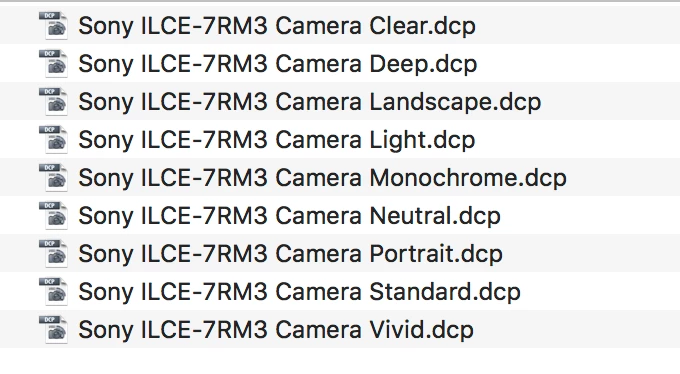
I just noticed an inconsistency:  the .dcp files in the screenshot are for the A7R III not the A7 III that you say you have.

Please confirm whether you have an A7 III or an A7R III and whether you see profiles (.dcp files) for the A7 III as well as the A7R III.

FWIW, I have profiles on my Windows for ACR 10.4 for both the A7 III and A7R III:

Adobe Employee
June 25, 2018

Are you selecting a raw file when looking for camera matching profiles?

larss77408363作成者
Participating Frequently
June 25, 2018

Hi Adriana,

Thanks for your message.

Yes, choosing a raw file (no matter what camera) leads to the „Matrix“ profile, instead of the camera dedicated Adobe profiles.

Best,

lars

Adobe Employee
June 25, 2018

Lars

How did you update camera raw? Is this a localized installer?

Adriana