Fabiano Magno Pechibella
Inspiring
September 5, 2016
解決済み

VENDOR ERROR CODE 4060 - SQL Server

  • September 5, 2016
  • 返信数 1.
  • 7565 ビュー

Guys,

We migrate our database from MS SQL 2008 to MS SQL 2012, but, when I tried access our app, the app show me the follows error:

Error Executing Database Query.

Cannot open database "DB" requested by the login. The login failed. ClientConnectionId:562379cb-792a-4d92-88fb-b274aed1a6e9

SQLSTATE       S0001

DATASOURCE       DB

VENDORERRORCODE       4060

We generated a dump from our production environment and we imported into our developing environment, after imported, the CF show for us the error above.

Someone, know how solve this problem?

Tks,

Fabiano Magno Pechibella
このトピックへの返信は締め切られました。
解決に役立った回答 Fabiano Magno Pechibella

Hi Fabiano, good the problem is solved. Please mark the correct answer.


Hi BKBK,

The solution was....

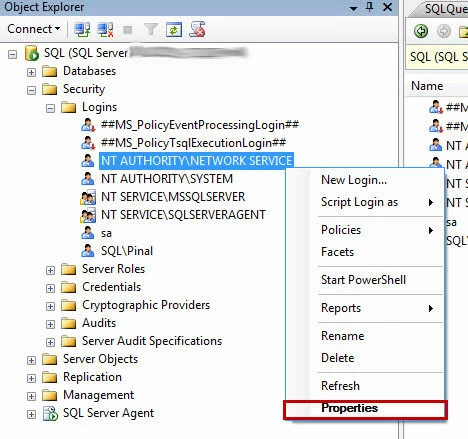
Go to SQL Server >> Security >> Logins and right click on NT AUTHORITY\NETWORK SERVICE and select Properties

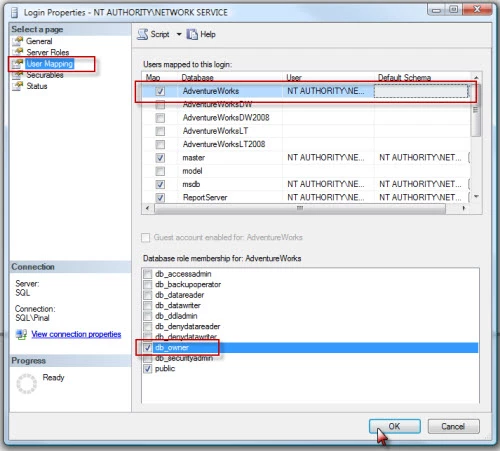
In newly opened screen of Login Properties, go to the “User Mapping” tab. Then, on the “User Mapping” tab, select the desired database – especially the database for which this error message is displayed. On the lower screen, check the role db_owner. Click OK.

Tks,

Best Regards,

Fabiano Magno Pechibella

返信数 1

Inspiring
September 5, 2016

It tells you what the problem is. The login failed. There is a problem with your authentication.

You need to start there and make sure all the authentication is setup the same way as it was before the migration.

How did you migrate the SQL? AS this is a Coldfusion forum you may get a better chance asking this somewhere SQL related.

Fabiano Magno Pechibella
Inspiring
September 5, 2016

Thanks haxtbh,

I found the problem!

When you generate a dump form other environment and import into in your DB some logins and password are changed,

I don't know why, but this was my problem.

Tks,

Fabiano Magno Pechibella

BKBK
Community Expert
Community Expert
September 5, 2016

Hi Fabiano, good the problem is solved. Please mark the correct answer.