


Participating Frequently
November 29, 2021
Question

Adobe background processes ( CEF Helper ) using a lot of memory and cpu
  • November 29, 2021
  • 2 replies
  • 1854 views

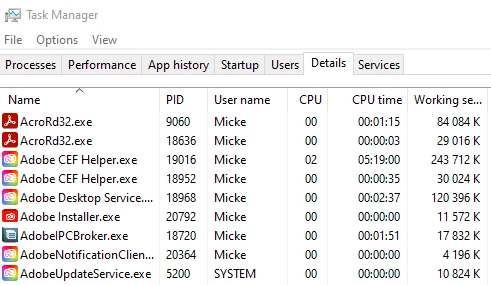
Adobe's background processes consume more than 400MB of my ram, and makes sure my cpu is busy. See above screen shot from Task Manager. Adobe CEF Helper has consumed more than 5 HOURS of cpu time. I don't know what Adobe CEF helper is doing, but I am pretty sure it isn't worth all this cpu consumption.

Abount a week ago I used the log collector tool (as described on https://community.adobe.com/t5/creative-cloud-services-discussions/what-is-adobe-cef-helper/m-p/11233475 ) The log collector tool said I would receive an email from Adobe, but no such email has been received. I have checked my gmail spam folder.


This topic has been closed for replies.

2 replies

New Participant
December 2, 2021

I can confirm this issue on both of my machines. Whats wrong with this adobe cef helper tool?

disabling the file syncing helped, i will continue to have a look at that.

John T Smith
Community Expert
November 29, 2021
mfalkviddAuthor
Participating Frequently
December 7, 2021

Thanks John.


Pausing sync seems to help a bit, but Adobe CEF helper is still using about 2% cpu constantly.

LinSims
Community Expert
December 9, 2021

Stange. I have tried in Firefox on Windows 10, and in Chrome on the same computer. I have also tried in Safari on my iphone.


If you haven't already, turn off ALL ad, popup and script blockers, or add the adobe.com domain to the list of allowed sites. 


Beyond that, there may be corporate firewall settings interfering, but I don't know enough about that to give assistance.