


New Participant
June 12, 2018
Answered

How to Fix Adobe Application Manager for CS6

  • June 12, 2018
  • 3 replies
  • 9147 views

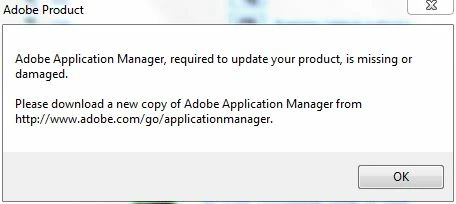
Short of going to a previous image backup & fixing this, how do I fix this that Adobe's update manager broke. I am not interested in going to cloud based software, so prefer to stay at CS6. Seems like there should be a simple download link for this somewhere, but all I find is the application manager download link for CC versions.   Here is the message I get when trying to do an update to either my Photoshop CS6 or Dreamweaver CS6. If I knew where this file was located on my hard drive, I could just extract it from imagex backup with 7zip.
    This topic has been closed for replies.
    Correct answer davidb9967256

    After some more google research, I was able to find where these files live.  I overwrote the folder tree C:\Program Files (x86)\Common Files\Adobe\OOBE\PDApp\core from my backup & it works again.  I will just ignore any updates that update manager tells me to update & hopefully just disabling that utility from starting using msconfig.exe will work.

    3 replies

    New Participant
    January 2, 2021

    Any way you could post the folder from your backup that works? I have this issue but no backup to pull from. Thanks!

    New Participant
    March 14, 2021

    I very much appreciate that tip. This happened to me and fortunately I have a copy of Dreamweaver CS6 (which I bought and paid for) on an old Win 7 PC and copied over the PDApp file complete and it is over 140MB but it worked immediately (I backed up the old PDApp first). I am delighted and I have booted off Creative Cloud permanently having just installed (and paid for) PS2020 Elements and Premier Elements.
    The question now is, how do we get this file to other honest people or can it be downloaded from somewhere.

    NB: My first time on this forum.

    Again, thank you David.

    John T Smith
    Community Expert
    August 18, 2020

    As soon as you install any part of the Cloud, even a trial, it replaces your program management system
    -if you plan to keep using CS6 (or earlier) you should NOT install a Cloud program, not even a trial
    -Read Cloud takes over https://community.adobe.com/t5/Get-Started/Get-off-the-cloud/td-p/8075485 for some ideas

    New Participant
    August 18, 2020

    I have my own serial number for my CS6 of After Effects by somehow the number has been revoked? 

    Nancy OShea
    Community Expert
    August 19, 2020

    A revoked license is a different issue unrelated to this topic.

    Contact the vendor who sold it to you.


    Adobe Genuine software FAQ

    https://helpx.adobe.com/genuine/faq.html


    Nancy O'Shea— Product User, Community Expert & Moderator
    davidb9967256AuthorCorrect answer
    New Participant
    June 12, 2018

    After some more google research, I was able to find where these files live.  I overwrote the folder tree C:\Program Files (x86)\Common Files\Adobe\OOBE\PDApp\core from my backup & it works again.  I will just ignore any updates that update manager tells me to update & hopefully just disabling that utility from starting using msconfig.exe will work.

    New Participant
    January 2, 2021

    Any way you could post the folder from your backup that works? I have this issue but no backup to pull from. Thanks!