


Exit
  • Global community
    • Language:
      • Deutsch
      • English
      • Español
      • Français
      • Português
  • 日本語コミュニティ
  • 한국 커뮤니티
0

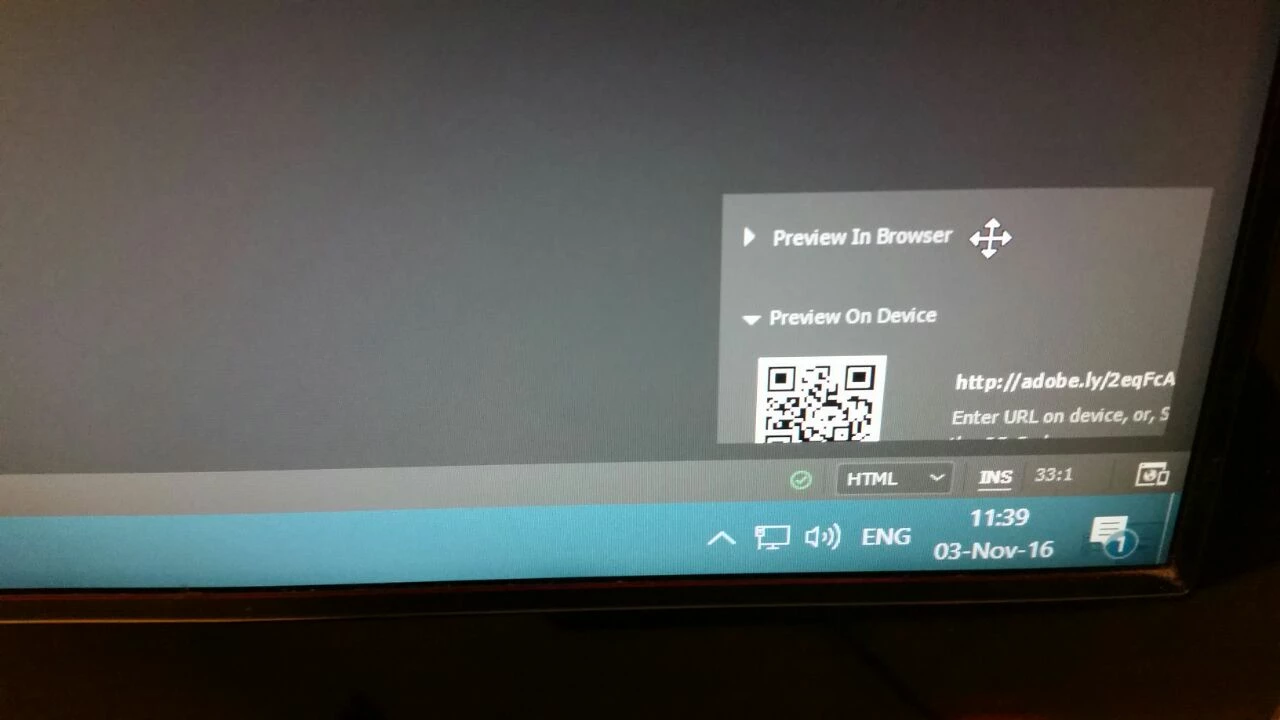
Dreamweaver "Real time preview on device": QR and Address to small to fit window and are cut off.
New Here ,
Nov 03, 2016 Nov 03, 2016

3405a13d-8046-4b0f-a748-348580060351.jpg

Dreamweaver "Real time preview on device" with QR or Address are to small to fit its window and are cut off in a way I cannot use either option. Can this be fixed on my end or is this a bug?

Thanks.

611
Translate
Report
Community guidelines
Be kind and respectful, give credit to the original source of content, and search for duplicates before posting. Learn more
community guidelines

correct answers 1 Correct answer

New Here , Nov 03, 2016 Nov 03, 2016

Yup, that does it.

But I prefer having my adjusted OS text size, over using that feature.

Hope adobe can tweak that little window to accommodate larger text in later updates.

thanks.

Eyal.

Translate
Adobe Employee ,
Nov 03, 2016 Nov 03, 2016

Hi Eyal,

Do you have text size greater than 100%? If yes, can you please try switching text size back to 100% and then try Real time preview in DW.

Hoping it would resolve the problem you are seeing.

thanks,

Lalita

Translate
Report
Community guidelines
Be kind and respectful, give credit to the original source of content, and search for duplicates before posting. Learn more
community guidelines
New Here ,
Nov 03, 2016 Nov 03, 2016

Yup, that does it.

But I prefer having my adjusted OS text size, over using that feature.

Hope adobe can tweak that little window to accommodate larger text in later updates.

thanks.

Eyal.

Translate
Report
Community guidelines
Be kind and respectful, give credit to the original source of content, and search for duplicates before posting. Learn more
community guidelines
Community Expert ,
Nov 03, 2016 Nov 03, 2016

It's one of the many items that will snap in line as soon as Adobe makes the program High DPI aware.

Translate
Report
Community guidelines
Be kind and respectful, give credit to the original source of content, and search for duplicates before posting. Learn more
community guidelines
Engaged ,
Nov 03, 2016 Nov 03, 2016
LATEST

I am having the exact same issue, but on an iMac with a Retina 5K display:

Screen Shot 2016-11-03 at 4.25.16 PM.png

As far as I know, the text size has never been set to anything other than 100% anywhere on this system. Is there someplace where I can (at least temporarily) scale the text to *less* than 100% so that I can at least read the full URL and type it into my mobile devices?

At least until the High DPI / Retina support is added to Dreamweaver? Or if/when the panel above becomes resizable?

Translate
Report
Community guidelines
Be kind and respectful, give credit to the original source of content, and search for duplicates before posting. Learn more
community guidelines