


Participant
February 26, 2017
解決済み

How do I mimic the Dreamweaver CC workspace to look like/act like the Dreamweaver CS6 workspace?

  • February 26, 2017
  • 返信数 3.
  • 1663 ビュー

I have tried to do the above to no avail.  I liked the ability to use the split code, etc.  But liked (and became familiar) with the Dreamweaver CS6 workspace.  What can I do to mimic the old workspace that I loved so much?   Thanks, Tripp
    このトピックへの返信は締め切られました。
    解決に役立った回答 Nancy OShea

    You're never going to get CC 2017 to look like retro CS6.  Too much has changed.

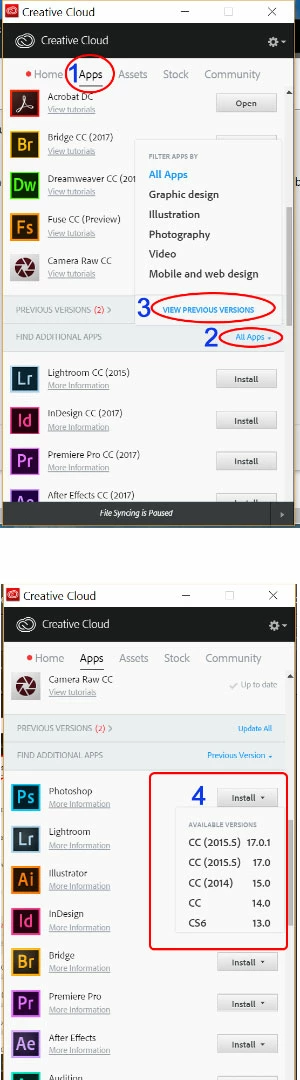
    If you're comfortable with CS6 and you don't need the new features, install the old version from your CC Desktop App.    Incidentally, you can have multiple versions on your computer.  You just can't launch them at the same time.   See screenshot.

    Nancy

    返信数 3

    Nancy OShea
    Community Expert
    Community Expert
    February 26, 2017

    It takes time to get comfortable with the new Dreamweaver UI because it was completely redesigned in the 5 years since CS6 came out.   The toolbars have changed.  The menus have changed.  The code color themes have changed,  Some features were removed and new ones were added.   See workspaces in Dreamweaver. 

    Overview of the Dreamweaver workspace

    I have created a custom workspace with the panels I use  most often by clicking on handles and dragging them into a new position that suits my workflow. 

    Nancy

    Nancy O'Shea— Product User & Community Expert
    paulk7737514
    Inspiring
    February 26, 2017

    Just download CS6 and use it instead. The new workspace reflects the rethinking of DW owing to the evolution of web design practices.

    pziecina
    Legend
    February 26, 2017

    You can mimic the CS6 workspace, but not the features.

    Which workspace would you like to mimic?

    fbradd作成者
    Participant
    February 26, 2017
    • Designer with split view.  Loved the prior CSS interface in CS6.
    • Too bad there isn't a 'retro to CS6' workspace feature (recognizing the advances built into CC 2017, etc).
    • Hard to believe I have put up with the CC workspace this long.
    • Understand the web design changes - (been at it since 1995 with Mosaic!)

    Unlike some on this forum who are professional web design and coders (who do elegant things for sure), I am a doctor who just needs quick access to WYSIWYG with the ability to change things quickly.  It took me a long time to 'wrap my brain and work flows' around the old workspace since I tactically and not too frequently use Dreamweaver.  Yes, I still prefer CS6 and probably why it took me so long to ask on this forum.

    I will continue to monitor the great responses and appreciate those that have contributed thus far.  Thanks again!!

    Best,

    Tripp

    Nancy OShea
    Community Expert
    Nancy OSheaCommunity Expert解決!
    Community Expert
    February 26, 2017

    You're never going to get CC 2017 to look like retro CS6.  Too much has changed.

    If you're comfortable with CS6 and you don't need the new features, install the old version from your CC Desktop App.    Incidentally, you can have multiple versions on your computer.  You just can't launch them at the same time.   See screenshot.

    Nancy

    Nancy O'Shea— Product User & Community Expert