


Participant
October 18, 2019
Answered

PDFMaker Addin status check - disable prompt

  • October 18, 2019
  • 2 replies
  • 2810 views

Hi,

This thread raised the same issue and by May 2016 there was no particular answer to it except for registry snapshot comparison during installation and prompt appearance that was involving re-installation:
https://community.adobe.com/t5/Enterprise-Teams/PDFMaker-Disabled-in-Office-Apps-After-11-0-16-Install/td-p/8333901


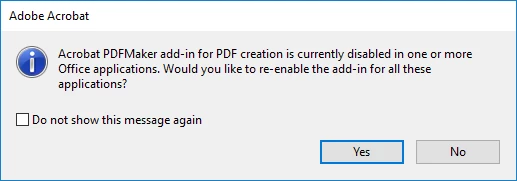
Could you please tell me if you created a reg key or any other way to disable this addin check and therefore prompt?

Citrix RDS environment with golden image so Do not show this message again doesn't work.

Has to be some User Configuration GPO solution.

    This topic has been closed for replies.
    Correct answer Bani Verma

    This issue needs our expert's insights hence, to resolve this, could you please create a case or start a chat from the Admin Console's support tab: Enterprise Support

    2 replies

    Participant
    August 3, 2022

    For anyone looking for the solution to this, there's a registry key that can be set:

    "HKEY_CURRENT_USER\SOFTWARE\Adobe\Adobe Acrobat\DC\AVAlert\cCheckbox"

    DWORD name: iAlwaysEnablePDFMAddin

    Value: 2

    Known Participant
    October 16, 2023

    Hi,


    Really interesting. Where did you find this key?


    Thanks,

    Participant
    October 16, 2023

    At this point, it's been so long that I cannot remember.  A quick search didn't reveal anything either.  Best guess is that I found it on a web forum or in a help article.

    Bani Verma
    Community Manager
    Community Manager
    October 18, 2019

    Hi, 

    Could you please check and confirm, do you see the 'Acrobat' tab in any of the Microsoft Office apps (Excel, Word, Powerpoint)? 

    If yes, then this issue is not related to deployment. 

    If you do not see it, then please check in your golden image if the following registry exists:

    HKEY_LOCAL_MACHINE\SOFTWARE\WOW6432Node\Microsoft\Office\Word\Addins\PDFMaker.OfficeAddin
    DWORD name:- LoadBehavior
    Change the value to 3

    If the key is not present you will have to manage to add and during the load time of the office apps, it will load the add-in automatically for the MS office apps and shouldn't trigger the message again.


    Hope this helps.


    nekkuAuthor
    Participant
    October 18, 2019

    Hi Bani!

    I'm not looking for a way to enable addins, I'm aware of how to do that.

    I'm looking for a way to disable the aforementioned prompt in case I've disabled addins intentionally.

    Bani Verma
    Community Manager
    Bani VermaCommunity ManagerCorrect answer
    Community Manager
    October 21, 2019

    This issue needs our expert's insights hence, to resolve this, could you please create a case or start a chat from the Admin Console's support tab: Enterprise Support