

Inspiring
January 29, 2020
質問

メニューの文字の灰色を薄くしたい

  • January 29, 2020
  • 返信数 1.
  • 595 ビュー

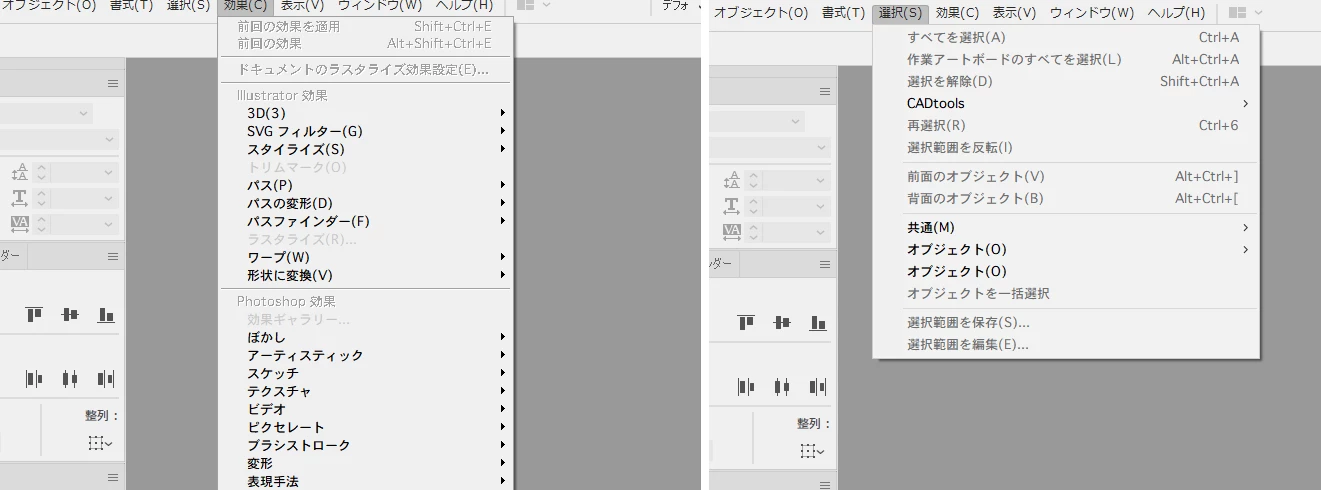
メニューを選択したとき、現在使えないメニューは灰色になりますが、

その灰色の色を薄くしたいです。現在は濃くて黒文字との区別が付きづらいです。

レジストリHKEY_CURRENT_USER」-「Control Panel」-「Colors

「GrayText」の値を変えたところ、「効果」メニューのみ色が変わった↓のですが、

これを他のメニューにも適用したいのです。どなたか方法をご存じではないでしょうか。
    このトピックへの返信は締め切られました。

    返信数 1

    Srishti Bali
    Legend
    January 29, 2020

    Hi there,


    Thanks for reaching out. As of now, we do not have this option available in the application itself, however, you may raise this as a feature request on our UserVoice page (https://illustrator.uservoice.com/). 

    This is the best way of communicating with the Engineering and Product Management teams regarding issues and suggestions so they can be implemented in future releases.


    We do not recommend changing application settings from the System Registry. Any mistake there could result in the application becoming unusable.

    Please let us know if you have any further questions, we'd be glad to help.


    Regards,

    Srishti


    unknown_error作成者
    Inspiring
    January 30, 2020

    Hi,Srishti


    Thank you very much. I posted immediately.
