


Copy link to clipboard
Copied
Hello
I'm now working on a project and I need some advice. My client sent me some Microsoft Word documents. Instead of a full text document, these files have lots of text inside boxes. When these documents are placed into indesign, we have a full text frame with lots of anchored text frames. (see image)
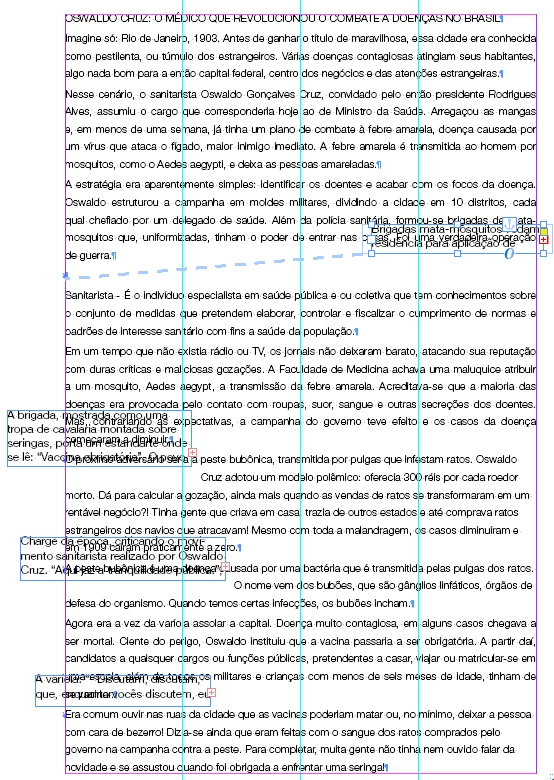
Here is what i'm doing: I copy the text inside anchored frame, place into the main text frame and than delete anchored frame.
Does Indesign have a function like "convert a anchored text frame to plain text" in the main text frame?
Is there any easy/faster way to get to the same result?
Thanks a lot
You can try this scrip:
(function () {
var stories = app.documents[0].stories.everyItem().getElements();
var ix;
for (var i = stories.length-1; i >= 0; i--) {
while (stories.textFrames.length > 0) {
ix = stories.textFrames[-1].parent.index;
stories.textFrames[-1].texts[0].move (LocationOptions.AFTER, stories.insertionPoints[ix]);
stories.textFrames[-1].locked = false;
stories.textFrames[-1].remove();
}
}
}());
Peter
Copy link to clipboard
Copied
Might be scriptable. Check the scripting forum.
Copy link to clipboard
Copied
You can try this scrip:
(function () {
var stories = app.documents[0].stories.everyItem().getElements();
var ix;
for (var i = stories.length-1; i >= 0; i--) {
while (stories.textFrames.length > 0) {
ix = stories.textFrames[-1].parent.index;
stories.textFrames[-1].texts[0].move (LocationOptions.AFTER, stories.insertionPoints[ix]);
stories.textFrames[-1].locked = false;
stories.textFrames[-1].remove();
}
}
}());
Peter
Copy link to clipboard
Copied
https://forums.adobe.com/people/Peter+Kahrel escreveu
You can try this scrip:
(function () { var stories = app.documents[0].stories.everyItem().getElements(); var ix; for (var i = stories.length-1; i >= 0; i--) { while (stories.textFrames.length > 0) { ix = stories.textFrames[-1].parent.index; stories.textFrames[-1].texts[0].move (LocationOptions.AFTER, stories.insertionPoints[ix]); stories.textFrames[-1].locked = false; stories.textFrames[-1].remove(); } } }());
Peter
Thanks a lot, @Peter Kahrel. But I know nothing about script. It´s like rocket science to me ![]()
I know, i know.. i should understand that.
Thanks, anyway.
Copy link to clipboard
Copied
Another option is to clean up the document in Word before importing. It's a pain to do manually one-at-a-time*, so a macro or utility would be easier.
*Save as a .doc file, not .docx; right-click on each box and convert to text frame; save as text file.
Copy link to clipboard
Copied
IDEAS-Training escreveu
Another option is to clean up the document in Word before importing. It's a pain to do manually one-at-a-time*, so a macro or utility would be easier.
Yes, Thats the best option. I'll have to hire someone to do that next time. Thanks!
Get ready! An upgraded Adobe Community experience is coming in January.
Learn more