


Participating Frequently
February 5, 2024
Answered

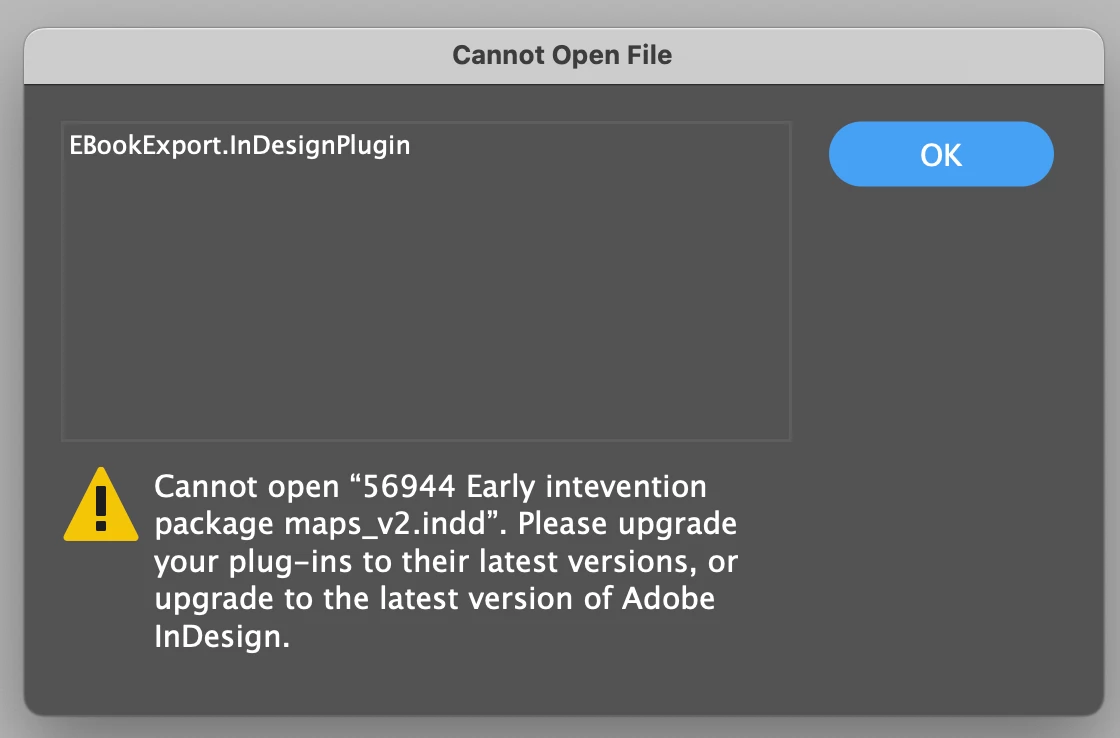
EbookExport.InDesignPlugin error when opening a file

  • February 5, 2024
  • 11 replies
  • 23284 views

Hello,


When opening a file I get this error asking me to upgrade "EbookExport.InDesignPlugin" to it's latest version version. I can't find whatever this is the plugins pannel, nor do I remember installing it in the first place. This happened when using different system in an office. Was fine on the home system. Both systems are with up-to-date versions of InDesign. Both Mac sylicon.


Fairly urgent matter so any input would be greatly apreciated.


Thank you, please help!
 

This topic has been closed for replies.
Correct answer HARSHIKA_VERMA

Hi Harshika,

The issue is now resolved for me. Still stuck on 19.0 in the office with the new 19.3 remotely. No issues or errors.

Thanks!


Awesome. Thanks for confirming that the issue is resolved with 19.3, Nick5CEF. Appreciate your patience and collaboration with us.


Please feel free to reach out to us in the future for any assistance. We would be happy to help you.


Thanks,

Harshika

11 replies

Participant
August 7, 2024

I'm also having this issue, and I have version 19.5...


Any fix here?

Abhishek Rao
Community Manager
Community Manager
August 7, 2024

Hello @Dee31208532xyra, 


We're sorry that you are experiencing this issue. Would you mind testing the issue on any of the previous versions of InDesign and update? 


We will be awaiting your response. 


Thank you, 

Abhishek Rao


Participant
July 3, 2024

I am having the same problem! I am on 19.0.0.151 and dont see an update?! Help


HARSHIKA_VERMA
Community Manager
Community Manager
July 5, 2024

Hi @kim3841112166bo,


Thank you for reaching out and sorry for the trouble. Would you mind checking the updates on the Creative Cloud Desktop app as shown in the screenshot below?


Please also try signing out of the Creative Cloud Desktop, restart the machine, sign back in and then try checking the updates.


Let us know if that helps.


Thanks.

Harshika

Participant
June 24, 2024

Hi,

From the USA here...I'm having this issue. I have a bunch of important files that I can't access because of this error. My adobe cloud shows 19.0 as latest version and no more updates available. How come updgrading to 19.3 is the solution if I don't even have that option?

Thanks.

leo.r
Community Expert
Community Expert
June 24, 2024
quote

From the USA here...I'm having this issue. I have a bunch of important files that I can't access because of this error. My adobe cloud shows 19.0 as latest version and no more updates available. How come updgrading to 19.3 is the solution if I don't even have that option?


By @JesusBarney


What's the version of your operating system? Also, what's your version of the Creative Cloud app? The current is 6.2.0.554. If yours isn't updating automatically for some reason, try to reinstall it.

Participant
June 24, 2024

So I uninstalled indesign, and then I was able to see versions 19.1 and above show up as update options on my adobe cloud app. Updated to 19.4 and was now able to open up the files. Very strange bug.

HARSHIKA_VERMA
Community Manager
Community Manager
March 6, 2024

Hi All,


Thank you for your patience. The issue is fixed with the 19.3 release, which is a phased rollout. Please update to the InDesign 19.3 version if the update is available in your Creative Cloud Desktop app in your country, and let us know if that issue is fixed.


Note: This is a phase-wise rollout, and updates will be available to users in different countries in the coming days. Check your notifications in the Creative Cloud Desktop application, or refresh the application to check for updates.


Thanks,

Harshika

Participant
March 7, 2024

Hi, I'm having the same issue when trying to open a document. Do you know approximately when 19.3 will roll out for customers in the US?

HARSHIKA_VERMA
Community Manager
Community Manager
March 7, 2024

Hi there,

We're sorry to hear about the issue you're experiencing. We recommend waiting for a week or two and regularly checking for updates on the Creative Cloud Desktop app.


As a workaround:- Please export the document to IDML from 19.2.0.046 and open it in InDesign 19.1.0.043.


Hope it helps you. 

Thanks,

Harshika

SanyamTalwar
Community Manager
Community Manager
February 20, 2024

We have been able to reproduce the issue in house and currently investigating the issue. 


Regards

Sanyam Talwar

Participant
February 22, 2024

We have the same problem two mac, two indesign licence

19.0, strating from friday one of the two license does not permit to the other to open the file.

Error: EBookExport.InDesignPlugin

HARSHIKA_VERMA
Community Manager
Community Manager
February 22, 2024

Hi @adacarpi,


Sorry for the trouble. The team is currently working on this issue. Would you mind trying the workaround and let us know if that resolves the issue?


The current workaround is to export to IDML from 19.2.0.046 and open in InDesign 19.1.0.043.


Let us know if that solves the issue. We will keep you posted on the bug update.


Thanks,

Harshika


Participant
February 15, 2024

I have the same problem.

jointMedia
Participating Frequently
February 13, 2024

After updating to version 19.2 and sharing documents with users still on version 19.1, those can't open the files with warning about EbookExport.IndesignPlugin missing.

This is especially annoying when using indesignserver, as here versions arrive later.
Wasn't it policy that files allways could be used within same main versionnumber (in this case 19.x)?


thefinalform
Participating Frequently
February 12, 2024

We (in the UK) are currently collaborating with an InDesign user in a different country (Germany). For us the latest version of InDesign is 19.2, for them it is 19.1. This is causing issues because they now cannot open the files we send them.


I assume this is because of the phased roll-out of 19.2 in different territories.


Is there a way for them to install 19.2? Maybe getting a prerelease version to show?


Thanks

leo.r
Community Expert
Community Expert
February 12, 2024
quote

We (in the UK) are currently collaborating with an InDesign user in a different country (Germany). For us the latest version of InDesign is 19.2, for them it is 19.1. This is causing issues because they now cannot open the files we send them.


By @thefinalform


Normally there shouldn't be any issues opening documents across different dot releases of the same major version (19.x in this case).


What error exactly do they get on attempt to open your documents in 19.1?

Participant
February 8, 2024

My organization is also having this problem. After reading delectrolux’s comments in this discussion, we found that one user had automatic updates turned on and had been updated to version 19.2 (so strange, since that isn’t available in Creative Cloud). After that user made updates to our files, the rest of our production and design teams could no longer open the documents and received the same “Cannot Open File” error message listing EBookExport.InDesignPlugin.

Nick5CEFAuthor
Participating Frequently
February 8, 2024

For whatever it's worth, I am on version 19.0, the most up--to-date version according to my Adobe CC.


I'm not sure if they stagger these releases, but this is the most current available on our Govmt / education plan in Australia. 


Nick5CEFAuthor
Participating Frequently
February 14, 2024

I have been in contact with an Adobe rep regarding this ongoing issue with that aim of sending them a sample file. Thing is, they don't allow attachments in the online messaging tool and my workplace blocks Dropbox etc. for security reasons. I have let them know this and hopefully will get them a sample file with the issue this week or respond with a solution. Lot's of people seem to be affected.

Participating Frequently
February 7, 2024

I am having this same issue with multiple users across our organization. All the computers (both Mac and PC) that created the files do not have any plugins installed. Random files created by these machines throw up the EPub plugin error when opened by other users. All users are on v19.1. This issue is slowly propogating to more and more users this week. 

Participating Frequently
February 7, 2024

We are running into the exact same issue with multiple users across our company as well. We get the same ePub plugin error when opened by another user. Everyone on v19.1. This is becoming a serious issue for several projects.

Participating Frequently
February 8, 2024

An Update – it appears this issue in our organization was caused when some people installed Indesign CC 2204 after January 31st (v19.2). Any file they open and save using that version will get this error when opened by anyone else. 

Participant
February 6, 2024

I am unable to open certain files and the error I'm getting is "EBOOKEXPORT.APLN." I am on the most recent update of InDesign and the error message says to check my plug-ins. But my colleague who is able to open the file is also on the same version and does not have any additional plugins. We have tried uninstalling and reinstalling InDesign but it has not resolved the issue.

James Gifford—NitroPress
Legend
February 6, 2024

This is the second thread in two days on this very obscure error — the first is here:

https://community.adobe.com/t5/indesign-discussions/ebookexport-indesignplugin-error-when-opening-a-file/td-p/14404115


Are you by chance both from the same organization, or is this really two separate instances of this problem?


The only answer in the other thread is that these files must be bound to an obsolete plugin that's no longer installed; the generic nature of the name makes searching for a source or update difficult. I believe the other OP solved the problem by exporting the file to IDML on a system/version that would open it... which may not be much of a fix for you.

Participant
February 7, 2024

Based on what I can glean from the other user's profile, it doesn't look like we are from the same organization. We don't work with ebook publishing in my org, so it's unlikely someone downloaded a specific plugin on their work device for that purpose. 


We have tried saving the files as IDML which was working for a bit but we are now encountering formatting errors with both text and images in the IDML.