Inspiring
October 2, 2022
Answered

Export: can I put different profile for color conversion and output intent?

  • October 2, 2022
  • 2 replies
  • 1054 views

Is it possible to set one profile for the color conversion and a different one for the output intent when exporting to PDF/X in Indesign? It seems that there's no way.


I would like to set the Output Intent to the CMYK profile specified by the printer (let's call it "FOGRA XY"),

but I would also like to set the color conversion to the K plate of the said profile.


I made a Black Ink profile in Photoshop and it can be used in Indesign if I choose "Convert to Destination" without "Preserve Numbers".


Or perhaps I can export this grayscale PDF/X from Indesign first and then I can convert it in Acrobat to PDF/X for "FOGRA XY". I guess that during the process the grayscale content will not be affected or converted and only the output intent will change, am I correct? If that's true, perhaps I can use a preflight fixup to change the output intent?


Thanks.

This topic has been closed for replies.
Correct answer rob day

Thank you very much, @rob day., very informative as always.


Yes, I was thinking about converting the whole content to the grayscale destination (images, text, line art, shapes and so forth).


But then, the resulting document will have "Black Ink - FOGRA XY" set in its Output Intent and not "FOGRA XY" as required by the printer. These things are related, but not the same (when you view these Black Ink images with the Black Ink simulation, that's not really the same as viewing them with the right CMYK simulation, am I correct?).


So I was thinking, how about changing the resulting PDF in Acrobat? I made a preflight profile for the conversion to PDF/X "FOGRA XY", but I hope that the grayscale content will not be affected or converted during the process. I hope that it will remain as it is.


I think that only the Output Intent will change, am I correct? This is important, cause additional conversions are not desirable.


I will also remove all the ICC profiles from the objects in the PDF, so that they won't cause 4-color grays.


Thanks


P.S. There's one more problem: I don't know how Indesign treats untagged grayscale content. Will it be treated as sGray or Gray Gamma 1.8 or 2.2?


I don't know how Indesign treats untagged grayscale content. Will it be treated as sGray or Gray Gamma 1.8 or 2.2?


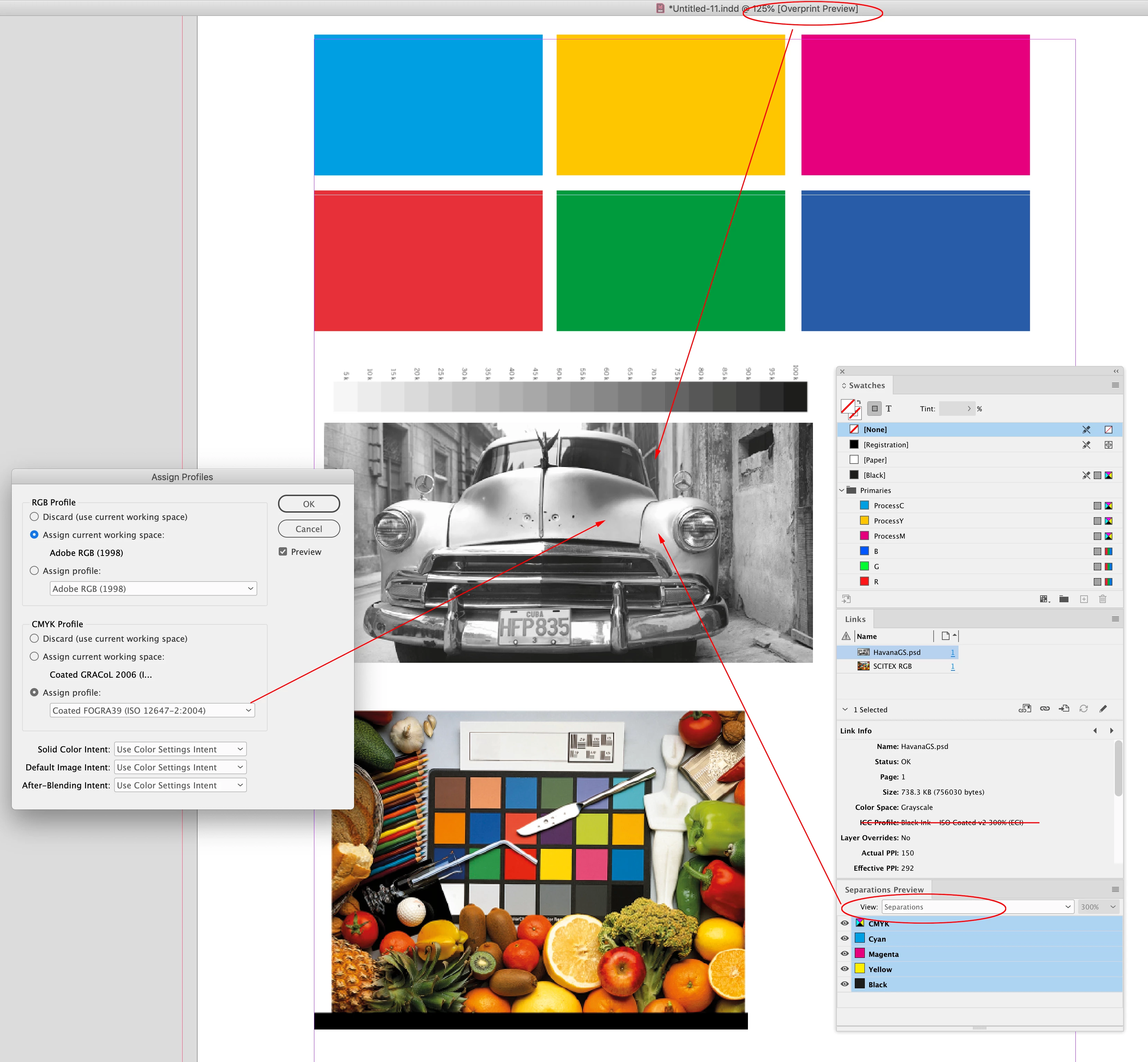
InDesign ignores gray profiles and treats placed grayscale objects as if they are on the CMYK black plate. There are two softproof modes for grayscale images: When Overprint/Separation Preview are off, grayscales are previewed as sGray (2.1 Gamma), and when Overprint/Separation Preview are on (or there is transparency on the page with a CMYK Transparency Blend Space), the soft proof is handled by the document’s assigned CMYK profile. Neither softproof mode affects the output numbers, which you can get from Separation Preview. More here: 


https://community.adobe.com/t5/indesign-discussions/greyscale-jpegs-or-psd-images-are-going-much-darker-when-dropped-in-on-indesign/m-p/11152264


Overprint Off:
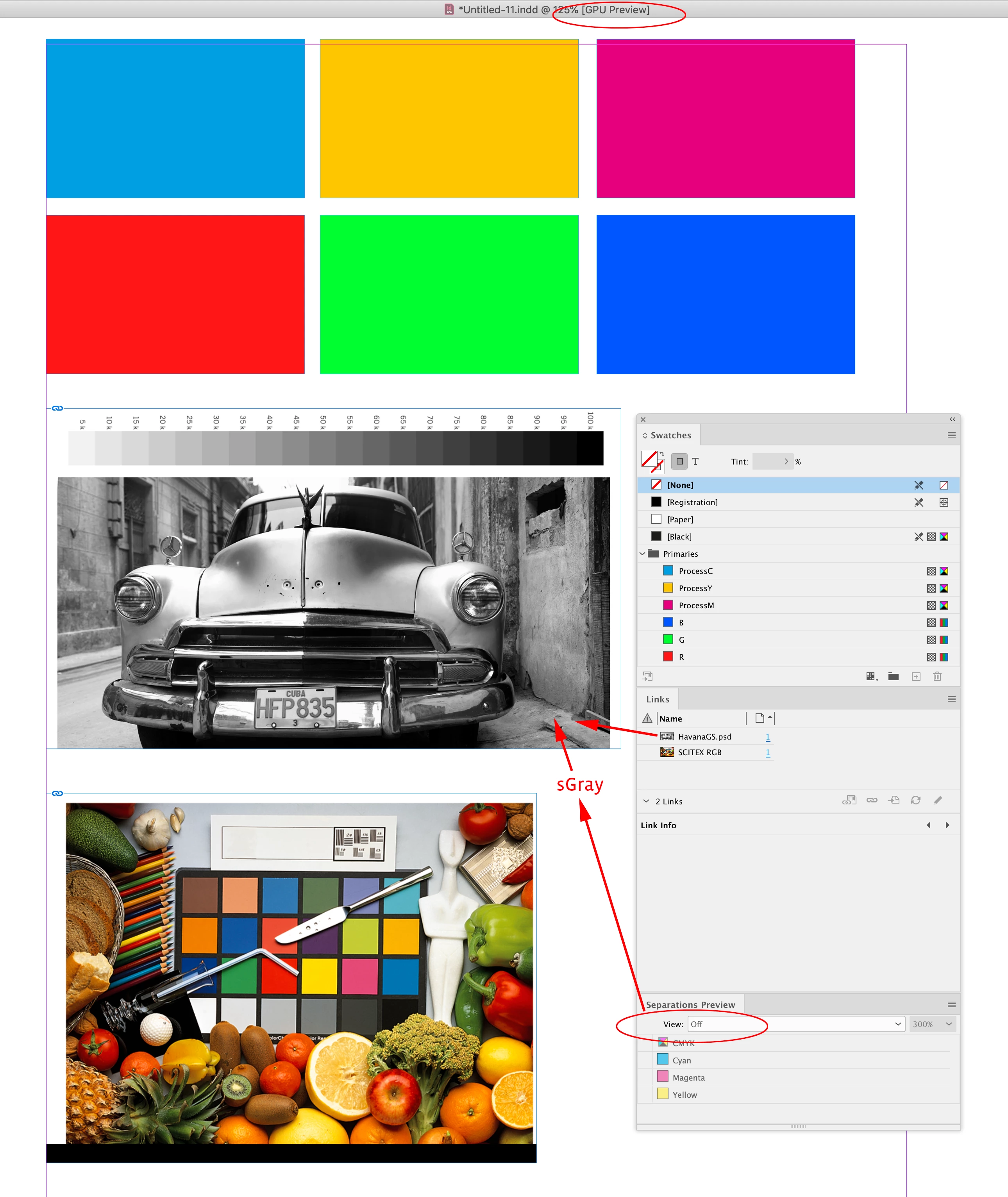


With OP on the document’s assigned CMYK profile is used to preview the Black plate. The image‘s embedded Gray profile (Black Ink - ISO Coated V2) is ignored, and Black Ink - Coated FOGRA 39 is used for the softproof.


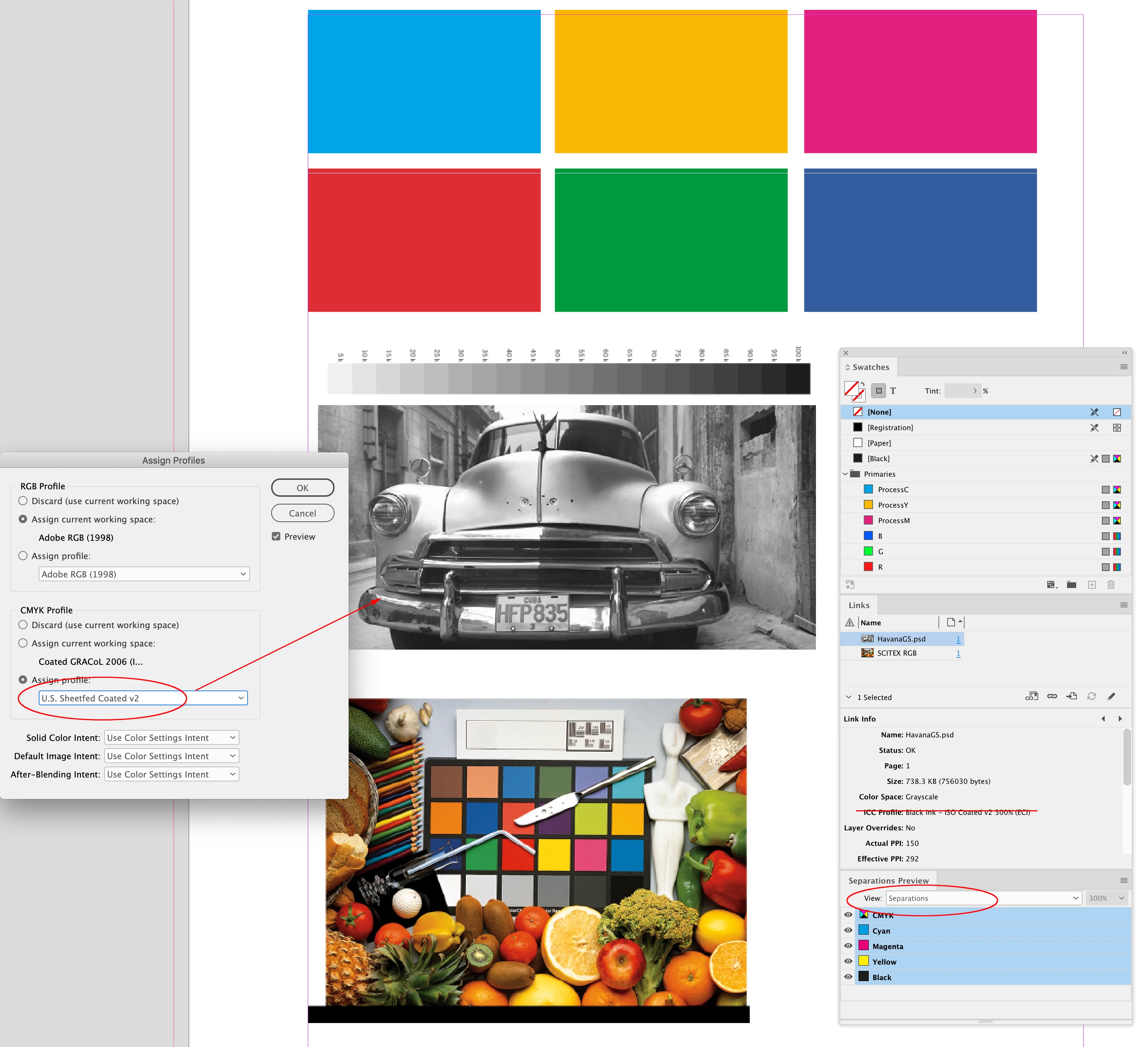
If I change the document’s assigned profile to US Sheetfed Coated, the grayscale preview is adjusted to preview as Black Ink-US Sheetfed Coated. The output values do not change:

 

2 replies

Mike Witherell
Community Expert
October 2, 2022

BTW, why would you have any images with no profile? Circle them thru PS and save with a profile. 

Is this a seriously old publication file?

Mike Witherell
Willi Adelberger
Community Expert
October 2, 2022

Therefore it would be good to place images as RGB images with the correct profile and convert with PDF export (or leave them with their profile when you export as PDF/X-3 or X-4).

Set the color policy Edit > Colour Settings > Colour Management Policies >

  • > RGB > …
  • > CMYK > Preserve Numbers (Ignore Linked Profile
sd5e8aAuthor
Inspiring
October 2, 2022

Thanks, @Willi Adelberger,  but something confuses me here.


If I convert everything at export to grayscale ("Black Ink"), the source profile for this conversion will be the ICC profile of each image, right?


But many images in the document do not have embedded profiles. Does that mean that Indesign's color settings will be used as a source profile?


If, for example, the untagged images are treated as sRGB - that's fine with me, but can I be sure that Indesign will treat them this way?


I also don't know how it will treat the untagged grayscale images.


There are all kinds of images in the document: sRGB, Adobe RGB, Dot Gain, sGray, so it is important to know both the source profile and the destination profile for this conversion.


Speaking of that, this message worried me:
Indesign > File> Export > Output > Convert to Destination:
"This may cause undesirable color changes for the content imported without embedded profiles".


So how these untagged images will be treated?


My settings: RGB: sRGB, CMYK: the profile required by the printery (let's call it "FOGRA XY"). "Preserve embedded profiles" is set for both RGB and CMYK. I also assigned these profiles to the document


Also there are other problems:


- During this conversion, Indesign will tag everything with ICC profiles. It reads "Include Destination Profile" and I can't change it, its greyed out. I will have to remove those profiles in Acrobat later.


- This conversion will also affect the content created in Indesign. In what way exactly - I don't know. I guess that line art, text and such stuff will convert to the destination.


I wish I could tweak each setting to my taste, but Indesign doesn't allow me (or maybe the PDF standard doesn't allow it).


I wish I could set the export like this:

Convert to destination ("Black Ink - FOGRA XY")

Don't include profiles

Output Intent ("FOGRA XY")


It seems that only Acrobat offers more detailed settings.


Thanks

Brainiac
October 2, 2022

One of the absolute rules of PDF/X is: *everything* has a profile. If it does not have its own profile, then the output intent profile MUST be used. There is no choice for PDF/X processors, this is what they must do. So "don't include profiles" must, I suppose, be taken as "the output intent profile is used". On export, this might also be embedded for the images and graphics, but it means the same thing.

