



Barb Binder
Community Expert
Community Expert
October 18, 2018
Answered

FindChangeByList—local formatting to a character style

  • October 18, 2018
  • 5 replies
  • 7805 views

I'm back.

I'm making progress—thanks winterm​ and [Jongware]​—but am stuck again. This time I am trying to target local formatting from a Word doc (italics and small caps) and change it to my existing Italic (and eventually SmallCaps) character style(s).

Seems like it might be something like this, but that's not working. No error message, just ignored. Any thoughts?

grep {findWhat:".",fontStyle:"Italic"} {changeTo:"$0",appliedCharacterStyle:"Italic"} {includeFootnotes:true, includeMasterPages:true, includeHiddenLayers:true, wholeWord:false}

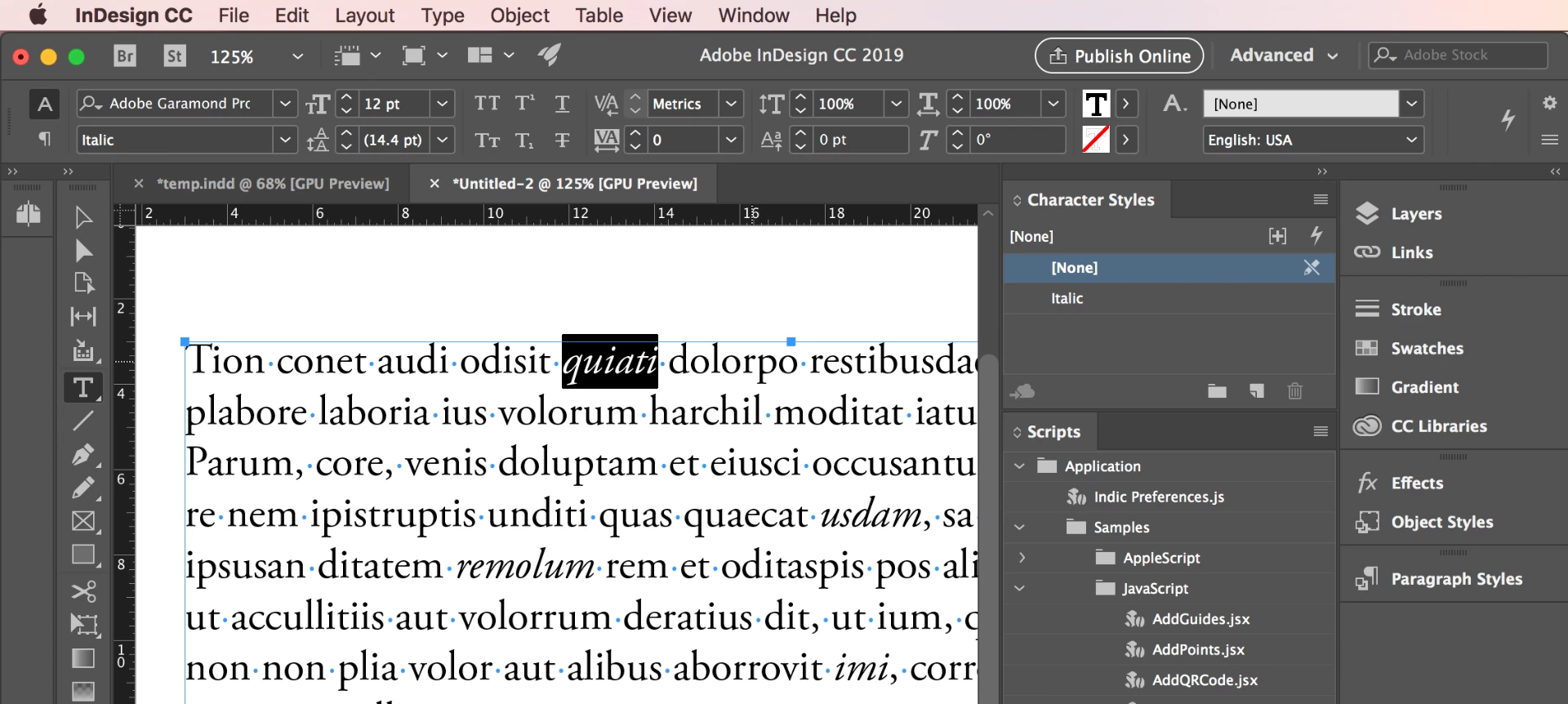
Notes: I have the style called Italic (not in a folder) and the text I'm looking for is Italic (not Oblique or some other variation):
TIA,

~Barb

This topic has been closed for replies.
Correct answer Manan Joshi

Hi Barb,

Works for me, one pointer please replace the space with tab after grep and also after }. I noticed that copying and pasting from the forum replaces tab with another character and hence the code does not work. See the instructions in the FindChangeList.txt file for details, i am pasting the relevant line below

findType<tab>findProperties<tab>changeProperties<tab>findChangeOptions<tab>description

Let me know if it works.

-Manan

5 replies

tukusejssirs
Known Participant
March 21, 2020

I needed similar script, but in JavaScript, therefore I have created the following. It still has an issue: when there is more than one style applied to text, only one style is kept (the one that is issues sooner). I am not a great scripter, therefore If one knows a better algorithm to check all styles in one go, create a necessary character styles and apply the style to the text, I wish to hear about it!


// Replace all font style italic with character style Italic

// author:  Tukusej's Sirs
// date:    21 March 2020
// licence: GPLv3


var doc = app.activeDocument;
app.findGrepPreferences = app.changeGrepPreferences = null;

// Replace the following font styles with respective character styles
restyle('Semibold Italic');
restyle('Bold Italic');
restyle('Bold');
restyle('Italic');
restyle('Semibold');
restyle('Small Caps');
restyle('All Caps');
restyle('Superscript');
restyle('Subscript');
restyle('Underline');
restyle('Strikethrough');

function restyle(style) {
	var charStyle = app.activeDocument.characterStyles.itemByName(style);

	// Create `style` character style if missing
	if (! charStyle.isValid) {
		var newStyle = app.documents[0].characterStyles.add();
		newStyle.name = style;

		switch(style) {
			case 'Underline':
				newStyle.underline = true;
				break;
			case 'Strikethrough':
				newStyle.strikeThru = true;
				break;
			case 'Small Caps':
				newStyle.capitalization = Capitalization.SMALL_CAPS;
				break;
			case 'All Caps':
				newStyle.capitalization = Capitalization.ALL_CAPS;
				break;
			case 'Superscript':
				newStyle.position = Position.SUPERSCRIPT;
				break;
			case 'Subscript':
				newStyle.position = Position.SUBSCRIPT;
				break;
			default:
				newStyle.fontStyle = style;
		}

		charStyle = app.activeDocument.characterStyles.itemByName(style);
	}

	// Restyle to character style
	switch(style) {
		case 'Underline':
			app.findGrepPreferences.underline = true;
			break;
		case 'Strikethrough':
			app.findGrepPreferences.strikeThru = true;
			break;
		case 'Small Caps':
			app.findGrepPreferences.capitalization = Capitalization.SMALL_CAPS;
			break;
		case 'All Caps':
			app.findGrepPreferences.capitalization = Capitalization.ALL_CAPS;
			break;
		case 'Superscript':
			app.findGrepPreferences.position = Position.SUPERSCRIPT;
			break;
		case 'Subscript':
			app.findGrepPreferences.position = Position.SUBSCRIPT;
			break;
		default:
			app.findGrepPreferences.fontStyle = style;
	}

	app.changeGrepPreferences.appliedCharacterStyle = charStyle;
	app.changeGrep();
}


Maiane Gabriele
Inspiring
April 15, 2020

About the Paragraph Style inside a group it didn't work the way it's here, but I've made a small change at the script and now it's working perfectly for me. 🙂


The way it's working is like this:

grep	{fontStyle:"Italic"}	{appliedParagraphStyle:app.doScript('function getStyle() { var ps = app.activeDocument.allParagraphStyles; for(var i = 0; i < ps.length; i++) { if( ps[i].name == "Italic" ) { return ps[i]; } } } getStyle();', ScriptLanguage.javascript)}	{includeFootnotes:true, includeMasterPages:true, includeHiddenLayers:true, wholeWord:false}


Inspiring
April 28, 2022

I've spent some hours trying to find a way to apply a paragraph style with FindChangeByList and this finally worked. Thanks!

I need to do a variation of this but I cant get it to work. 

I have a paragraph style for questions. So I want to search for a question mark and apply the paragraph style "Question". But I don't know how to make that work.

I've tried this:

grep {findWhat:"?"} {changeTo:"?", appliedParagraphStyle:app... (from the working example)

and

grep {findWhat:"?"} {appliedParagraphStyle:app... (from the working example)

Can someone help me with this?

Inspiring
August 14, 2019

Hi Manan Joshi​ after some successful find & replace actions I am stuck... like BarbBinder​ said it is difficult to make any leaps in logic on my own. This is the problem I am facing now: I need to target forced returns after a string with the character style "bold"; they need to be replaced by a normal return AND the character style on the string before the return needs to be cleared. The code I have so far doesn't work completely right. The wildcard in the findWhat works but the wildcard in the changeTo replaces the text... how can I accomplish the task in one grep function?  Do I need to work with the "followed by" (?=\n) code or is there a "preceded by" code?

My code so for:

grep {findWhat:".+\n", appliedCharacterStyle:"Bold"} {changeTo:".+\r", appliedCharacterStyle:"[No character style]"} {includeFootnotes:true, includeMasterPages:true, includeHiddenLayers:true, wholeWord:false}

The text source:

This is a subheading in bold[forced return]

This is a paragraph with some text following the subheading ...

The text result:

This is a subheading without characterstyle[normal return]

This is a paragraph with some text following the subheading ...

Community Expert
August 15, 2019

Hi peteremil,

I see two issues in your string, mostly its fine

  • Firstly you will have to escape \r and \n so that should be \\r and \\n
  • In findwhat you will have to capture the string before forced enter and then we can use substitution in the changeTo field

So the findWhat should be "(.+)\\n" and changeTo should be "$1\\r"

Here () creates a capturing group that will populate the substitution $1 which means content of the first capturing group.

Try this and let me know if it works or not

-Manan

-Manan
Inspiring
August 15, 2019

Thanks a lot Manan Joshi​! You certainly have a lot of grep knowledge. Using your guidance it worked!

Inspiring
June 17, 2019

I was looking for some documentation on the correct structure of the grep string within the .txt file used by FindChangeByList to target character styles and paragrahstyles and I end up in this thread. Seems to me Manan has it all sorted out .

Perhaps BarbBinder​ you can enlighten me as well on this...

How can I target a used character style and change that to another? So not targeting a specific string, but specific styles...

Community Expert
June 17, 2019

Hi Peter,

You can look at my comments above for full description, however its very simple. For example if you need to change the character style named "Original" to "Italic" in your document you need to use the following string

grep {appliedCharacterStyle:"Original"} {appliedCharacterStyle:"Italic"} {includeFootnotes:true, includeMasterPages:true, includeHiddenLayers:true, wholeWord:false}

The first string inside the {} after grep identifies the properties to be searched and the next one identifies the properties to be applied once the search matches. You can look at the full list of properties you can use by referring the following links

Find properties for Grep (the ones you would use to search as explained above)

Adobe InDesign CS6 (8.0) Object Model JS: FindGrepPreference

Replace properties for Grep

Adobe InDesign CS6 (8.0) Object Model JS: ChangeGrepPreference

The other thing that i explained in the above posts was the case of using the character styles and paragraph styles which are present in folders. Since such styles can't be accessed directly by their names in the script, we would need to pass in some JS code in the find/change string and that is what i have done

Hope this helps you to understand and get your task done

-Manan

-Manan
Inspiring
June 17, 2019

Hi Manan, thanks for chiming in. Unfortunately when I use the mentioned code it is not working; the already applied style is not changed to the new one. This is what I have put in the FindChangeList.txt:

grep  {appliedCharacterStyle:"Italic"} {appliedCharacterStyle:"[No character style]"} {includeFootnotes:true, includeMasterPages:true, includeHiddenLayers:true, wholeWord:false}

I used tabs between the } { characters.

When I combine a find and replace with the applied style like Barb did, like this line of code:

grep  {findWhat:"\\s~_\\s", appliedCharacterStyle:"Italic"} {changeTo:"~_", appliedCharacterStyle:"[No character style]"} {includeFootnotes:true, includeMasterPages:true, includeHiddenLayers:true, wholeWord:false}

I get an Javascript error stating "Expected: } (...) Source: app.doScript(myString, ScriptLanguage.javascript);

- but I did not change that piece of code.

Community Expert
October 19, 2018

Hi Barb,

You could use the following string

grep {fontStyle:"Italic"} {appliedCharacterStyle:"Italic"} {includeFootnotes:true, includeMasterPages:true, includeHiddenLayers:true, wholeWord:false}

-Manan

-Manan
Barb Binder
Community Expert
Community Expert
October 19, 2018

Hi Manan Joshi:

First of all, thank you for helping.

However, it's still not working. After running the script with just your line, the character style still isn't getting applied.

  And separately, are the words "findWhat:" and "changeTo:" optional when simply doing a format find/change?

~Barb

~Barb at Rocky Mountain Training
Manan JoshiCommunity ExpertCorrect answer
Community Expert
October 19, 2018

Hi Barb,

Works for me, one pointer please replace the space with tab after grep and also after }. I noticed that copying and pasting from the forum replaces tab with another character and hence the code does not work. See the instructions in the FindChangeList.txt file for details, i am pasting the relevant line below

findType<tab>findProperties<tab>changeProperties<tab>findChangeOptions<tab>description

Let me know if it works.

-Manan

-Manan
Barb Binder
Community Expert
Community Expert
October 19, 2018

I have a bunch of these to work through. Is there a resource somewhere with examples of the various options? For my next one I'll need to find a tab, replace with an en space and assign a para style that is contained within a folder. I have the first part working but have no idea how to reference a style contained within a folder.

~Barb

~Barb at Rocky Mountain Training
Community Expert
October 19, 2018

Regarding using style present in the folders with FindChangeByList.jsx, the issue is that styles within folder can't be accessed directly using its name as done by this script code

So we will have to send something more that just the style name to the FindChangeByList.jsx in order for the code to get the correct style. If we take the original sample and suppose that the character style was within a folder, then the string argument for the script would be something as below

grep {fontStyle:"Italic"} {appliedCharacterStyle:app.doScript('function getStyle(){var cs = app.activeDocument.allCharacterStyles;for(var i = 0; i < cs.length; i++){if( cs[i].name == "Italic" ) return cs[i]}}getStyle()', ScriptLanguage.javascript)} {includeFootnotes:true, includeMasterPages:true, includeHiddenLayers:true, wholeWord:false}

For finding the paragraphstyles within folders use the following string

grep {fontStyle:"Italic"} {appliedParagraphStyle:app.doScript('function getStyle(){var ps = app.activeDocument.allParagraphStyles;for(var i = 0; i < ps.length; i++){if( ps[i].name == "Italic" ) return ps[i]}}getStyle()', ScriptLanguage.javascript)} {includeFootnotes:true, includeMasterPages:true, includeHiddenLayers:true, wholeWord:false}

P.S. :- In the above string change the name of the paragraphStyle or characterstyle to be found in the line cs[i].name == "Name of CStyle you want to search" and similarly ps[i].name == "Name of PStyle you want to search"


Hope this helps, this is my take to the solution, would like to know if someone has any other less complex way of achieving this.


-Manan

-Manan