


Inspiring
May 14, 2019
Answered

Font size is being displayed at the wrong size

  • May 14, 2019
  • 3 replies
  • 12096 views

I've been running into an odd problem recently. If i type a line of type and them enlarge it by dragging it bounding box the the size of the font is displayed incorreclty in the tool bar. It usually displays a very small font size and then another font size in parenthesis. The is presists even when I change the type manually in the tool bar. The only solution is to completely delete the text box and start fresh. Why is this? Here is an example of what I am talking about.
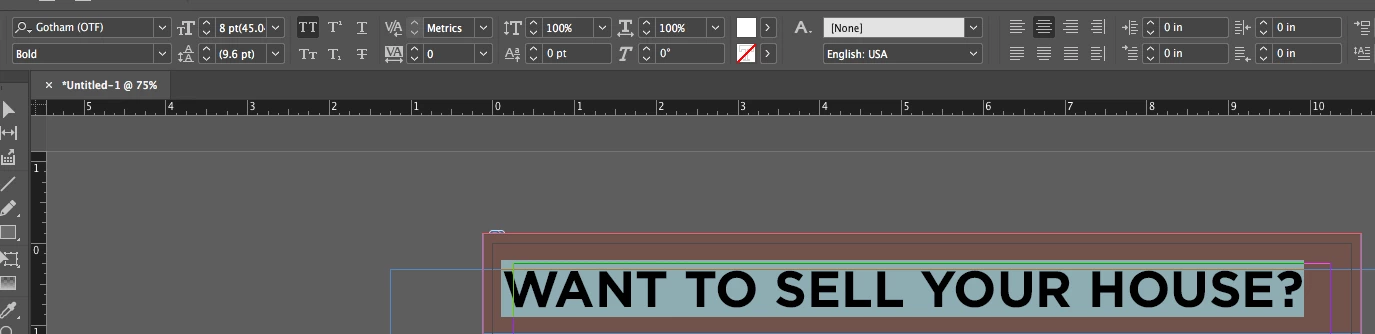
I am using InDesign CC 2018 on a mac running high sierra.
    This topic has been closed for replies.
    Correct answer SJRiegel

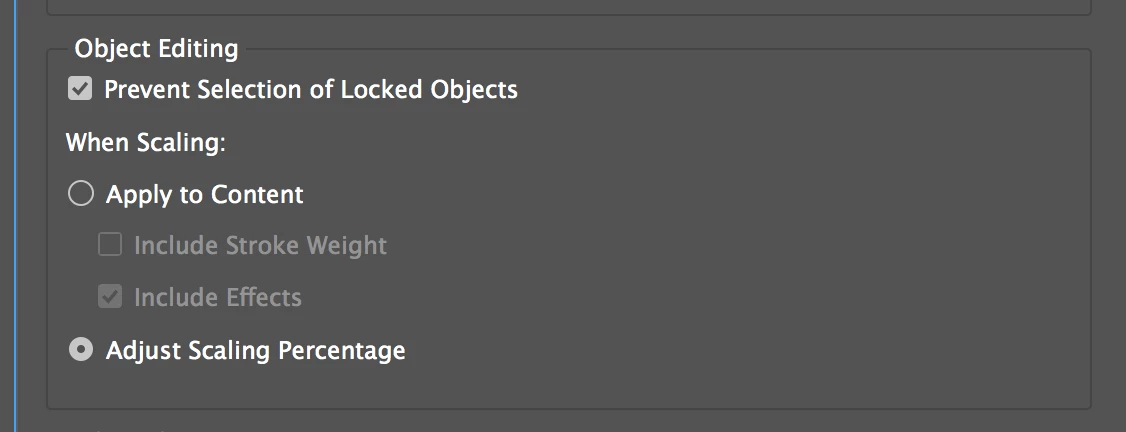
    You can prevent this happening again by changing a preference. Change this setting in General Preferences from Adjust Scaling Percentage to Apply to Content.

    3 replies

    Community Expert
    April 28, 2022

    Cicely said: "The distinction is seen between the two styles - 'long quote' and 'paragraph body' - I must be missing something obvious but I can't see anywhere where these styles should be clashing like this with any character styles etc? They should both be 12pt."


    Hi Cicely,

    the case is easy:

    You have applied superscript as formatting.


    Regards,
    Uwe Laubender

    ( ACP )


    // EDITED

    Participating Frequently
    April 28, 2022

    Thanks Uwe, you saved me! Have a great day.

    Community Expert
    April 6, 2022

    Kwooz said: "This did not work for me."


    Hi Kwooz,

    then make a sample InDesign document available with one single text frame that is showing the issue.

    Could be also substituted contents. Your issue is solvable!


    Thanks,
    Uwe Laubender

    ( ACP )

    Participating Frequently
    April 28, 2022

    I'm also having the same issue and have tried all of the above. Nothing's worked to fix it. 

    jmlevy
    Community Expert
    April 28, 2022

    I don't see any issue on your screenshots. Can you explain?

    Community Expert
    May 14, 2019

    Hi COGordonW ,

    you scaled the text frame.

    Either scale it back to 100 % or select it, open the Transform Panel and do "Redefine Scaling as 100%".

    Regards,
    Uwe

    SJRiegelCorrect answer
    Community Expert
    May 14, 2019

    You can prevent this happening again by changing a preference. Change this setting in General Preferences from Adjust Scaling Percentage to Apply to Content.

    New Participant
    April 6, 2022

    This did not work for me.