

martinw90678772
Participant
February 3, 2018
Answered

HOW DO ACCESS THE PANTONE SWATCH BOOKS IN INDESIGN

  • February 3, 2018
  • 10 replies
  • 102324 views

I CAN'T FIND THE PANTONE BOOKS IN THE LATEST UPDATE OF INDESIGN.

THEY USED TO BE EASILY ACCESSED.

NOW I CAN'T FIND THEM AT ALL.

Correct answer Barb Binder

Hi Martin:

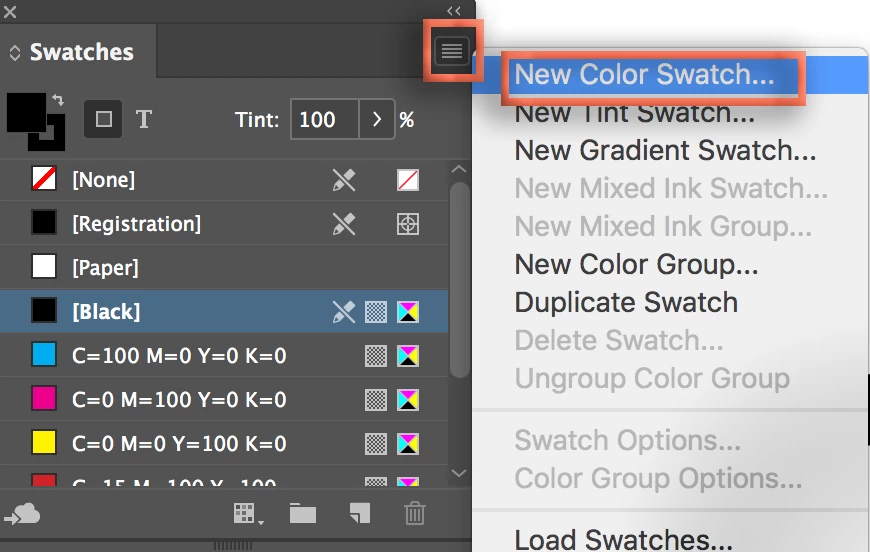
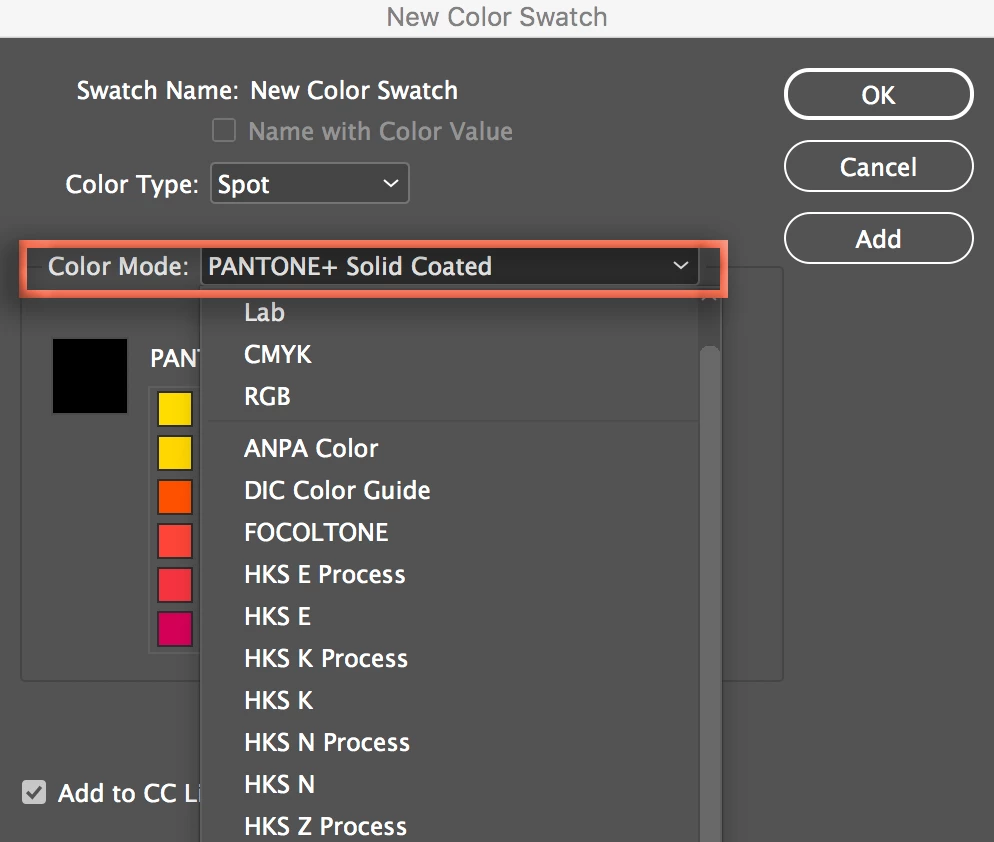
Did you open Window > Swatches > Swatches Panel menu > New Color Swatch, then choose a Pantone book from the Color Mode menu?

~Barb
10 replies

Participant
January 11, 2025

I cannot access the pantone colors. This is what shows up please help

Inspiring
January 13, 2025

This is 7 years old. Pantone colors are no longer installed as part of InDesign. Pantone has their own "Pantone Connect" program if you want true Pantone swatches. It's a paid subscription. Once you sign up for that, you can then install Pantone swatches through their extension/plug-in. I don't see a need for that, personally.


What I've been doing is just creating CMYK builds that match the Pantone build in my Pantone fan book, and then I click the "spot color" checkbox and name it that Pantone color. I then save it to my Library so that I can access it whenever I need. It's been working for me, and I just need a swatch to indicate the color. Doesn't really matter if it's not a "true" Pantone swatch.


But, yeah, Pantone and Adobe haven't had that same arrangement for a number of years, now, so Pantone does not natively provide their swatches by default. It's now a separate thing you have to pay for through Pantone, and then you can install the Pantone Connect extension/plug-in.

Participant
July 12, 2023

I totally feel your pain about "where did the PMS books go in Indesign! The reasoning of moving Pantone books on Indesign totally escapes me, too. 

I found a quick fix. Not ideal, but at least this solution helps you access the the PMS books once again. Simply open up an older versions of Indesign. I found the PMS books still in tact in the Indesgin 2021 version. However, you will best need to start a new file using the older version.  Not sure if you can take a current file of Indesign in the earlier version without messing up your file from a 2023 version, etc.

Hope this helps! 

rob day
Community Expert
Community Expert
July 13, 2023

I totally feel your pain about "where did the PMS books go in Indesign!


The Pantone acb files no longer get installed in any of the CC2023 apps, but you can manually install them by copying or moving the .acb files from your CC2021 folder to your CC2023 Swatch Library folder:


Applications⁩ ▸ ⁨Adobe InDesign 2023⁩ ▸ ⁨Presets⁩ ▸ ⁨Swatch Libraries⁩


After the manual install they should show in the CC2023 New Swatch Color Mode dropdown list.


Participant
June 7, 2023

Martin,


I think people are misunderstanding your question. I have the same issue. I know how to add colors to the swatch panel and when you used to open InDesign swatch panel to add a spot color you'd have the option of choosing the color book Pantone PMS colors and using the numbers associated with the color to find it in the color book. But, now, the only Pantone libraries I have are CMYK coated and uncoated. I suspect that's what you are seeing too. Did you ever find a solution? 

Thank you.


rob day
Community Expert
Community Expert
June 7, 2023

But, now, the only Pantone libraries I have are CMYK coated and uncoated


Hi @unterschutzch30069572x7j3 , This thread is 5 years old. If you have upgraded to CC2023 the Pantone Libraries are no longer installed during the upgrade. See this thread for pantone options using the latest version:


https://community.adobe.com/t5/indesign-discussions/pantone-alert-in-indesign/td-p/13565184


Participant
June 7, 2023

Rob,


Thank you so much for this info and the link. I appreciate the help. I am hoping I can install the .abc files. As I was researching the issue I came to the conclusion something like this was the issue. I guess I haven't used spot colors much over the past few years but the one time I needed a spot color I relaized I didn't have the pms book options I used to have. Have been using InDesign as long as it's been around. Always something new to learn 🙂 Thanks again for your help. -Cheryl 

Inspiring
October 19, 2022

I realize this is old, but why would you want to load the entire Pantone library into your InDesign document? ... because that is what you're doing when you load all swatches -- it loads every single Pantone swatch into that one document only. I suspect you're not using every single one of them in your document. You don't want to include unnecessary swatches in your InDesign document. Load the swatches you need for that particular document.


All of the swatches are available at any time -- the entire library (well, up to a point; there are some swatches that are not available, but are part of Pantone Connect) -- the way that @Barb Binder@Steve Werner and others have described. They're already "loaded" into the program -- you just have to pick the one(s) you want for the current document. Loading all Pantone swatches into your document swatches palette is overkill and bloating.


Like I said, all of the swatches are already there -- the window just looks different, like @Steve Werner was saying. What you're describing in Illustrator is not the document swatches palette, it is the Color Book palette, which is separate. You don't load the entire Pantone library into your Illustrator palette either -- you view the full list in the Color Book palette and then you add the one(s) you want to your document swatches from there. Likewise, in InDesign, you go to the Swatches panel, select "New Color Swatch..." and then you select "PANTONE+ Solid Coated" or whichever... which then shows you the entire list of available Pantone colors, and you select the one(s) you want, just like Illustrator's Color Book palette, but with a different look/feel.


Why in the world you would try to add the entire Pantone library to a single InDesign document is beyond me.

rob day
Community Expert
Community Expert
October 19, 2022

Hi @BriGuyOSC , Adobe is going to stop installing Pantone .acb files in future updates—   @Ere Perez should be able to manually load old .acb files from earlier versions, but it will not happen automatically.

Inspiring
December 9, 2022

Oh, yes, I'm aware. Just scratching my brain over why the OP would want to load the entire Pantone library into their InDesign document swatch palette. Mind-boggling.

Ere Perez
Participant
September 30, 2022

Pantone Bridge is no longer available in Adobe and I'm struggling to find an easy (and inexpensive way) to get it back. We use the Pantone Bridge book for our colour matching, and now the digital version is no longer available via Adobe we feel a bit left in the dark. Any advice?

Noel_M
Known Participant
January 23, 2021

Thank you, that was so helpful! Seems like an overly obscure place for Adobe to tuck this imporant feature. Thanks again.

Participating Frequently
August 8, 2019

An actual answer that works

Seeing, for what ever reason, we can no longer load the entire Swatch Library, even though the "Load Swatches" option is available, I figure out a way.

Swatches >> New Color Swatch >> Pick a Library (ex.Panatone Uncoated) >> Select the first swatch >> Scroll all the way down >>

Holding Shift , Select the last swatch, and click Add.

Doug A Roberts
Community Expert
Community Expert
August 8, 2019

The only way I can account for this is if colour books were stored as some format other than ACB in an older version. This topic from 2009 suggests that it was not possible to 'load' colour book files as far back as CS4, though:

Swatches won't open

Participating Frequently
August 8, 2019

Calling BS on some of the advice

In the very recent past, you were able to go into "Load Swatches" option, which is still listed in Indesign and load the entire library.

Now you can't? You can only load one color at a time? How convenient!

example


Community Expert
August 8, 2019

keithagu75  wrote

…In the very recent past, you were able to go into "Load Swatches" option, which is still listed in Indesign and load the entire library. …

You still can do this if you have a *.ase file at hand.

Regards,
Uwe

Steve Werner
Community Expert
Community Expert
February 3, 2018

In case you didn’t understand: In public forums, typing  in ALL CAPS IS LIKE SHOUTING. Please reply in upper/lower case. Thanks.

Steve Werner
Community Expert
Community Expert
February 3, 2018

Pantone has both process and spot color books. Try selecting Spot.

Derek Cross
Community Expert
Community Expert
February 3, 2018

Please don't SHOUT!

martinw90678772
Participant
February 3, 2018

This is not the color listing I get.

I get a cmyk window to create a color in process or spot

I'm in the US on a windows platform if that makes any difference.

Barb Binder
Community Expert
Barb BinderCommunity ExpertCorrect answer
Community Expert
February 3, 2018

Hi Martin:

Did you open Window > Swatches > Swatches Panel menu > New Color Swatch, then choose a Pantone book from the Color Mode menu?

~Barb
~Barb at Rocky Mountain Training