


dublove
Brainiac
September 14, 2017
Answered

In InDesign, does this custom stroke style possible?

  • September 14, 2017
  • 5 replies
  • 1866 views

I need a line that wants its endpoint to be rounded

But not a circle or a rectangle

Just like this:

    This topic has been closed for replies.
    Correct answer rjcaldwell70

    This seemed like something I might want to do for myself some day...

    It can be done in a paragraph style by using a combination of 2 paragraph rules (for the rounded corners) and paragraph shading (to fill the gap), as follows:
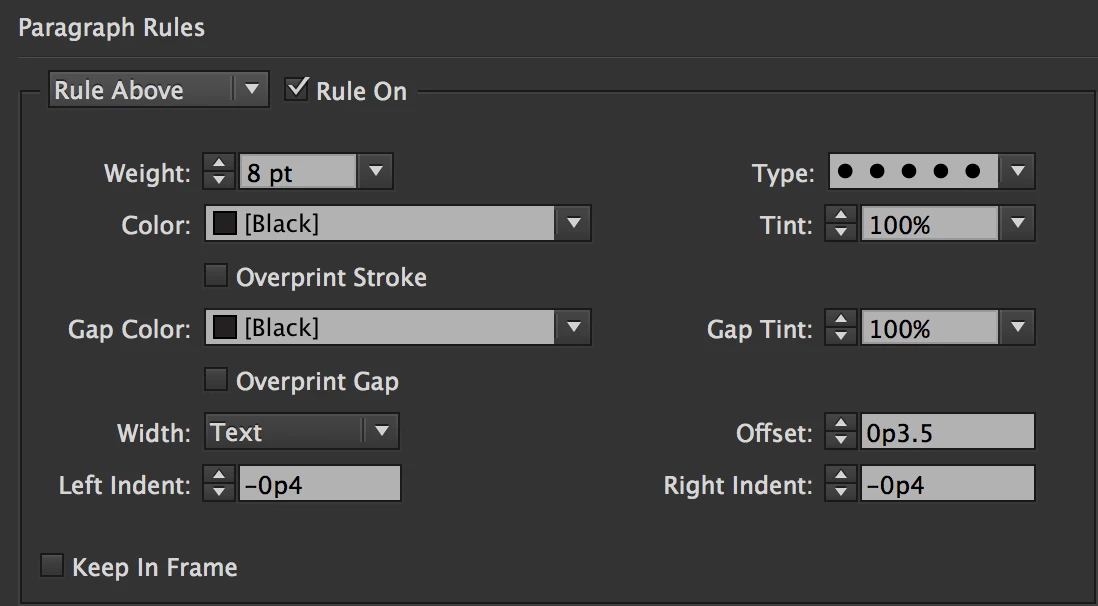
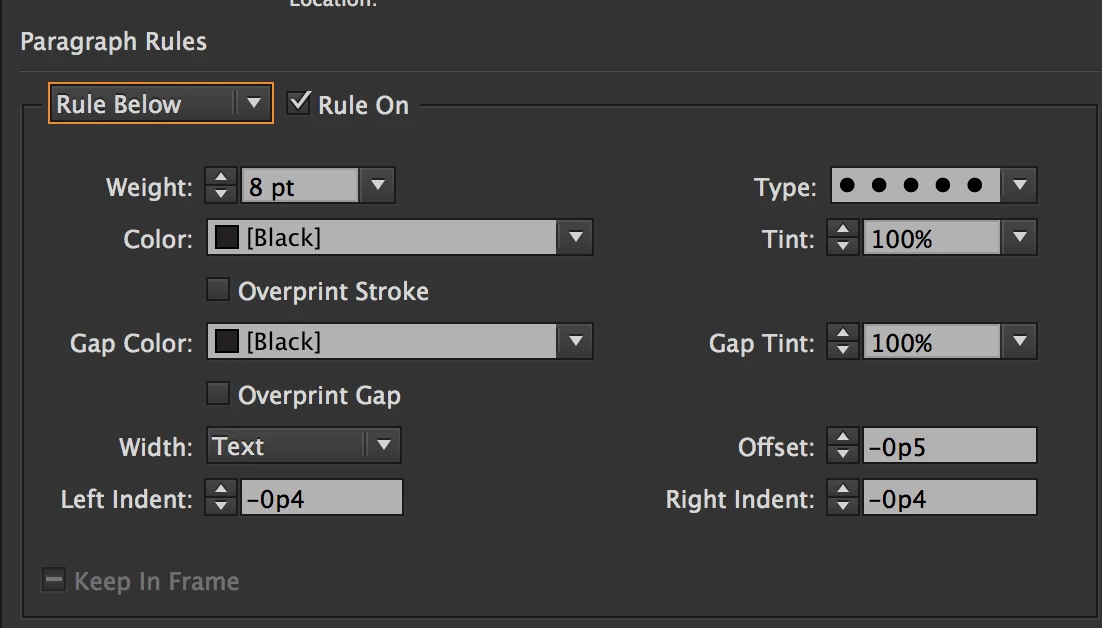
    It took some tinkering around to get the exact offsets and indents needed so everything matches up, but it wasn't as difficult as I feared.

    If it needed to work for headers on multiple lines, that would be problematic unless the width were changed to Column for everything, in which case this would work perfectly for text of any number of lines—the rounded box just expands downward. If the OP intended to use this as a rule only, the offset values can be adjusted so that the rounded rectangle is below the text, although different styles will be needed for paragraphs of different line counts.

    5 replies

    rjcaldwell70Correct answer
    Inspiring
    September 23, 2017

    This seemed like something I might want to do for myself some day...

    It can be done in a paragraph style by using a combination of 2 paragraph rules (for the rounded corners) and paragraph shading (to fill the gap), as follows:
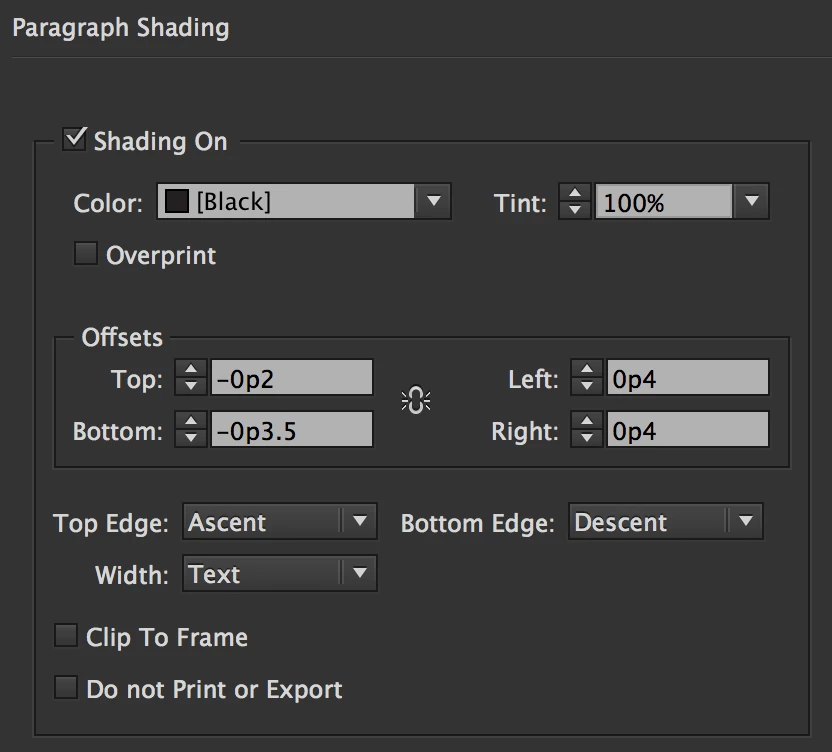
    It took some tinkering around to get the exact offsets and indents needed so everything matches up, but it wasn't as difficult as I feared.
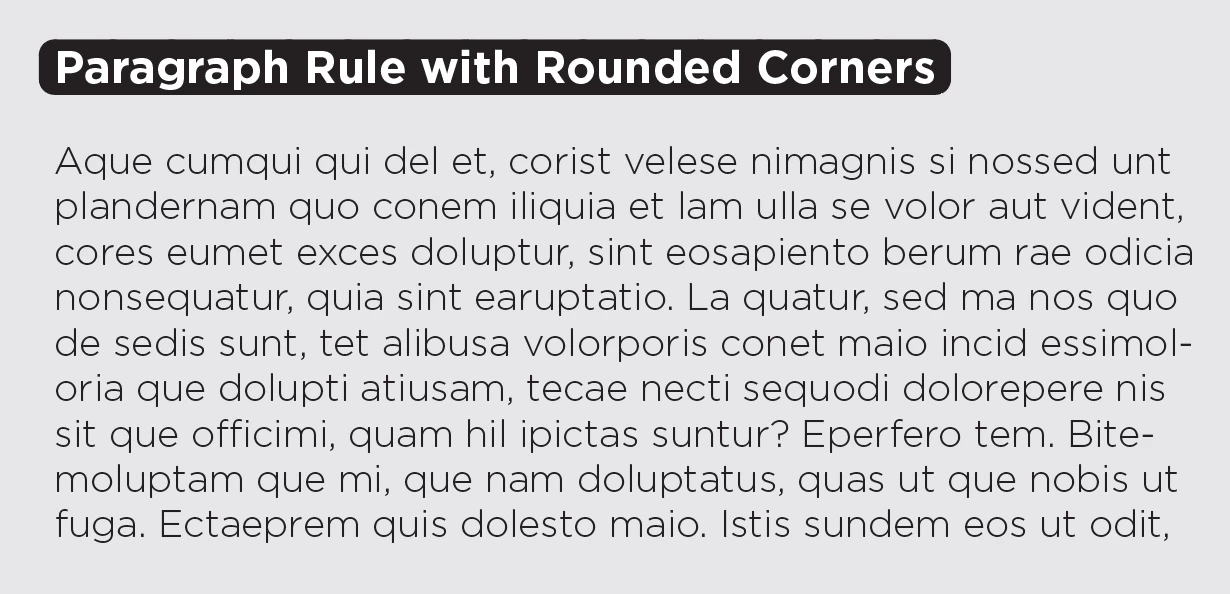
    If it needed to work for headers on multiple lines, that would be problematic unless the width were changed to Column for everything, in which case this would work perfectly for text of any number of lines—the rounded box just expands downward. If the OP intended to use this as a rule only, the offset values can be adjusted so that the rounded rectangle is below the text, although different styles will be needed for paragraphs of different line counts.

    Obi-wan Kenobi
    Brainiac
    September 24, 2017

    … To do this, you'll need … more! … But could we say 1 click is more!  

    (^/)

    dublove
    dubloveAuthor
    Brainiac
    October 2, 2017

    Excuse me

    How did you do it?

    Can CS6 and below be implemented?

    Thank you~

    vinny38
    Brainiac
    September 15, 2017

    Hi.

    As for now, it is not possible to create such a custom stroke style.

    Now, there are a couple of possible workarounds (Abambo's suggestion is one of them), but they would depend on what you want to do with your stroke...

    So, I'll just quote Obiwan:

    For what use?

    (^/)

    Barb Binder
    Community Expert
    September 15, 2017

    Yes.

    1. Draw a line in InDesign


    2. Window > Stroke, Change the Cap to Round.
    3. You can also set up a Stroke Style to make this easier in the future.

    For more information, see https://www.rockymountaintraining.com/adobe-indesign-stroke-primer/

    ~Barb at Rocky Mountain Training
    dublove
    dubloveAuthor
    Brainiac
    September 23, 2017

    Thank you very much~

    NO,I do not want that.

    First of all, it must be lines, such as four corners are rounded the same lines, not the port for the semi-circular lines.

    I use it with paragraph lines

    Abambo
    Community Expert
    September 15, 2017

    You do it like this: Round the corners of a frame |

    A line is nothing more as a rectangle...

    ABAMBO | Hard- and Software Engineer | Photographer
    dublove
    dubloveAuthor
    Brainiac
    September 23, 2017

    What I need is lines, rounded lines

    Not a rounded frame

    I use it as a paragraph line

    Abambo
    Community Expert
    September 23, 2017

    You need to live with what you can get for the moment. Best I can imagine is using my style of frame as an in-line grahics or use those rounded end points as of BarbBinder​'s suggestion.

    ABAMBO | Hard- and Software Engineer | Photographer
    Obi-wan Kenobi
    Brainiac
    September 14, 2017

    Hi,

    For what use?

    (^/)

    dublove
    dubloveAuthor
    Brainiac
    September 23, 2017

    I use it as a paragraph line
