
Participating Frequently
October 26, 2024
Question

Last Letter Disappears in PDF Export for Hebrew Text in InDesign 2025

  • October 26, 2024
  • 5 replies
  • 1612 views

The problem is not solved from 2022/3-2025


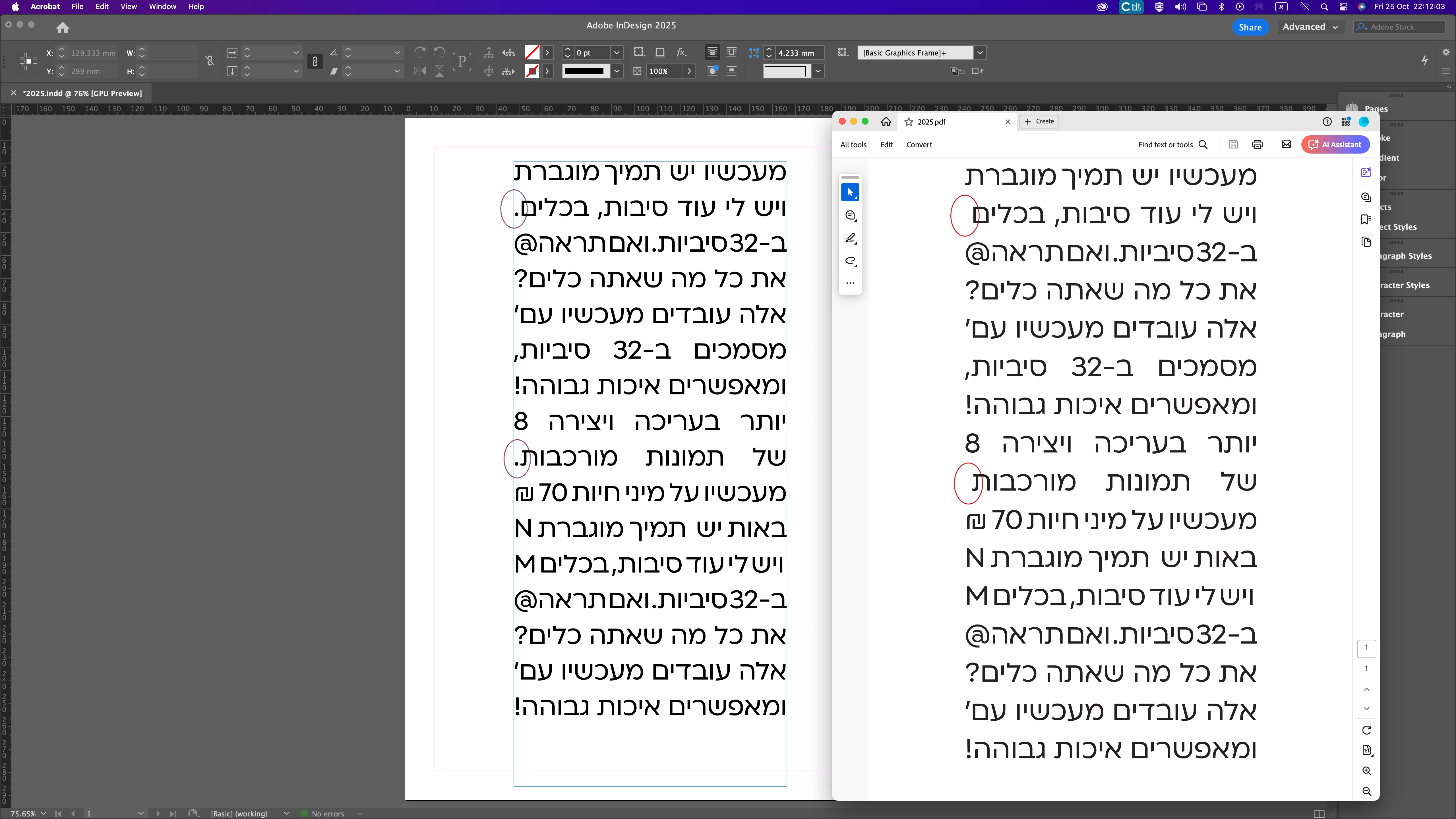
A problem that the last letter disappears after exporting the file to pdf format-on Hebre

The problem is that there are text cubes (Hebrew) that are closed precisely on the text/font

This happens inside a text cube in block alignment mode.

It mostly happens that there is a "period" at the end of a sentence.
I also tried Latin letters, numbers and other punctuation marks at the end of the sentence.
There was no bug.


I exported the file to print in pdf format
The result was a "disaster" the dots disappeared at the end of a sentence.
If you don't pay attention... it can mean financial damage to the office and the client, from printing expenses.

It is important that you address this issue urgently.
The users of the software in Hebrew/Arabic languages ​​cannot advance to the 2025 software and remain to work in lower versions.


Test on

mac studio m1 max (and olders)

Mac Os Monterey V12.7+ventura 13.6

InDesign 2025 26.00

thank you


<Title renamed by MOD>

5 replies

Participant
January 21, 2025

I only stumbled over this bug recently, but it is pretty catastrophic and embarrassing if you deliver faulty PDFs and cannot really explain it. I helped myself for the moment by adding an unneeded character at the end and changing its colour to “none”. But you have to be (made) aware of the problem on your page first, which is usually done by the customer, unfortunately.

Participant
October 28, 2024

Please fix this bug ASAP

Participating Frequently
October 28, 2024

Hi,
Thank you very much for getting back to me and addressing the email and the problem.
I and all InDesign users in Israel will be very happy that the problem will be solved,
And we can upgrade the software to 2025

Looking forward to fixing the bug soon
Thank you very much.
estimator

Eldad


<Personal info removed by MOD>

Abhishek Rao
Community Manager
Community Manager
October 28, 2024

Hello @Boroda5CC6,


Thank you for reaching out and providing such detailed information about the issue. We understand how frustrating it is to have the last letter disappear after exporting to PDF, especially with Hebrew text.

I want to assure you that this has already been identified as a bug, and our product team is actively working on a fix. We recognize the urgency of this issue, particularly for users working in Hebrew and Arabic languages, and we are committed to resolving it as quickly as possible.

For reference, you can check out a similar community post here: Missing dots at the end of paragraph when exporting a PDF from InDesign.

We will keep the community updated with any developments, and your patience is greatly appreciated during this process. If you have any further questions or need additional assistance, please feel free to ask. Thank you for being part of our community!


Thanks, 

Abhishek Rao 

Participating Frequently
January 22, 2025

Hi
I checked the latest InDesign 2025, and there is still no bug fix.
What are you at Adobe doing about this?
Will there be a fix?
This is a very important fix!
It is impossible to move forward with Adobe innovations.
I am stuck with version 2023.
Very sad if you do not fix


Abhishek Rao
Community Manager
Community Manager
January 22, 2025

Hey @Boroda5CC6,  


Good news! The bug you’ve been dealing with has been fixed in InDesign version 20.1. 🎉  

Give it a try and see if everything works smoothly now. If you spot anything else or need help with something, just let me know—We're here for you. Fingers crossed this finally resolves the hassle for you and all the InDesign users in Israel!  


Best,
Abhishek  

Participant
October 27, 2024

Adobe Indesign (19.0 : 20.0) 2024-2025 / Mac os Sequoia 15.0.1
When using a Text Variable (Running Header ‹Paragraph Style›) and applying it to fully diacritized Arabic text, the first letter of the heading does not appear in the result. This issue arises when exporting to PDF.

The text is expected to display correctly without errors; however, contrary to this, the first letter of the fully diacritized text does not appear. This issue arises when exporting to PDF.

The test files and illustrative screenshots of the issue are attached.


Joel Cherney
Community Expert
Community Expert
October 28, 2024

I wonder if this bug is at all related to another bug where RTL glyphs drop a character upon export to PDF. If so, there have been quite a few threads here that may also be about this same bug. There are also some other Uservoice posts that might be relevant. I include those links to see if any of the workarounds in those threads are helpful for you. Please do add your votes to the Uservoice posts; upvoting those posts increases the likelihood that this bug will get attention from developers. 


However, please do check if you're really using version 19.0. Apparently, numerous bugfixes went out with 19.2, and if you're genuinely using 19.0 (check in Help -> About InDesign). Furthermore, the employee reccomendation that went out on this community was to roll back to 18.5; if you don't still have that version installed, you might be able to get Adobe Customer Care to get you a download link.