

March 6, 2018
Answered

Last Line Indent issue?

  • March 6, 2018
  • 1 reply
  • 2465 views

Hi,

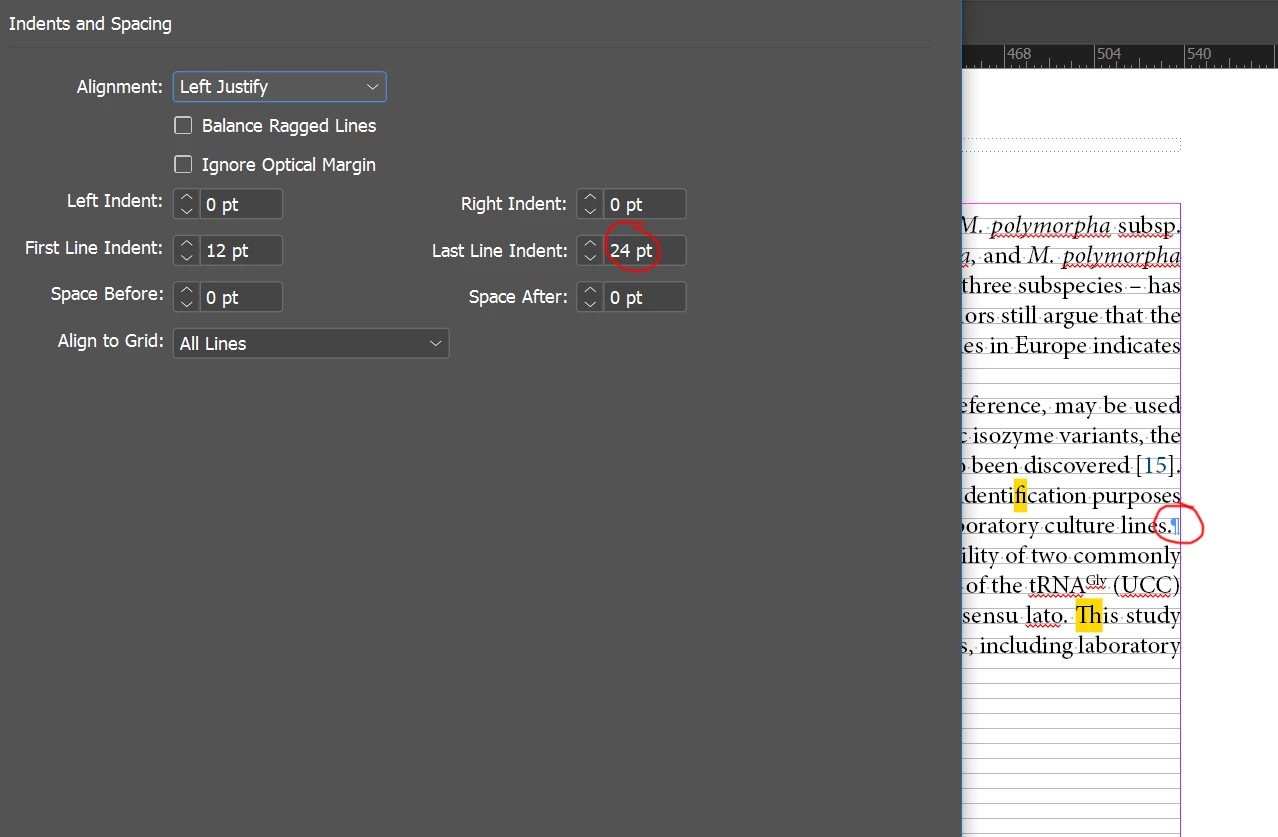
I set up paragraph indents, including Last Line Indent. However, it doesn't seem to work as expected, as show in the screen below. Am I missing something?

I use Adobe InDesign CC for Windows.
This topic has been closed for replies.
Correct answer Barb Binder

Hi piotreba:

I'm still puzzling over your question but getting ready to head out, so here's one last thought.

If the purpose of defining a last line right indent was because you don't care for a body paragraph going all the way to the right margin—and perhaps that is because you are concerned that the reader will think that this paragraph continues into the next one—a last line right indent will not accomplish that goal with the text set to Left Justify (as you have discovered).

Options include:

  • not worrying about where the last line ends, and add either space between body paragraphs or a first line indent to alert the reader to the beginning of each new paragraph, or
  • copy-fitting (which means re-writing that one sentence so that it is a word or two shorter), or
  • very subtly tighten the letter spacing on that one line with a negative tracking value so that is a bit shorter. The rule of thumb on using tracking as a copy-fitting option is that it is not noticeable to others.

~Barb

1 reply

Braniac
March 6, 2018

The last line right indent is rarely used. The only place I would consider employing it is in a table of contents with very long headings because as a default the page numbers get lost. With the last line right indent, I can make the numbers more prominent via a paragraph style. Think of it as how you'd create a last line hanging indent.

That's clearly not the goal here, but most of your page is blocked by the dialog box so I'm not sure what you are after.

~Barb

Barb BinderCorrect answer
Braniac
March 6, 2018

Hi piotreba:

I'm still puzzling over your question but getting ready to head out, so here's one last thought.

If the purpose of defining a last line right indent was because you don't care for a body paragraph going all the way to the right margin—and perhaps that is because you are concerned that the reader will think that this paragraph continues into the next one—a last line right indent will not accomplish that goal with the text set to Left Justify (as you have discovered).

Options include:

  • not worrying about where the last line ends, and add either space between body paragraphs or a first line indent to alert the reader to the beginning of each new paragraph, or
  • copy-fitting (which means re-writing that one sentence so that it is a word or two shorter), or
  • very subtly tighten the letter spacing on that one line with a negative tracking value so that is a bit shorter. The rule of thumb on using tracking as a copy-fitting option is that it is not noticeable to others.

~Barb

March 6, 2018

Dear BarbBinder​,

what I need last line right indent for is to better distinguish subsequent paragraphs, as you have guessed. I noticed that this option when its value increases generally alters the indent, but the indent itself definitely doesn't change point-by-point (rather in larger steps, like tabs). So I leave it as it is, as this situation doesn't take place too often, but I was curious why the paragraphs behaves this way and if I am overlooking some options maybe.
