Participant
December 19, 2016
Answered

Missing Pantone Coated and UnCoated Colors in InDesign 2017

  • December 19, 2016
  • 5 replies
  • 78565 views

How do I update Pantone Color Palettes in inDesign CC 2017 so that missing colors can be made available (i.e.: colors 2389 & 2263 are currently unavailable via the Pantone Coated Color Library. Thanks in advance for any assistance.

PS: Running Adobe CC 2017 products on a Mac running OS X Yosemite 10.10.5
This topic has been closed for replies.
Correct answer rob day

Still not getting the colors I need. They are in the swatch book but not in the application.

Any thoughts on how I can get all the colors in the swatch book in my applications?

Any ideas on why some are missing?

I have the latest books and they are registered. I have the latest manager software version and it's activated.


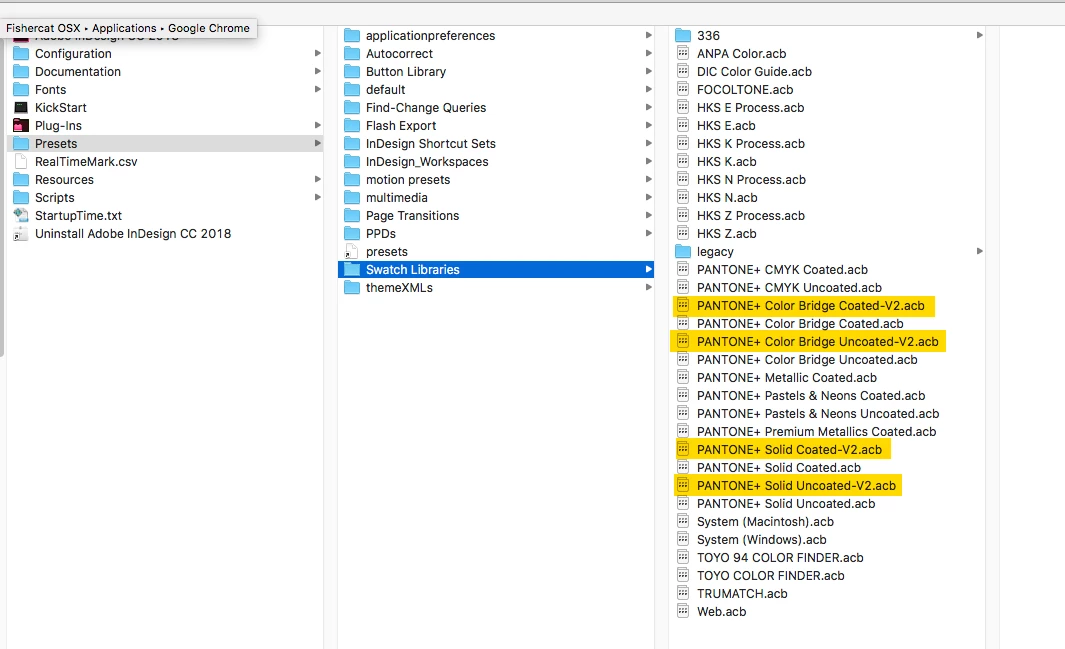
For InDesign copy the downloaded .acb files into your Presets/Swatch Libraries folder:

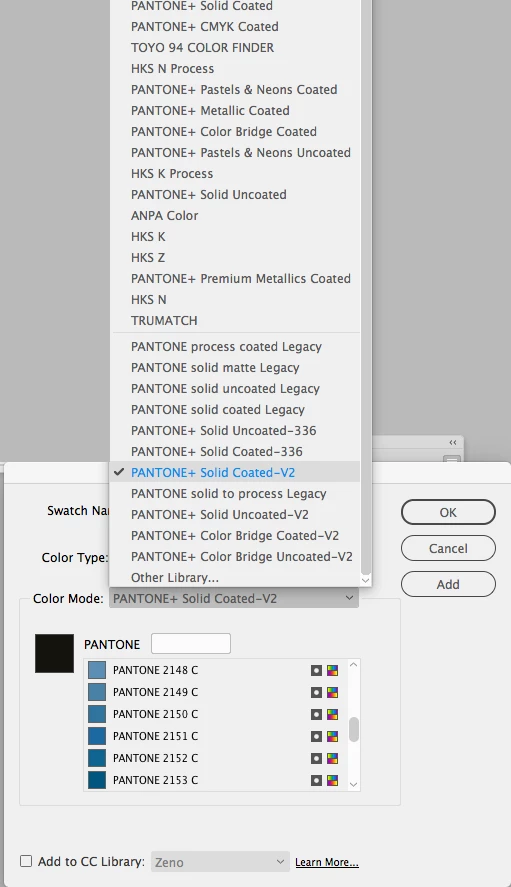
Then to load a swatch it's New Swatch from the Swatch panel fly out where the new libraries can be found Color Mode dropdown menu.

For Illustrator I think you'll have to use Other Library and load the .acb, see my #4

For Photoshop copy the .acb files into /Applications/Adobe Photoshop CC 2017/Presets/Color Swatches and restart Photoshop

5 replies

Participant
August 17, 2022

THANK YOU TO EVERYONE who so persistently stuck with this post!!! You're all life savers!!!


schroef
Inspiring
December 5, 2018

Im also missing a PMS color, its PMS 3515c. Neither in Illustrator nor Photoshop 2018cc    

rob day
Community Expert
Community Expert
December 6, 2018

There's now Pantone V3, which includes 3515.

You can run Pantone Color Manager as a trial, which will let you export the books for the CC apps until the trial expires. Click the Fan icon in the lower right corner of the app, choose a book from the list and from the main menu choose Export>Application>Lab for the Solid Libraries, or Export>Application>CMYK for the Bridge libraries.

Pantone's help pages, which included the licensing page Danny and I posted, are now all linking to a page on matching Pantone colors to house paint. I'm not sure what happened to their help pages or the sharing page, so I'm not going to post the new libraries.

Danny Whitehead.
Legend
December 10, 2018

@Danny white,

Sorry but that fellow is out of this game.

Why forget RGB values, if those are important to a designer they cant be neglected. Not everybody works with print


schroef  wrote

@Danny white,

Sorry but that fellow is out of this game.

Why forget RGB values, if those are important to a designer they cant be neglected. Not everybody works with print

It's Pantone's RGB values I'm saying we should forget. If you want RGB values, you derive them from the Lab values, converted to appropriate RGB space using colour managed software.

PrintShopLinda
Participant
November 13, 2018

The best workaround I have to offer is this, which may or may not apply to any of you. I've been a graphic designer at a printing company for 36 years. I still have the "box set" of Adobe Creative Suite CS4.  When I need a missing PMS color, I open a blank document in InDesign CS4, create the swatch I need, draw a rectangle, fill it with color, and copy and paste it into ID 18.  Works fine, no Pantone licensing issues, and ID has no problem with the swatch importing.  We from the "old school" don't throw away or uninstall older software, because you just may need it.

rob day
Community Expert
Community Expert
November 13, 2018

But that wouldn't solve Stephen's problem because 2389 & 2263 didn't exist in the CS4 library, they are new colors. There are no licensing issues see Danny's #8

Participating Frequently
June 15, 2018

This isn't quite the right answer.

rob day
Community Expert
Community Expert
June 16, 2018

I have the latest version of the Pantone color manager software and my books are registered. I have most colors but I'm missing PMS2149 when I try to spec. in Illustrator.

You have to export the new books from Pantone Manager and load them into Illustrator

Looks like Danny's link is broken. Try this one, this zip archive has the new books as .acb files:

xxxxxxxxxxxxxxxxxx

Link removed by moderator – unless you can provide documentation from Pantone to redistribute their products, you cannot post links to them here!

From Illustrator try loading the books. Choose Swatch Libraries>Other Library... and choose the new .acb file. Moving them into the AI Presets folder doesn't work for me in AI but does in InDesign:

Danny Whitehead.
Legend
June 18, 2018

Fixed link:

xxxxxxxxxxxxxxxxxx

Link removed by moderator – unless you can provide documentation from Pantone to redistribute their products, you cannot post links to them here!

Danny Whitehead.
Legend
December 20, 2016

The Pantone Colour Manager software can download up-to-date Pantone libraries and install them in Adobe software. Pantone (foolishly IMO) charge for this software, but if you have an actual Pantone guide, there should be a code with which you can get it for free.

Or, you can download the libraries below, and place them in /Applications/Adobe InDesign CC 2017/Presets.

xxxxxxxxxxxxxxxxxx

Link removed by moderator – unless you can provide documentation from Pantone to redistribute their products, you cannot post links to them here!

Participating Frequently
June 15, 2018

I am having the same problem. I have the latest version of the Pantone color manager software and my books are registered. I have most colors but I'm missing PMS2149 when I try to spec. in Illustrator. It's critical I have the correct spot color for this job as it's a brand color for a client. Any other suggestions?