


New Participant
March 26, 2025
Answered

P: Error message (Script line 2798) with InDesign & Illustrator after update
  • March 26, 2025
  • 31 replies
  • 32734 views

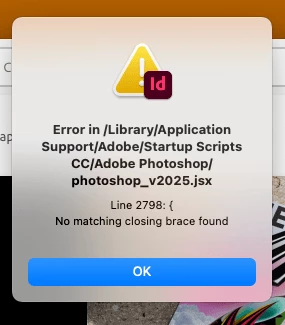
I just installed updates for Photoshop and Photoshop beta and received this error on opening Indesign. Any ideas? [I am on a Mac Mini M4] - there is no error opening Photoshop or Photoshop Beta.


<Title renamed by MOD>

Correct answer SanyamTalwar

Hi,

As confirmed by the user, the issue is due to the latest Photoshop update, and the workaround below will resolve the issue.

  • Workaround 1:
    • Uninstall Photoshop 26.5 (make sure to remove preferences).
    • Reinstall Photoshop 26.5. This will install the correct “photoshop_v2025.jsx”.
  • Workaround 2:
    • Open jsx, which is available at "/Library/application support/Adobe/Startup Scripts CC/Adobe Photoshop/" mentioned in the alert in the Text Editor 
    • Add } in the last line

Reference UserVoice Thread - Error message is seen while opening InDesign after Photoshop 26.5 update 

Sanyam Talwar

31 replies

New Participant
April 1, 2025

Getting the following message every time I start In-Design


Error in /Library/Application

Support/Adobe/Startup Scripts

CC/Adobe Photoshop/ photoshop_v2025.jsx

Line 2798: {

No matching closing brace found

Robert at ID-Tasker
Brainiac
April 1, 2025

@Pankaj26258324en2z


Have you read other replies - before posting? 


Known Participant
March 30, 2025

Hi there,

I’m facing the same issue after installing the latest Photoshop update (26.5). When I open InDesign, I get a script error related to the photoshop_v2025.jsx file. I’ve tried editing the file as suggested, but it’s not resolving the issue.

Would anyone be able to share the correct version of the photoshop_v2025.jsx script that works after the latest Photoshop update? It seems like the script might be missing or corrupted after the update.

Thanks in advance for your help!

Community Expert
March 30, 2025

You can reinstall the PS version and that should solve the problem

-Manan

Known Participant
March 30, 2025

Thanks this worked perfectly.

Scott Falkner
Community Expert
March 30, 2025

Only today I see this error message when launching InDesign 20.2 for MacOS (Apple Silicon):

Never seen it before. Perhaps related: Many menus in panels (e.g. Font in Control panel or Character panel or Stroke Type in Conrol panel or Stroke panel) won't stay open. The menu appears then disappears, making it impossilbe to select anything in the menu.


I rebooted and deleted then re-installed InDesign, but it doesn't fix it. Anyone else seen this problem? Is there a fix?


Mac: M1 MacBook Air

OS: 15.3.2

InDesign: 20.2

Community Expert
March 30, 2025

Ah yes - someone else reported this recently too ! 


Seems like a few posts got merged into one here -

https://community.adobe.com/t5/indesign-discussions/error-in-scripts-opening-indesign-after-photoshop-update-line-2798-no-matching-closing-brace-found/m-p/15231798#M617854
Found a huge thread here

Inspiring
March 29, 2025

Keep getting this on launch of InDesign

New Participant
March 29, 2025

I keep getting this message when I open Illustrator. I updated it to 29.4 and I keep getting this message

Error in /Library/Application Support/Adobe/Startup Scripts CC/Adobe Photoshop/photoshop_v2025.jsx  Line 27

I can only follow the path as far as /Library/Application Support/Adobe 

I cannot seem to find a Startup Scripts folder


Please help


New Participant
March 29, 2025

Nevermind, I tracked it down and deleted that file..

SanyamTalwar
Adobe Employee
SanyamTalwarCorrect answer
Adobe Employee
March 28, 2025

Hi,

As confirmed by the user, the issue is due to the latest Photoshop update, and the workaround below will resolve the issue.

  • Workaround 1:
    • Uninstall Photoshop 26.5 (make sure to remove preferences).
    • Reinstall Photoshop 26.5. This will install the correct “photoshop_v2025.jsx”.
  • Workaround 2:
    • Open jsx, which is available at "/Library/application support/Adobe/Startup Scripts CC/Adobe Photoshop/" mentioned in the alert in the Text Editor 
    • Add } in the last line

Reference UserVoice Thread - Error message is seen while opening InDesign after Photoshop 26.5 update 

Sanyam Talwar

New Participant
April 1, 2025

Tried both of these workaround, neither worked. Specifically in Workaround 2 it says I "dont have permission to edit" the .jsx folder... any other fixes?! How did Adobe release this.

Known Participant
April 2, 2025

Try opening Notepad as an administrator (Right-click > "Run as administrator"), then edit the .jsx file. This should give you the necessary permissions to make changes.

New Participant
March 28, 2025

I had the same issue after latest update.

Fixed by going to file location given in error screen (C:\Program Files (x86)\Common Files\Adobe\Startup Scripts CC\Adobe Photoshop\).

Copied the Photoshop_v2025.jsx file to desktop & opened it with Notepad++ (may be able to also use notepad)

went down to Line 2798 that error mentions, Added missing closing curly bracket on line 2801

saved it and replaced original Photoshop_v2025.jsx file with the one I modified.

Issue solved.

No need to uninstall/reinstall


Let me know if this helps

New Participant
March 28, 2025

I have uploaded Modified .jsx file

Just replace original .jsx file in C:\Program Files (x86)\Common Files\Adobe\Startup Scripts CC\Adobe Photoshop\


Modified JSX file

Mike Witherell
Community Expert
March 28, 2025

Just an admonition everybody: Don't install beta software on your production machine. Maybe test it on another machine.

Mike Witherell
JTTaylor
Participating Frequently
March 28, 2025

I'm getting the sam error in Illustrator.


Error in /Library/Application Support/Adobe/Startup Scripts CC/Adobe Photoshop/photoshop_v2025.jsx


Line 2798: {

No matching closing brace found

Inspiring
March 28, 2025

Desisntala PS Beta y vuelve a instalar Illustrator. Luego instala nuevamente PS Beta. Solucionado.

Participating Frequently
March 28, 2025

After the latest updates to my Adobe apps (Indesign, Photoshop and Photoshop Beta) my Indesign is not working anymore. It constantly crashes.


After the Photoshop updates I got the error, which has already been posted here:

I deinstalled Indesign, Photoshop, Photoshop beta, installed Indesign again, tries different versions of Indesign but … nothing is working. I even did the harddisk repair of my Mac several times and rebooted the system several times after uninstalling, etc...


With the Cleaning tool and the logger I completely removed the whole Adobe Creative Cloud from my Mac (M1 Pro on 14.7.4) – I deleted all of the remaining entries in the Library connected to Adobe and made a fresh install of Adobe Creative Cloud + Indesign + Photoshop (no beta) + Illustrator + Bridge.


I do not get the error message anymore, Indesign starts. I can sometimes open a document and it stays open, but when I use magnifier or crtl+- to zoom, it crashes. After that it will directly crash when I open it again. After this I can open it, select that I do not want to recover the file I was working on and can continue for some time until I use a shortcut or the glass … at least this is what I can see at the moment, which constantly lets Indesign crash.


I have not imported any old settings – I saved a new workspace in Indesign, thats it …


How can the problem be solved?

Thanks.


Dave Creamer of IDEAS
Community Expert
March 28, 2025

Are you using any third-party utilities, such as Magnet, Typeface, etc.?

Do a safe boot and see if things works.

I don't believe the Adobe CC Cleaner cleans all the caches, check out this page for more info:

https://www.ideastraining.com/TutorialsAndTips/TroubeshootInDesign.html


David Creamer: Community Expert (ACI and ACE 1995-2023)
Participating Frequently
March 28, 2025

did a safe boot and the problem stays. tried it on several 20.X versions now – even with Photoshop completely uninstalled.