Known Participant
October 10, 2018
Question

Right align endnote numbers

  • October 10, 2018
  • 1 reply
  • 2046 views

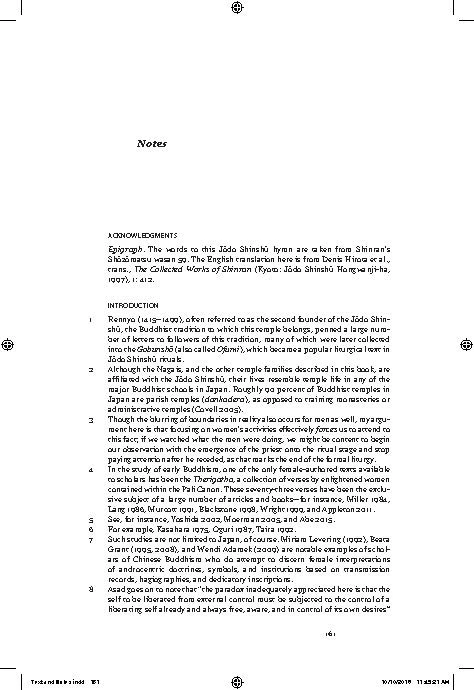
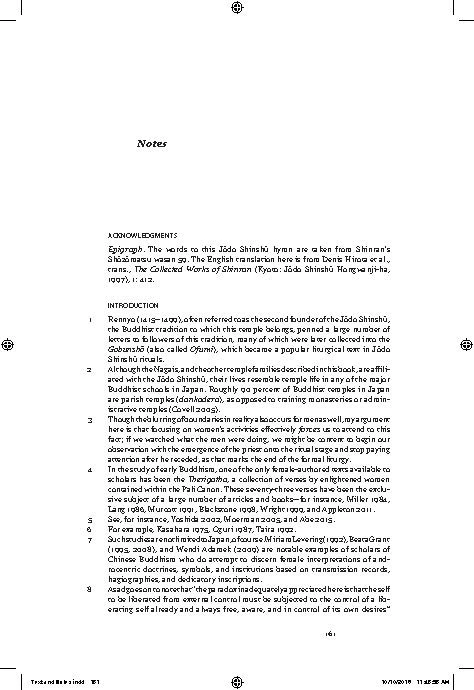
When I use a tab as a prefix in the Endnote Options and set up a right align tab in my paragraph style so the note numbers will be right aligned the first line of the note does not justify correctly. What I've figured out is that when I put the tab in the prefix the first line does not rejustify, it just takes the text that would be on the line without the tab and smashes it all together. Has anyone else experienced this, and do you know how I can fix this without having to insert figure spaces before every note?

I have attached 3 images, one the way it should look like (with figure spaces in front of the number to get the numbers to somewhat right align), one the way it looks with the tab in the prefix box in the Endnote Options, and one the way it looks without the tab so you can see the line breaks are the same as the one with the tab.
This topic has been closed for replies.

1 reply

Community Expert
October 24, 2018

Hi Lanimoomoo ,

do you mean that you want to format your endnote numbers this way?

I could do this by using a tab as prefix in the Endnotes Options:

You then have to carefully choose your values for tabs in the paragraph style for the endnotes' text:

As first line indent I have -7 mm, the tab is right aligned at position +5 mm and the indent for all other lines is +7 mm.

Regards,
Uwe

Known Participant
October 25, 2018

Hi Uwe,

Thanks for replying.

My problem is not setting up the numbers, the problem is the kerning of the first line of the note for notes longer than 1 line. My 1st attachment was to show you how it is supposed to look, see note #1, the line ends with "Shin-". In the 2nd and 3rd attachment note #1 ends with Shinshu, but in the 2nd attachment the line is all bunched up.  Do you have any ideas on how to fix or work around this using the instructions you posted?

Wanda

Community Expert
October 26, 2018

Hi Wanda,

if you look closely to my sample screenshots you may notice that there is a second line of text in every paragraph.

And that will align to the the first one optically ( without the number and the tab ).

Your samples are too low res to judge kerning.

I can only see that your number 6 is off in the second sample.

Maybe the reason for that is an extra blank before the tab?

If you do screenshots like that show the page in InDesign with all hidden characters and frame edges showing.

Select some text and show the tab settings of your paragraph style like I did. And do your screenshots with higher resolution.

Thanks,
Uwe