NGWSP
Participating Frequently
March 6, 2019
Answered

Two aligned columns without using a table

  • March 6, 2019
  • 4 replies
  • 3451 views

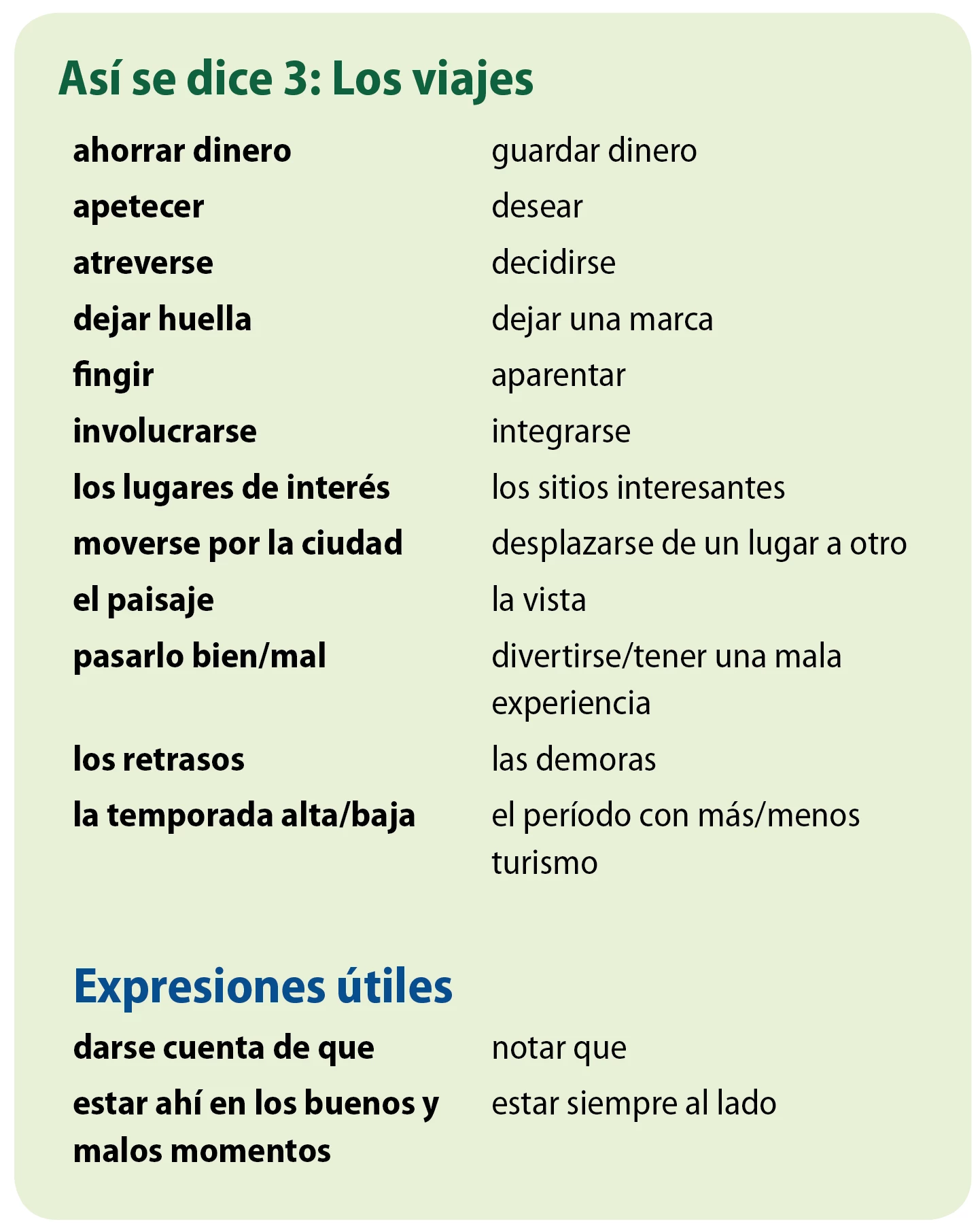
I'm working on this section of text and for several reasons it needs to be set without separating the entry on the left and the definition on the right (as in what table cells would do).

Breaking it up into two column text is no good because the words need to be next to their definitions.

A simple tab seems like the correct answer until there's a two-line entry on the left column. When that happens the definition on the right is no longer aligned to the top of the left entry.

Does anyone have any ideas about how to make this work?

This is currently set in a table with two columns, but it needs to be taken out of this format. We are trying to use the index feature to compile a list of these words and definitions, but using a table makes it impossible to select the entry and definition together.

This topic has been closed for replies.
Correct answer FRIdNGE

Hi Michel,

I'm trying to follow you with your idea and still cannot make it work.

The green paragraphs get a span option to span all columns, that's clear and is working for me.

But how did you wrap the red paragraph to the next column?

Are you working with the Keep Options and did you set Start Paragraph to Next Column ?

As you can see below my key paragraphs ( they should go to the left column ) and the value paragraphs ( they always should go to the right column ) are alternating with each other. I did three paragraph styles because I suspected that I need at least two for my key paragraphs. Maybe not, maybe more. Right now the two are all the same in definition but the fill color. I also did one paragraph style for the value paragraphs.

Currently the Keep Options of paragraph style ValueItems is shown below with

Start Paragraph set to Anywhere

If I change this to Start Paragraph set to Next Column the first value paragraph will indeed go to the second column. Exactly what I want. But from then on the things do not go right. The second entry for the next key paragraph starts in the second column. That's not the thing I wanted to do. And the rest of the text goes to overset.

Here the Keep Options of my KeyItem-2-GRAY paragraph style with

Start Paragraph set to Anywhere

Obviously you are doing something very differently just from the start.

Can you show some details of the formatting of your blue and red paragraphs?

Regards,

Uwe


Hi Uwe,

In fact, it's truly simple to be played [as often with me]! …  

You need 3 para styles:

• Green [you're right on its settings: it includes a "span" feature!]

• Blue / Red for the 2 "problematic" parts [as Vinny previously indicated => keep all para lines together]

… 1 supplementary one: the magical "Separator" para style!    [no size, no leading, no color + "span" feature] -- totally invisible!

and 2 regex [not 3! played in 1 click]:

Regex 1:

Find:  \r

Replace by:  $0@\$0

Find Format:  "Red" para style

Regex 2:

Find:  @(?=\r)

Replace by:  nothing

Replace by Format:  "Separator" para style

That's all!

Best,

Michel

4 replies

Brainiac
March 6, 2019

Hi NGWSP ,

if in column one, the left column, there were only one line entries this would be doable in one text frame.

But unfortunately that's not the case. You already stated that.

So did you set this up with a couple of threaded text frames?

One text frame for every cell's entry?

( Horrible to manage! )

Regards,
Uwe

Brainiac
March 6, 2019

So, NGWSP, why are tables off the table? That's really your best bet, IMHO.

~Barb

Brainiac
March 6, 2019

BarbBinder  wrote

So, NGWSP , why are tables off the table? That's really your best bet, IMHO.

Hi Barb,

our OP states:

… using a table makes it impossible to select the entry and definition together.

True. There are two cells. One for the key entry and one for the value entry.

What I do not get is why both entries should be selectable in one go…

Regards,
Uwe

NGWSP
NGWSPAuthor
Participating Frequently
March 7, 2019

About this last point:

The script finds the contents (without the carriage-return) of the "Blue" paras ==> Array 1

The script finds the contents (without the carriage-return) of the "Red" paras ==> Array 2

… and creates, e.g. at the beginning of each "Blue" para, an index entry, concanating:

index entry 0 => Array 1[0] + + Array 2[0]

index entry 1 => Array 1[1] + + Array 2[1]

...

The "" is what the user wants (a tab for example).

We could have something like that too:

Xxxxx xxx xxxxx [yyy yyy yyyyy]……………… 1

including Grep styles in the "Index Entry" para style!

Best,

Michel


This seems like a good option as well. I'll look into how I can build this out. Thank you!

Michael Bullo
Participating Frequently
March 6, 2019

Could this do the trick?

  1. Regular text
  2. Type > Insert Special Character > Other > Indent to Here
  3. Inserted a tab before the "Indent to Here" character. Then controlled the position of that tab using the Tabs panel or the Tabs section within a Paragraph Style

NGWSP
NGWSPAuthor
Participating Frequently
March 6, 2019

This would work for when there are multiple lines in the definition column, but not when there are multiple lines in the entry (left) column. That's the part I'm struggling with.

Michael Bullo
Participating Frequently
March 6, 2019

What about two adjacent text frames that are threaded together?

You could insert a Frame Break within the text which would force the text beyond that point into the next frame. The text is still one continuous piece which might allow for the kind of selecting you need to do.

Brainiac
March 6, 2019

Make a hanging indent by setting the left indent to the same amount as your tab setting. Then, set the first-line indent to a negative of that value. For example, if your tab is set to 2", make your left indent 2" and your first-line indent -2".

NGWSP
NGWSPAuthor
Participating Frequently
March 6, 2019

Right, that would work for the "pasarlo…" entry in the screenshot, also achievable by placing an indent to here marker at the beginning of the definition.

The part I haven't figured out is for examples like the last entry, where the left column entry is two lines long.

Brainiac
March 6, 2019

I'm not sure there is a simple solution to that. The first lines of the two "columns" need to align, so you cant just tab after the bold on the left without having to sandwich the Roman on the right between two bits of the bold, and that would kill your index. There may be a way to jimmy this into something that works, but I don't have the time right now to look into it. Maybe later I'll get a minute, or maybe someone else will know a solution before that. Good luck.