Known Participant
December 5, 2018
Question

[URGENT HELP PLS!] How to make texts no weird spacing in full justify?

  • December 5, 2018
  • 4 replies
  • 5071 views

Hi,

I was trying to make texts to have no weird spacing in full justify, couldnt work at all even when i google for tutorial..

i had tried paragraph option and it still dont work ..
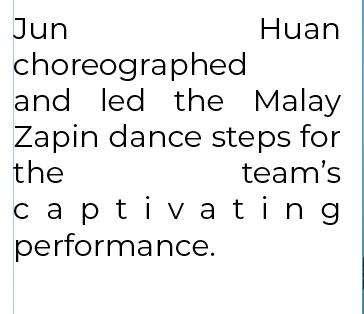
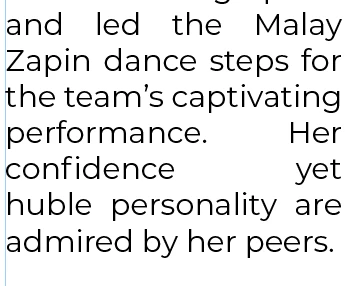
this is the orignal in full justify,

even if i follow the tutorial -> Spacing in Justified Text

the text didnt change.

I had been stressing over it , how to keep it in normal magazine style in full justify without the weird spacing... UGH

please help! T___T

This topic has been closed for replies.

4 replies

hammer0909
Community Expert
Community Expert
December 6, 2018

Full justification and a short line length is incredibly difficult to make work. You'll always end up with rivers of white space throughout the content especially with hyphenation turned off.

Mike Witherell
Community Expert
Community Expert
December 6, 2018

My guess is that the better setting would be Left Justify; not Full Justify.

I often suggest allowing Adobe Paragraph Composer

and ...

Hyphenation set to 9/3/4/1/1p6/off/off/off

along with...

Justification set to Word 80/100/120; Letter -5/0/5%; and Glyph 95/100/105; and single word set to align left.

Mike Witherell
Known Participant
December 6, 2018

Why do you use the Single Line Composer - and not the Multi Line Composer? Mostly you will get better results with the second one. ( But without hyphenation you will still have such weird spaces - the narrow the columns, the more the spaces.)

I dont know..? i just follow what i found in google.. to be honest, i dont know what is the difference between single or multi..... :/

Get a new boss.

Your boss needs to be educated. It is either this or hyphenate.

HAHA I wish i could ... Yes, i had studied in interactive media designs and i had told her this or that but she thinks it is soooo easy   and her way of thinking is quite old-fashioned and she love to see the proof whether it can work or not. she is quite stubborn.

Something that might help a bit is changing the glyph scaling to 97 100 97. Contrary to what purists might tell you, nobody will notice with body copy.

Okay, i'll try that out. thanks!

Try adjusting the Word and Letter Spacing as well as the Glyph Scaling:

Oh~ I'll try that too but i know her style, she dont like texts being too small or crowd. she like everything to be BIGGER.

jmlevy
Community Expert
Community Expert
December 6, 2018
she like everything to be BIGGER.

Tell her that it is not because it is big that it is legible.

You could also tell her that it is very very very difficult to put BIG suitcases in a tiny car trunk…

Derek Cross
Community Expert
Community Expert
December 5, 2018

Get a new boss.

Legend
December 5, 2018

It looks like you aren't using hyphenation. If you let some words break, you might get better spacing.

Known Participant
December 5, 2018

yes im not using hyphenation.

My boss wont like it.. she wanted me to do magazine that has no hypernation and texts must be in full justify... sigh

Jongware
Community Expert
Community Expert
December 5, 2018

Then this is exactly what your boss wants. You might be able to tinker with tracking a bit, but you cannot over-do that either.