


Known Participant
February 6, 2021

P: Mac: Tooltips not showing up

  • February 6, 2021
  • 14 replies
  • 2542 views

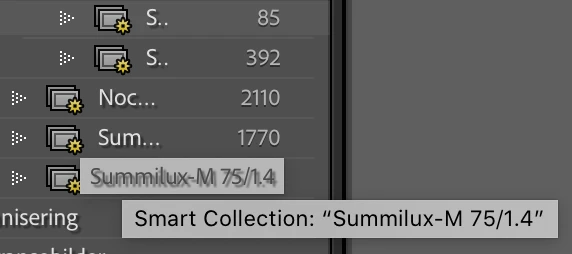
I work on a small screen and the side panels have to be as small as possible most of the time. This means that I cannot always read the entire name of folders and collections. If I could just hold the cursor over to view the full name, it would be very helpful. But usually no tooltip is showing up, even if I hold the cursor there for a long time. 


Sometimes it appear after a while, and then not only one, but two tooltips appear. First one that it hardly legible because of a shadow under the text, then – some seconds later – another tooltip appear. The last one is much clearer and easier to read. But I would prefer that only this last tooltip appeared, and that it always showed up, not only from time to time. 
 

This topic has been closed for replies.

14 replies

Rikk Flohr_Photography
Community Manager
Community Manager
December 14, 2023

Greetings all,


Updates for the Adobe Photography Products have been released.  The December 2023 updates contain an update for this issue. 

If you do not see the update in your Creative Cloud Application, you can refresh it by hitting [Ctrl/Cmd]+[Alt/Opt]+[ R ].

Note: It may take up to 24 hours for your update to be available in your Creative Cloud app.


Thank you for your patience.

Rikk Flohr: Adobe Photography Org
gtstudios
New Participant
August 15, 2022

Still happening in Aug 2022 - I get NO tool tips at all on Mac for collections or folders. Collection names are useless without this as the names are often long and the window width is hard limited. Everything is the latest version at this time.

The only way to tell the full folder name is to right click so that it shows "create a folder inside <myLongFolderName> or choose Rename collection etc.

Rikk Flohr_Photography
Community Manager
Community Manager
February 9, 2021

I've logged a bug for this. 

Rikk Flohr: Adobe Photography Org
Bob Somrak
Brainiac
February 7, 2021

@bill_3305731 

Hopefully 11.2 would fix it but tooltips have been an issue on Mac for a long time and not just in LrC so its probably still an issue

M4 Pro Mac Mini. 48GB
evikne71Author
Known Participant
February 7, 2021

My Mac is from early 2013 and can no longer be updated.

Known Participant
February 7, 2021

You are running an old version of macOS, see if it still happens on V11.2. Lots of bugs fixed with this update. 

Bob Somrak
Brainiac
February 7, 2021

I created a folder with the name way longer than the panel.  I can duplicate this issue in Folders if the folder text length is longer than can be displayed in the panel.  macOS 10.15.7. 

As @yves_crausaz and @John_R_Ellis said, tool tips on the Mac are hit and miss.  

Sometimes it just displayed the fuzzy drop shadow folder name

Sometimes it displayed both

Sometimes it displayed the full path as it is supposed to 

Sometime the tooltip never showed up.  Could hover for 30 seconds

There is definitely and issue/bug here.

M4 Pro Mac Mini. 48GB
Inspiring
February 7, 2021

@evikne Pour moi, sur macOS 10.15.7 si les noms des dossiers ou ceux des collections sont trop longs, il n'y a jamais d'info-bulle affichées. Avec ou sans GPU activées !!!!!

Yves Crausaz, Suisse, retraité actif dans le monde de la photo et des arts graphiques.
evikne71Author
Known Participant
February 7, 2021

I didn't mention initially that I use a Mac. I don't know if it can be seen on the screenshot.

ouiouiphoto
Known Participant
February 7, 2021

On W10 tooltips depend of what is doing LRC. If you launch a publish service, LRC is occupied doing something else and tooltips will appear or not or when they want 😉

.Sheepdog trying to help Lightroom and Photoshop beginners