


New Participant
June 14, 2022
Answered

P: Gray / Negative image display in the Develop module

  • June 14, 2022
  • 65 replies
  • 64515 views

Bonjour,

Je viens d'installer la dernière version de Lightroom Classic (11.4) sous Windows 11 et mes fichiers RAW ne peuvent plus s'afficher correctement dans le module "Développement". Je ne rencontre pas le problème dans les autres module, l'affichage de la miniature est bon, tout comme l'histogramme qui semble cohérent. Seul l'affichage dans la zone de travail est blanc (cf. copie d'écran dessous). 

__________________________________________

Hello,

I just installed the latest version of Lightroom Classic (11.4) on Windows 11 and my RAW files can no longer display correctly in the "Develop" module. I don't encounter the problem in the other modules, the thumbnail display is good, as is the histogram which seems consistent. Only the display in the working area is white (see screenshot below).
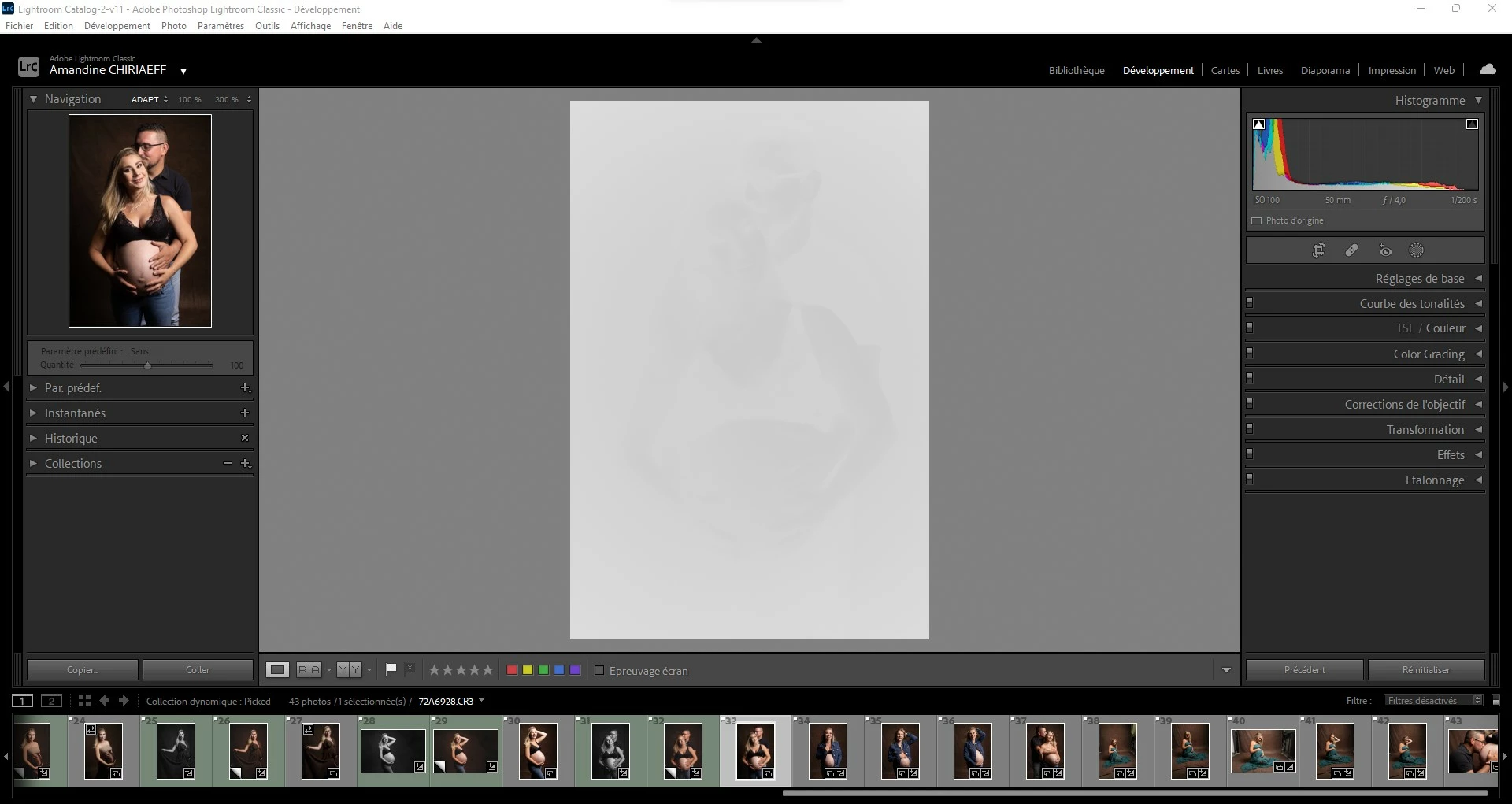
This topic has been closed for replies.
Correct answer AxelMatt

I've heard about this issue for two users here in the forum.

Please try to update the driver for your graphic card.


See also here: Gelöst: Re: P: Gray image display in the Develop module - Adobe Support Community - 13006731


65 replies

New Participant
July 17, 2022

Foto's ontwikkelen werkt niet meer sinds de update. +Beeld blijft gris en foto's laden niet.

brucel98221505
New Participant
July 16, 2022

After updating Lightroom to version 11.4.1 and selection Develop tab, photos all turn white (negative) look.  Only way to fix it per picture is to change from Version 5 to Version 4.   However found that if you go into preferences and look at the Performance options and disable GPU processing, this will fix the issue.

I am using a Nvidia K620 graphics card and would like to continue to use GPU processing for the images as it helps a great deal when processing changes.


johnrellis
Brainiac
July 17, 2022

Most people who have experienced these symptoms have out-of-date graphics drivers for their Nvidia graphics hardware.  Update the driver by going directly to the Nvidia web site, as described here:

https://helpx.adobe.com/lightroom-classic/kb/troubleshoot-gpu.html#solution-4


If that doesn't help, please do Help > System Info and copy/paste the output here.

New Participant
July 15, 2022

I am running Lightroom Classic 11.4.1


When I used to use Noise Reduction Luminance, I slid the slider and the whole picture would get a little softer as the noise was reduced. Now when I slide the slider, the image seems to completley wash out. I've attached a before and after screenshot. Any thoughts?

New Participant
July 15, 2022

Hallo,

ich habe seit längerem ein Problem mit der Vorschau von Presets und Profilen in der Lupenansicht im Lightroom Classic Programm (Windows PC / Version 11.4.1).

Ich arbeite jetzt schon länger mit den gleichen (gekauften) Presets sowie mit den Profilen von Adobe selber und hatte vorher nie Probleme, dass wenn ich eins auswähle,die Vorschau bzw das Bild nur in schwarz-weiß oder Sepiatönen angezeigt wird (bei den Profilen). Auch bei den Presets habe ich nichts verstellt und sie werden nur ganz komisch, teilweise zb viel zu stark belichtet etc angezeigt (siehe Bilder die ich beigefügt habe). 

Das Komische: auf der kleinen Vorschau links oben wird alles korrekt angezeigt. Es wird also nur auf der großen Hauptarbeits-Anzeige falsch angezeigt.

vor ein paar Wochen hatte ich das schon einmal, das ist aber irgendwann von selber wieder "normal" geworde. Jetzt wirds wieder falsch angezeigt.

Ich habe schon versucht das komplette Programm zu deinstallieren und neu zu intallieren, aber nichts hat geholfen.


Ich bin echt langsam am Ende meiner Ideen woran es liegen könnte. Ich finde auch niemanden im Internet mit dem gleichen Problem. Vielleicht habe ich die Anzeige irgendwie ausversehen umgestellt und deshalb wird das so angezeigt aber eigentlich bin ich mir sicher nichts verstellt zu haben. Wenn ich das Bild manuell verändere bleibt es auch farbig, nur halt bei de Profilen und Presets nicht (und ich arbeite nur mit Presets etc, hatte wie gesagt vorher viele Jahre kein Problem)


Vielleicht hat hier in der Community jemand eine Idee oder das selbe Problem! Mir fällt das Bearbeiten von Bildern dadurch sehr schwer.

Vielen Dank im Vorraus!

LG

New Participant
July 15, 2022

Hat sich erledigt, Danke!

New Participant
July 15, 2022

I am having an issue with my lightroom where the preview is showing as this greyscale image. I cannot find a setting that would cause this. This is happening for ALL images ALL albums.


Also, just to test it out, I imported some JPEGs into lightroom and it displayed fine. I imported a new RAW album (just to make sure it isn't just old albums affected) and the same issue persists.


I have restarted lightroom, restarted my computer, uninstalled and reinstalled lightrom.


Participating Frequently
July 16, 2022
Hi. You should update the driver of your graphic card, or disabe the GPU in
LR.
New Participant
July 14, 2022

Bonjour à tous,


j'ai un gros problème d'affichage sur mon Lightroom Classic. Depuis que j'ai la suite Adobe (5 ans environ), je n'ai eu aucun soucis de ce genre. J'ai supprimé mon LR puis réinstallé sans succès. 


Si quelqu'un a une astuce, je suis toute ouïe ! Comme vous le voyez sur mon screenshot, tout a l'air de bien s'afficher sauf l'image au milieu, la principale en fait.

Elle apparait hyper voilée et à chaque action que je fais, elle redevient dans cette état, voire pire.

J'ai trouvé une manip mais c'est très long : Paramètres > Version du processus > Version 4 (ou antérieure). Mais comme je disais, dès que je modifie quelque chose, elle réapparait grisée et inexploitable. 


Si vous savez comment réinitialiser ce paramètres de processus, je vous remercie par avance de votre aide !


DdeGannes
Community Expert
July 14, 2022

I suspect you are experiencing a known issue which is related to GPU Drivers on Windows Operating system. Try the following in your Lightroom Classic preferences > performance tab > turn off the Use of GPU acceleration. Then shut down your system and reboot. Launch Lightroom and see if that works.

Then search for an updated Driver for your Graphics Card and install.


Regards, Denis: iMac 27” mid-2015, macOS 11.7.10 Big Sur; 2TB SSD, 24 GB Ram, GPU 2 GB; LrC 12.5,; Lr 6.5, PS 24.7,; ACR 15.5,; (also Laptop Win 11, ver 24H2, LrC 15.0.1, PS 27.0; ) Camera Oly OM-D E-M1.
New Participant
July 12, 2022

hola! cuando estoy en revelar a la foto se le pone una especie de capa blanca y no me permite ver lo que estoy editando, alguien me puede ayudar por favor!!! 

New Participant
July 12, 2022

When I process images in the develop module, they are showing as if they are an embossed black and white high key image.  The preview panel looks correct.  If I set the processing version back to version 4 it works until I make any adjustment and then the problem re-occurs.  This even happens with older images that were previously processed.  I tried to go back one version and the issue persists.  Please advise.

New Participant
July 12, 2022

I hat to update my NVIDIA graphit card and after that everything was fine

New Participant
July 8, 2022

Bei mir funktioniert das Entwickeln-Modul bei dem 11.4. Update nicht. Ich sehr hier statt des Bildes nur einen weißes Viereck

Brainiac
July 8, 2022
New Participant
July 7, 2022

Help!  I don't know what to do and I don't even know how to describe it!  The photos export totally normal, but I can't edit them becasue they are totally blown out black and white!  This happened after doing the update...how do I fix this?!?!