


New Participant
June 14, 2022
Answered

P: Gray / Negative image display in the Develop module

  • June 14, 2022
  • 65 replies
  • 64515 views

Bonjour,

Je viens d'installer la dernière version de Lightroom Classic (11.4) sous Windows 11 et mes fichiers RAW ne peuvent plus s'afficher correctement dans le module "Développement". Je ne rencontre pas le problème dans les autres module, l'affichage de la miniature est bon, tout comme l'histogramme qui semble cohérent. Seul l'affichage dans la zone de travail est blanc (cf. copie d'écran dessous). 

__________________________________________

Hello,

I just installed the latest version of Lightroom Classic (11.4) on Windows 11 and my RAW files can no longer display correctly in the "Develop" module. I don't encounter the problem in the other modules, the thumbnail display is good, as is the histogram which seems consistent. Only the display in the working area is white (see screenshot below).
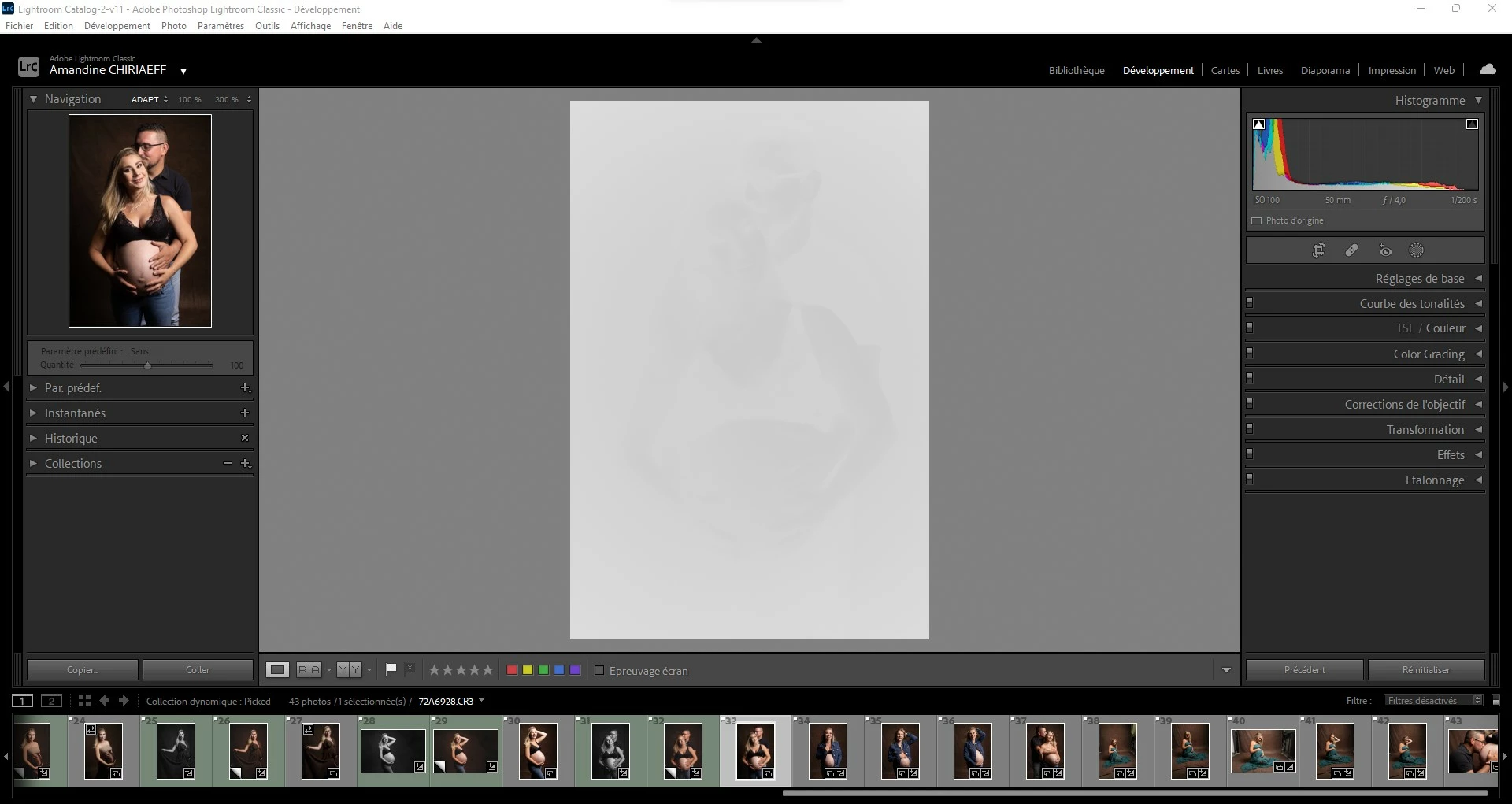
This topic has been closed for replies.
Correct answer AxelMatt

I've heard about this issue for two users here in the forum.

Please try to update the driver for your graphic card.


See also here: Gelöst: Re: P: Gray image display in the Develop module - Adobe Support Community - 13006731


65 replies

New Participant
September 12, 2022

New Participant
August 29, 2022

j'ai le même soucis que faut il faire?


New Participant
August 28, 2022

Hi, 

When I open Lightroom classis, my photo's are shown in grey (see picture below). I think it is a setting, but I can't figure out how to fix is. When I view the picture in full screen mode, it is normal. 

How can I fix this?


{Moved from Lightroom Cloud to Lightroom Classic Forum by Moderator} 

AxelMatt
Braniac
August 28, 2022

This is a known problem. Please try is to switch off the GPU support from the Lightroom preferences and check if that helps to fix the issue.  

Go to Lightroom > Preferences > Performance tab > Uncheck "Use Graphics Processor" > Restart Lightroom. 

https://helpx.adobe.com/lightroom-classic/kb/lightroom-gpu-faq.html#troubleshooting 

https://helpx.adobe.com/lightroom-classic/kb/troubleshoot-gpu.html 

If it's help check if there's an update for your graphic driver is available. If yes, then download and install this update and check again. 


More informations you find also here: 

https://community.adobe.com/t5/lightroom-classic-discussions/p-gray-negative-image-display-in-the-de...

My System: Intel i7-8700K - 64GB RAM - NVidia Geforce RTX 3060 - Windows 11 Pro 25H2 -- LR-Classic 15 - Photoshop 27 - Nik Collection 8 - PureRAW 5 - Topaz Photo
New Participant
August 18, 2022

I have upgraded my lightroom to version 11.14. After the upgrade my images are greyed out in the develop view (not in thumbnail view). After rolling back to version 11.13.1 the problem is gone. (see examples in attached .doc)


Today I have tried to update to the latest version 11.5 to see if the problem is fixed. The same problem occurs in version when rolling back to 11.13.1 the problem is gone.


I use Ligthroom for editing photo's (Camera Nikon Z 6 ii), version Camera raw is up to date to today 18-8-2022 (see system specs in attachted .doc)


Please let me know what to do since I would like to stay up to date on new Lightroom versions

New Participant
August 18, 2022

I have just upgraded my Ndivia video driver and this indeeds solves the problem. Thank you very much for the help!

New Participant
August 6, 2022

LRc 11.4.1. Foto's zijn in de bibliotheek of afdrukmodule prima zichtbaar, maar bij het starten van de ontwikkelmodule worden álle foto's in de catalogus wit. Histogram ziet er prima uit, maar dit is niet zichtbaar in de voorvertoning. Iemand ideeën?

New Participant
August 1, 2022

Hi, I opened LR today and the image in develop mode goes to monochrome image...usually I have same image as in the navigator and I can see changes that I make...LR 2v10 2v11, version5

New Participant
July 28, 2022

Desde a ultima atualização no final de junho, não consigo ver a imagem no modo revelação, fica como um negativo

DdeGannes
Braniac
July 28, 2022

Indications are that your GPU graphics driver may need updating.

To check, in your LrC preferences performance tab turn off GPU acceleration then reboot Lightroom and see if that helps.

Regards, Denis: iMac 27” mid-2015, macOS 11.7.10 Big Sur; 2TB SSD, 24 GB Ram, GPU 2 GB; LrC 12.5,; Lr 6.5, PS 24.7,; ACR 15.5,; (also Laptop Win 11, ver 24H2, LrC 15.0.1, PS 27.0; ) Camera Oly OM-D E-M1.
mr mapper
New Participant
July 27, 2022

Lightroom Classic  release 11 4.1 on Windows can import and view photos but in the develop module the image is very light with only a few of the darkest shadows showing. 


going to "Settings"  "process version" and setting the version back to a previous setting lets the image display normally.  changing any parameter, like exposure, triggers the display back to the light image


images imported into Lightroom can be edited normally in Bridge


My setup


New Participant
July 20, 2022

Lightroom Classic has been working fine. Today after a session I uploaded photos and in the Library Module they look perfect, just as they are uploaded to my computer. When I go to the Develop Module they are white and cannot be seen or edited. Please help!!!

GoldingD
Braniac
July 20, 2022

Sounds like your GPU needs a new driver. In preferences, turn off use GPU. Does the issue go away? Driver


for reference, see:

https://community.adobe.com/t5/lightroom-classic-discussions/p-gray-negative-image-display-in-the-develop-module/m-p/13006731


Please post your System Information as Lightroom Classic (LrC) reports it. In LrC click on Help, then System Info, then Copy. Paste that information into a reply. Please present all information from first line down to and including Plug-in Info. Info after Plug-in info can be cut as that is just so much dead space to us non-Techs.


New Participant
July 18, 2022

Hola tengo un problema que me.lleva loco, siempre revelé con RAW canon y nunca tuve un problema, ahora compre la.sony rx100 vII y puedo visualizarlo en la biblioteca pero no puedo revelar xq no se ve bien.

Por favor ayuda, me tiene loco. Tengo la última versión de lightroom.

Braniac
July 18, 2022

What software are you using, Lightroom (Lr icon) or Lightroom Classic (LrC icon)? Please tell us the version NUMBER of your software (words like "latest" are not sufficient, we need the version NUMBER).


Show us a screen capture of how it looks that you say (translated to English) "doesn't look good".

New Participant
July 18, 2022

I work with lightroom classic v11.4.1.

When i work in calibration 4 i can see the photo but when i beging to work i can not.