


Participating Frequently
May 5, 2021

P: Desktop Memory leak on M1 Machines

  • May 5, 2021
  • 57 replies
  • 14713 views

Hi!


I am a software developer. Recently, my Lightroom CC (version 4.2 - 20210301-0713) is very slow . A close look at activity monitor reveals that the app consumes too many threads and memory (attached photos) which freezes the app.
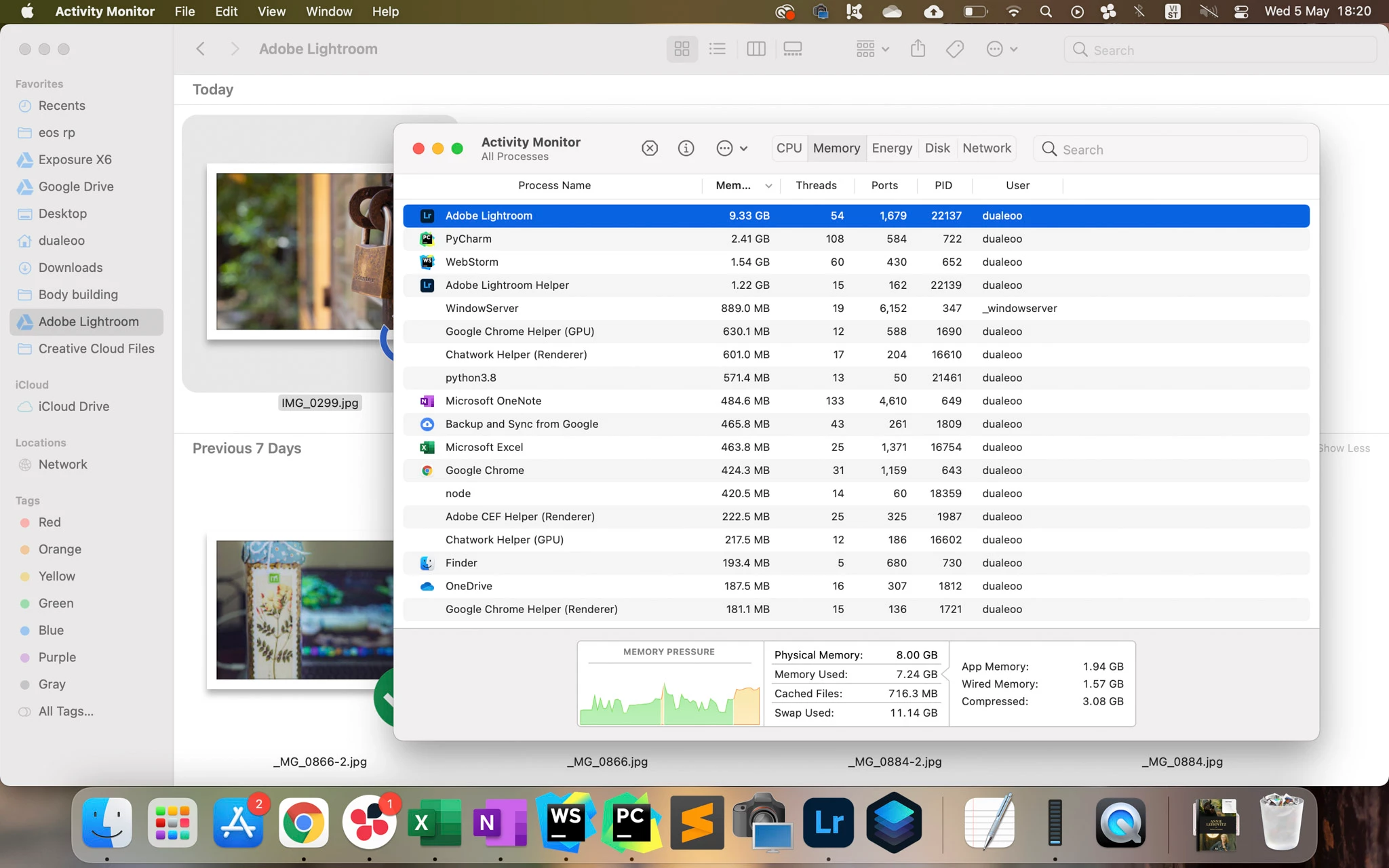


@Rikk Can you help me forward this to the development team?


Thank you so much!

57 replies

Known Participant
May 6, 2022

New Studio Ultra with 128GB ram (20cpu 48gpu), current versions of all OS (Monterey v12.3.1) and software (LR v11.3.1, PS v23.3.1). Despite setting memory limits in Photoshop preferences (and what little I can control with Lightroom), both PS and LRc will routinely and quickly gobble up ram to the point that I get an OS error ('out of application memory'). LR is the bigger offender.


This just happened to me with LR open and being used (cloning headshots, maybe 60x/image), PS closed; ram usage shot up to 98GB over the course of maybe 30 minutes, and then I got the OS error, requiring me to close LR. Oddly, Activity Monitor showed 0.0 bytes of memory being used. PS set to 55% memory limit; when open editing large panoramas, it will often exceed that and head toward 100+GB; unfortunately LR does not allow you to limit memory usage, although it's a moot point since PS does not respect the limits set, anyway.


Three screenshots of Activity Monitor from the last several days included below.


This is becoming way worse than the years-old memory leak on Intel machines (longtime user, coming from 2021 5k iMac i9 w/128GB). One would think that having ample ram would help issues like this, but it seems to matter not.

New Participant
May 6, 2022

How come are we still adressing this? How come this is still an issue? 


It seems even worst now, even without GPU aceleration LR just keeps wanting more and more RAM, makes no sense.


Inspiring
April 7, 2022

Just giving this a +1. I've had the issue on my old Intel iMac and had hoped moving to an M1 would help. No luck; using an M1 Pro with 16GB RAM and I'm having the exact same situation. LR Classic uses 15-16GB RAM and won't let it go until I quit and restart. 


Adobe--this is so frustrating. I've posted about this memory leak on these forums before. 

New Participant
March 6, 2022

New Macbook 16 with 16GB RAM.  I iinstalled the Lightroom (Cloud) from the adobe creative cloud.  When I open the software the RAM is pegged to the point where I can't open anything else without massive warnings about SWAP usage because RAM is pegged. 


If I close everythiing else and just use LR, I can get by but that's not acceptable, definitely something wrong with its memory usage. 

New Participant
February 16, 2022

would this help with illustrator/


Participating Frequently
January 13, 2022

Providing a little more context which may be helpful. 

First: Lightroom 5.1 (20211204-1710-0e71941 Build). MacOS 12.2 Beta (21D5039d). (Yes, it's a beta. The same problems occurred on 12.1. I upgraded to see if it fixed them; it didn't.)


Test. I put 30 D7500 NEFs in a folder in Lightroom and Apple Photos, none with any existing adjustments, and then ran the following test: start at the first image, hit the 'auto' button for adjustments, scroll through each image as quickly as possible and at the last one again hit 'auto'. So effectively that's browse a folder of 30 images and adjust two. And when I say folder I mean it's a normal dumb folder in my main library with only these images in it. Before running the test I switch to the folder, quit the app, then restart it so it opens directly there with, hopefully, no other images loaded in memory.


And one additional test for Lightroom: I ran it again with 'Use Graphics Processor' in Preferences > Performance switched to 'Off'. For the first run it was set to the default of 'Auto'.


Results: Photos consumed 1.14 GB of memory; Lightroom with use graphics processor switched to auto used 7.6 GB; with it switched to off, 1.45 GB. 


Hypothesis: there may be a leak or bug with the M1 series and their unified memory architecture when LR's use graphics processor setting is switched to auto.

Participating Frequently
January 12, 2022

Also, you can see clearly from the memory pressure graph where I opened Lightroom.

Participating Frequently
January 12, 2022

I'm running into memory pressure from Lightroom too on an M1 Pro 16GB. Here's a screenshot showing it ballooning to 8.8GB after opening it, browsing through a few folders, and lightly editing two files (no local corrections). This is the only app that seems to put the Mac under this kind of stress. 

Inspiring
January 9, 2022

Hey there, 
I am very upset with my new iMac 2021 16/256 machine. I just use adobe photoshop and lightroom classic which taking too much ram and using swap memory. I talked with adobe support team they weren't able to fix my issue. 
Any idea? what i can do in this case? 
Thanks 

Braniac
January 9, 2022

How much memory is "too much"? How much do you want it to take up?


I have seen occasional reports of memory leaks; but other than that, Lightroom Classic uses as much memory as it needs.


What version NUMBER of Lightroom Classic? We need the version NUMBER and not words like "latest" or "up-do-date".

Inspiring
January 9, 2022

Lightroom Classic version: 11.1 [ 202112022200-7fd1f998 ]
License: Creative Cloud
Language setting: en-BD
Operating system: Mac OS 12
Version: 12.1.0 [21C52]
Application architecture: arm64
Logical processor count: 8
Processor speed: NA
SqLite Version: 3.36.0
Built-in memory: 16,384.0 MB
Real memory available to Lightroom: 16,384.0 MB
Real memory used by Lightroom: 2,030.8 MB (12.3%)
Virtual memory used by Lightroom: 4,03,796.8 MB
Memory cache size: 164.3MB
Internal Camera Raw version: 14.1 [ 993 ]
Maximum thread count used by Camera Raw: 5
Camera Raw SIMD optimization: SSE2
Camera Raw virtual memory: 438MB / 8191MB (5%)
Camera Raw real memory: 450MB / 16384MB (2%)
Displays: 1) 4480x2520

Graphics Processor Info:
Metal: Apple M1


Application folder: /Applications/Adobe Lightroom Classic
Library Path: /Users/radoanahamed/Pictures/Lightroom/Lightroom Catalog.lrcat
Settings Folder: /Users/radoanahamed/Library/Application Support/Adobe/Lightroom

Installed Plugins:


Config.lua flags: None

AudioDeviceIOBlockSize: 512
AudioDeviceName: $$$/dvaaudiodevice/SystemDefaultAndEffectiveDeviceName=System Default - iMac Speakers#{comment}DVAAU-4201250: Open the audio hardware preferences page.
AudioDeviceNumberOfChannels: 2
AudioDeviceSampleRate: 48000
Build: Uninitialized
CoreImage: true
GL_ACCUM_ALPHA_BITS: 0
GL_ACCUM_BLUE_BITS: 0
GL_ACCUM_GREEN_BITS: 0
GL_ACCUM_RED_BITS: 0
GL_ALPHA_BITS: 8
GL_BLUE_BITS: 8
GL_DEPTH_BITS: 32
GL_GREEN_BITS: 8
GL_MAX_3D_TEXTURE_SIZE: 2048
GL_MAX_TEXTURE_SIZE: 16384
GL_MAX_TEXTURE_UNITS: 8
GL_MAX_VIEWPORT_DIMS: 16384,16384
GL_RED_BITS: 8
GL_RENDERER: Apple M1
GL_SHADING_LANGUAGE_VERSION: 1.20
GL_STENCIL_BITS: 8
GL_VENDOR: Apple
GL_VERSION: 2.1 Metal - 76.3
OGLEnabled: true
GL_EXTENSIONS: GL_ARB_color_buffer_float GL_ARB_depth_buffer_float GL_ARB_depth_clamp GL_ARB_depth_texture GL_ARB_draw_buffers GL_ARB_draw_elements_base_vertex GL_ARB_draw_instanced GL_ARB_fragment_program GL_ARB_fragment_program_shadow GL_ARB_fragment_shader GL_ARB_framebuffer_object GL_ARB_framebuffer_sRGB GL_ARB_half_float_pixel GL_ARB_half_float_vertex GL_ARB_imaging GL_ARB_instanced_arrays GL_ARB_multisample GL_ARB_multitexture GL_ARB_occlusion_query GL_ARB_pixel_buffer_object GL_ARB_point_parameters GL_ARB_point_sprite GL_ARB_provoking_vertex GL_ARB_seamless_cube_map GL_ARB_shader_objects GL_ARB_shader_texture_lod GL_ARB_shading_language_100 GL_ARB_shadow GL_ARB_shadow_ambient GL_ARB_sync GL_ARB_texture_border_clamp GL_ARB_texture_compression GL_ARB_texture_compression_rgtc GL_ARB_texture_cube_map GL_ARB_texture_env_add GL_ARB_texture_env_combine GL_ARB_texture_env_crossbar GL_ARB_texture_env_dot3 GL_ARB_texture_float GL_ARB_texture_mirrored_repeat GL_ARB_texture_non_power_of_two GL_ARB_texture_rectangle GL_ARB_texture_rg GL_ARB_transpose_matrix GL_ARB_vertex_array_bgra GL_ARB_vertex_blend GL_ARB_vertex_buffer_object GL_ARB_vertex_program GL_ARB_vertex_shader GL_ARB_window_pos GL_EXT_abgr GL_EXT_bgra GL_EXT_bindable_uniform GL_EXT_blend_color GL_EXT_blend_equation_separate GL_EXT_blend_func_separate GL_EXT_blend_minmax GL_EXT_blend_subtract GL_EXT_clip_volume_hint GL_EXT_debug_label GL_EXT_debug_marker GL_EXT_draw_buffers2 GL_EXT_draw_range_elements GL_EXT_fog_coord GL_EXT_framebuffer_blit GL_EXT_framebuffer_multisample GL_EXT_framebuffer_multisample_blit_scaled GL_EXT_framebuffer_object GL_EXT_framebuffer_sRGB GL_EXT_geometry_shader4 GL_EXT_gpu_program_parameters GL_EXT_gpu_shader4 GL_EXT_multi_draw_arrays GL_EXT_packed_depth_stencil GL_EXT_packed_float GL_EXT_provoking_vertex GL_EXT_rescale_normal GL_EXT_secondary_color GL_EXT_separate_specular_color GL_EXT_shadow_funcs GL_EXT_stencil_two_side GL_EXT_stencil_wrap GL_EXT_texture_array GL_EXT_texture_compression_dxt1 GL_EXT_texture_compression_s3tc GL_EXT_texture_env_add GL_EXT_texture_filter_anisotropic GL_EXT_texture_integer GL_EXT_texture_lod_bias GL_EXT_texture_rectangle GL_EXT_texture_shared_exponent GL_EXT_texture_sRGB GL_EXT_texture_sRGB_decode GL_EXT_timer_query GL_EXT_transform_feedback GL_EXT_vertex_array_bgra GL_APPLE_aux_depth_stencil GL_APPLE_client_storage GL_APPLE_element_array GL_APPLE_fence GL_APPLE_float_pixels GL_APPLE_flush_buffer_range GL_APPLE_flush_render GL_APPLE_packed_pixels GL_APPLE_pixel_buffer GL_APPLE_rgb_422 GL_APPLE_row_bytes GL_APPLE_specular_vector GL_APPLE_texture_range GL_APPLE_transform_hint GL_APPLE_vertex_array_object GL_APPLE_vertex_point_size GL_APPLE_vertex_program_evaluators GL_APPLE_ycbcr_422 GL_ATI_separate_stencil GL_ATI_texture_env_combine3 GL_ATI_texture_float GL_IBM_rasterpos_clip GL_NV_blend_square GL_NV_conditional_render GL_NV_depth_clamp GL_NV_fog_distance GL_NV_fragment_program_option GL_NV_fragment_program2 GL_NV_light_max_exponent GL_NV_texgen_reflection GL_NV_texture_barrier GL_NV_vertex_program2_option GL_NV_vertex_program3 GL_SGI_color_matrix GL_SGIS_generate_mipmap GL_SGIS_texture_edge_clamp GL_SGIS_texture_lod

mikebrodt
Inspiring
January 8, 2022

I cna concur that there seems to be some kind of memory issue. I was using Lightroom CC for about an hour and noticed the fan on my M1 Max 14" MacBook Pro starting to spin (a extremely rare occurance I've noticed). I checked that activity monitor and Lightroom was using 32GB of memory. I was able to quit and relaunch and it was back down 6.49 GB, but quickly climbed to 8.15 without me doing anything at all in the application. I'll keep an eye on it.

fastson99
New Participant
December 3, 2021

Editing one RAW 25MB image with "Lightroom 5.0 arm64 [ 20211012-0002-a1240ed ] (Oct 12 2021)" then closing Lightroom (Memory pressure graph).


Disabling GPU acceleration for image processing makes the software behave more normally.