


Community Manager
September 14, 2021
Question

Announcing the availability of Unified Text Engine in Photoshop Beta

  • September 14, 2021
  • 4 replies
  • 17784 views

Photoshop Beta now includes Unified Text Engine, which provides seamless unified typographical support for scripts and languages across the world, including Arabic, Hebrew, Indic scripts, Japanese, Chinese, and Korean. 


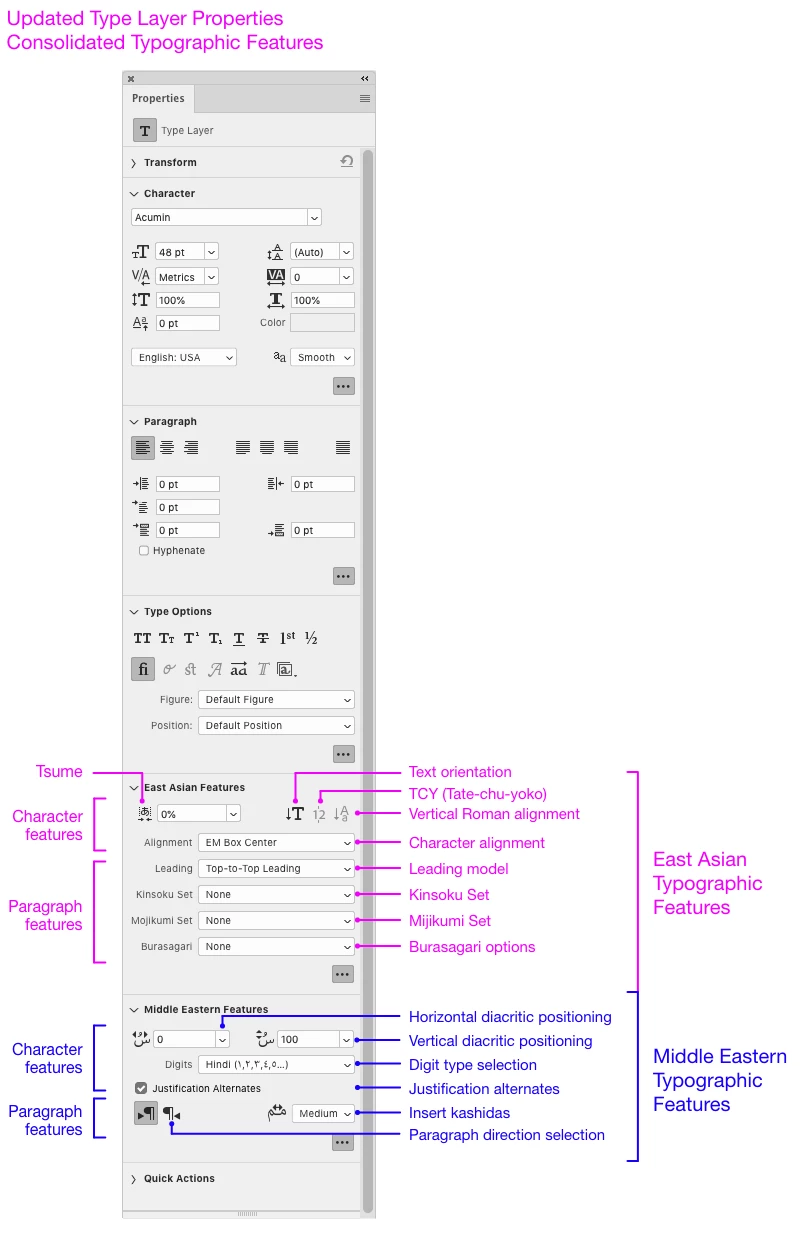
In previous versions of Photoshop, users selected a default in Photoshop preferences or choose a preference in the Paragraph flyout menu to enable type tool support for Middle Eastern (Arabic), Indic, and Southeast Asian languages. With Unified Text Engine all advanced typographic will be automatically available and grouped together in the Photoshop Type Properties panel.


Unified Text Engine Feature Highlights:

  1. Improved text shaping for Arabic, Hebrew, and all non-Latin scripts
  2. Improved support for bi-directional text
  3. Consolidated advanced typographic features are now located in the Type Layers Properties panel
 

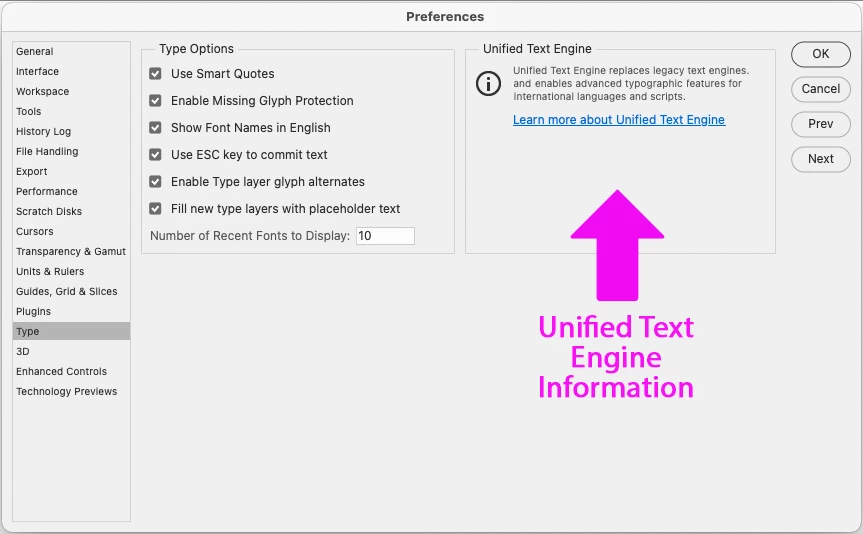
The text composer switching in the Type Preferences panel has been removed.  We now present a short description describing that there is now just one text engine in Photoshop moving forward (no more switching between type engines!).


The feedback we are seeking:

  • Script shaping for Middle East and North African languages
  • Right to left languages number formatting (i.e: Arabic, Hebrew) 
  • Diacritic positioning
  • Use of kashidas 
  • Right to left text positioning
  • Experience mixing different scripts/languages in one type layer


This topic has been closed for replies.

4 replies

User9500
Participating Frequently
October 5, 2021

Finally, Photoshop correctly displays emoticons!

It was a bit odd that it would show the correct glyphs in the title bar and layer panel, but not the actual text. 


Participant
October 4, 2021

I'm just starting to play with the Beta (version 23.0.0). Quite excited to try the new features. I have a quick question. My font has 'historical' or 'old style' ligatures. I'm able to turn these features on in regular macOS apps like TextEdit and Pages. However I am not able find this option in PhotoShop's Type Options panel. Are these exposed in the UI? If not, how can I turn them on?

Vinod Balakrishan
Adobe Employee
Adobe Employee
October 4, 2021

Hi @Muthu Nedumaran

Photoshop's Unified Text Engine hasn't changed list of the OpenType features exposed in the UI. What Ps have is the list of most common OpenType features by popularity in sync with other Adobe products. I understand your example squarely fits with definition of the OpenType feature. I see 'hlig' has the potential to be used for some other script too, but I haven't seen many fonts with these features yet. I remember someone was trying to add similar alternates through stylistic sets in the past, yes that is not a perfect solution.


-Vinod

Participant
October 5, 2021

Yes, I was considering stylistic sets as a workaround, but that's really not perfect as you've said. It's a pity that all the nice features available in OpenType are not usable because there's no UI to pick them.  Hopefully they get exposed in the future across all Adobe apps 🙂 


~ MUTHU


Thanks for keeping AAT shaping that comes with Harfbuzz! We can now add fonts for minority languages or newly encoded scripts that are not yet supported in OpenType.

Egor Chistyakov
Inspiring
October 1, 2021

There's an advantage of not being involved in all that's going in within PS, some thing get you surprised in a good way.

Good news!

We should have this as the Unified Unified thing across all apps. Please let us know when it will happen.

Zaid Al Hilali
Community Expert
Community Expert
September 18, 2021

Good day Amy. Thanks for posting this valubale infomation, so this will be the first for Adobe to have a bidrectional text features in one text engine.

I'm not currently a beta tester, I stopped being one years ago, however, for the sake of testing this engine, could I join the testing to provide my feedback?

strawbo13
Adobe Employee
Adobe Employee
September 18, 2021

The beta program is open to all customers; no sign-up needed. Just open Creative Cloud Desktop, go to "Beta apps", and install "Photoshop (Beta)."


Let us know what feedback you have!

Zaid Al Hilali
Community Expert
Community Expert
September 18, 2021

Thanks mate!


In my testing, I typed few mixed Arabic/English lines with Hindi numbers ١٢٣٤ and Arabic numbers 1234. The result is faboulus and no complaints, althoug I'm going to further test it.

As @strawbo13 explained, I downloaded the beta Photoshop "Strawbery letters" from the Adobe CC desktop application. Now I had the Arabic features right there as @amy durocher mentioned, but I have one question here as I do pretty much Middle Eastern support. Did I get the Arabic features in the beta Phtoshop because my Adobe CC settings were set as "English يدعم العربية" which supports Arabic language, or this is how it is going to be for all users when they download the beta, I mean every one will get the Right-to-Left support features showing regardless what their Adobe CC Langauge settings were?