


I Am Eddie
Known Participant
April 24, 2024

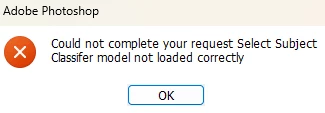
P: PS Error: Could not complete your request Select Subject Classifier model not loaded correctly
  • April 24, 2024
  • 84 replies
  • 46138 views

Hi,Is this a BUG?It happens after a new update. (2.57)

84 replies

New Participant
October 1, 2024

How do I fix the error  "select subject classifier model not loaded correctly".

New Participant
September 3, 2024

One layer with background. The tool worked last semester. I am a Photoshop teacher in high school.

I have read the threads and tried varies suggestions with no luck.

New Participant
September 4, 2024

I changed my Preferences but am still getting the error.

Participating Frequently
August 18, 2024

Al parecer a mi también me funciono, estoy en la versión 25.11, lo que no me anda es detectar persona en camera raw. 

New Participant
August 18, 2024

Scroll back up the chat to see the preference settings that Trevor.Dennis displays! 

New Participant
August 18, 2024

Correcting my image processing preferences to what Trevor.Dennis displayed fixed my problem!  Adobe should hire him. The agents that I got on the chat (2 of them) were useless. Thank you Trevor Dennis! 

New Participant
August 12, 2024

Hi. I experienced this issue earlier this summer. What fixed my error was updating my graphics drivers. Once those were updated, and my computer restarted, I had no further error messages.

New Participant
August 10, 2024

Wenn man über den Reiter - Auswahl - Auswählen und Maskieren - geht und dann oben bei  - Motiv auwählen - den Pfeil auf  Cloud (nicht Gerät) anwählt, geht es. Ist aber sehr umständlich! 

New Participant
August 9, 2024

Hello

i am having issue with my subject selection tool not working and  also with my lens blur not working. 

it keeps bringing out the error codes 


Photoshop 25.11.0 and Lightroom 13.4

Windows 11 

All object/subject selection tools not working 

i try to select subject using the object selectiontool, but instead i get error messages "select subject tool classifier not loaded correctly "

Jqqerry
Inspiring
August 7, 2024

https://community.adobe.com/t5/creative-cloud-desktop-discussions/can-download-older-version-creative-cloud/m-p/14784938#M7138


I asked all of my desktop and laptop and colleagues to test this out once in a while.
There may be a direct cause for Photoshop, but the creative cloud after some point seems to be the cause.

Even if you don't change the Photoshop version (2023 or earlier), updating the Creative Cloud will cause several bugs, including that one.

And I think the release timing below is a problem (most of my teams were also keeping the creative cloud before that release)


Version 6.2.0.554 was released on May 10, 2024 (required release)

Improved user interface for viewing and managing pending application updates.
Easily view and manage credits generated from the account menu.
Use application preferences to display or hide recent files from the Home tab.
A recent section of the Home tab has been improved.
For businesses with access to Creative Cloud Edition 4, the Firefly tab has been released exclusively.
In-context purchases have been activated in Creative Cloud for Teams.
Enterprise users with Acrobat privileges can now access cloud-based documents via the Files tab.
Support for Microsoft Visual C++ 12.0 has been discontinued.
Fix bugs and technical improvements.


" Support for Microsoft Visual C++ 12.0 has been discontinued. "

I don't know exactly if this is a problem, but what is certain is that it wasn't just a Photoshop problem.

So the definitive solution I found, if there is no problem at the moment and the creative cloud is not the latest version, never update it.
If you've already updated it, you can't avoid this because even if you reinstall Windows OS until an improved release, the latest version will always be installed. (Even if I contacted a Adobe counselor via chat, I couldn't get a specific release from the Creative Cloud separately.)

maximiliand57329788
New Participant
August 6, 2024

I had the same problem. With the settings specified by Trevor.Dennis, it worked again immediately - thank you very much!