
Participating Frequently
May 19, 2020

P: This Face Expression File is bad or corrupted

  • May 19, 2020
  • 93 replies
  • 177636 views

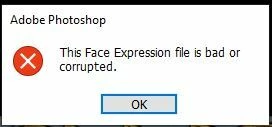
I keep gettting the following error when I launch Photoshop 2020 on a Windows 10 64bit machine


This Face Expression File is bad or corrupted


I assume it relates to the Default Face Expression Presets.p3f file, which a scan reveals to be OK. The application launches after I click OK but how can I get rid of the error?


I have reinstalled, tried the clean up tool and there has even been an update since it started but still it persists. Is there anywhere I can find a replacement file?


Thanks in advance


Steve


93 replies

tedt6258165
Participating Frequently
October 26, 2023

getting error message every time I open PS,  "this face expression file is bad or corrupted"  v25.1

jane-e
Community Expert
Community Expert
October 26, 2023

@tedt6258165 


Does this work for you?


Try this solution for the "This Face Expression File is bad or corrupted" message box:

  • Quit Photoshop
  • Go to C:\Users\[username]\AppData\Roaming\Adobe in Windows File Explorer and search for "Face".
  • When you find a file called "FaceExpressionPresets.psp", rename it with .old at the end (to preserve it just in case).
  • Restart Photoshop. The file will recreate itself. If there is still an issue, the older file is still there and can be renamed again.


This is not a Developer question and I have moved your post to the Photoshop forum for you.


Jane


tedt6258165
Participating Frequently
October 27, 2023
I don't have that path to follow
Participant
October 22, 2023

Whenever I start up Photoshop 2024, I get this error, I can click enter and continue using Photoshop but how do I get rid of this error?


Ged_Traynor
Community Expert
Community Expert
October 22, 2023
Participant
October 21, 2023

quando lancio photoshop mi compare questo messaggio "il file di espressione volto non valido o danneggiato"

versione photoshop 25

Ged_Traynor
Community Expert
Community Expert
October 21, 2023
Participant
October 18, 2023

So I just got this error and then after hitting ok and then get an error about Face Expression file as well. Anyone happen to have any advice to remeding this?

Participant
October 4, 2023

Este erro aparece toda vez que eu vou abrir o Photoshop, o programa só abre depois que eu clico em "OK".

Estou usando a versão mais atualizada do Photoshop (v25.0), na versão anterior também estava com esse erro.

Kevin Stohlmeyer
Community Expert
Community Expert
October 4, 2023

Go to Photoshop Help Menu/System Info and copy/paste details in a reply. Post only once as the system takes time to process the large amount of data.

satheeshlive_pro
Participant
September 28, 2023

Sadly i couldn't find any file named "face" in above mentioned destination,
But i was able to find the same file in "\AppData\Roaming\Adobe\Adobe Photoshop 2024\Adobe Photoshop 2024 Settings", i renamed it as above mentioned and the problem / error message is gone, 
Thank you @larry_vh 

Participant
September 23, 2023

cuando abro la app me sale este letrero, y cuando voy a exportar una imagen se daña, le salen unos cuadrso blancoas, alguien sabe que pasa.

kglad
Community Expert
Community Expert
September 23, 2023

what app?

Participant
September 25, 2023
Para Photoshop 2024 última versión
Participant
March 9, 2022

always when starting Photoshop the dialog "This facial expression file is invalid or damaged." how to solve?

jane-e
Community Expert
Community Expert
March 13, 2022

always when starting Photoshop the dialog "This facial expression file is invalid or damaged." how to solve?

By @Ariel23510794dxu4


Try this solution for the "This Face Expression File is bad or corrupted" message box:

  • Quit Photoshop
  • Go to C:\Users\[username]\AppData\Roaming\Adobe in Windows File Explorer and search for "Face".
  • When you find a file called "FaceExpressionPresets.psp", rename it with .old at the end (to preserve it just in case).
  • Restart Photoshop. The file will recreate itself. If there is still an issue, the older file is still there and can be renamed again.


Jane


Known Participant
December 2, 2020

I'm having this problem too from a couple days. Did anyone solve this?

Participating Frequently
December 3, 2020

Yes, I posted the solution I got when I tweeted Adobe Care on August 3rd...


I renamed the file by adding .old at the end of its name. The file is located at "C:\Program Files\Adobe\Adobe Photoshop 2020\Required" in Windows, uninstalled Photoshop & then re-installed it.

Known Participant
December 3, 2020

thank you very much!

Participant
October 30, 2020

Hi, I have a problem every time I start photoshop the following warning appears " File di espressione volto non valido o danneggiato" (I am Italian and I have an Italian photoshop version)
The problem remains even if I update photoshop to the latest version.
Thanks to those who want to help me

Giovanni

Participant
November 26, 2020

Ciao, ho lo stesso problema...

Participant
July 9, 2021