
Known Participant
January 19, 2025
Answered

Liquify Tool "disk error" PS 2025

  • January 19, 2025
  • 5 replies
  • 1940 views

For several months, I had issues where Liquify would not work on my Windows 11 system. To use the tool, I had to go all the way back to my PS 2022 version. (I always keep at least several back versions on my computer because I frequently run into issues where newer versions are wonky.)


I solved the issue by resetting my preferences, which I hate doing because I have my own workspace I've created which suits my needs, and resetting craps that all up. So, after resetting, I worked with first Essentials workspace, then copied over my own workspace and Liquify was ok. Over the course of the past few days, I changed a few things to my workspace, adding some plugin panels, re-arranging some windows of pallets. now Liquify again does not work! What the heck is going on? It takes time to recreate the workspace I have used for years and am comfortable with to work quickly and efficiently. I've wasted hours trying to solve these issues. Another good reason to get rid of the subscription model. Most of the PS updates are bugging and sometimes take whole versions to correct.

Correct answer AlanGilbertson

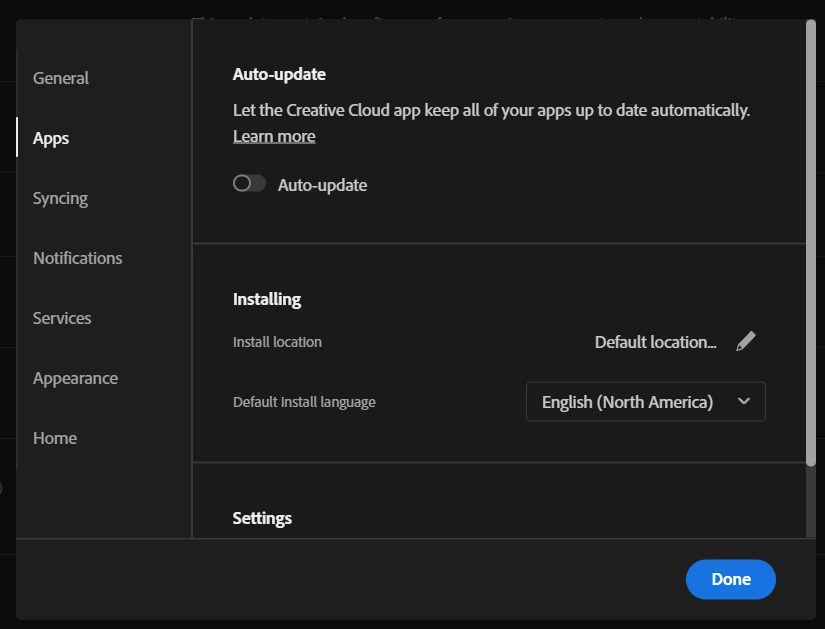
Turn off automatic updates in the CC desktop app:


Save a backup of your "Adobe Photoshop 2025 Settings" folder. On Windows, you'll find this at [systemdrive]\users\[userID]\AppData\Roaming\Adobe\Adobe Photoshop 2025. If you run into the problem again, just copy the backup over the existing.


Given that you should not be seeing this happen so often, I'd also recommend you open a command prompt as administrator and run sfc /scannow to check for any OS-level corrupted files, then run a thorough test of the drive this is sitting on to ensure there isn't a hidden hardware problem.


5 replies

Known Participant
November 5, 2025

Same old crap, new day and time. This intermittent "disk error" is getting old. PS 2025 will work somedays doing Liquify, other days I feel like Bill Murray in "Groundhog Day". Nothing has ever worked to alleviate this crap. As always, PS2022 comes to the rescue. I now have 2022, 2023, 2024, and 2025 on my system because of glitches in one might be exclusive to that version (especially 2025). Fortunately, everything always works in 2022. This is really getting old. I thought of installing yet the "latest and greatest" version v.27, but it will likely hog another 4-5GB only for me to fall back on PS 2022. 

D Fosse
Community Expert
Community Expert
November 6, 2025

I strongly suspect this is related to the reported bug that stops the Camera Raw plugin from opening after an indefinite period. Photoshop v25.9 and earlier are not affected. 

https://community.adobe.com/t5/photoshop-ecosystem-bugs/p-ps-25-27-could-not-complete-the-camera-raw-filter-command-because-of-a-program-error/idc-p/15571610#M129167 

Known Participant
July 7, 2025

Well, the stupid freaking Liquify issue raised its ugly head yet again. I seemed to have sorted it out, though I'm not quite sure how to be honest. Definitely, not by disabling lots of things or resetting the preferences, which I hated doing since I like the recent file view upon launch. I did try all of those things, though. What created this latest issue seems to be the go ol' update. I updated and the Liquify Beast is back. For now, I'm back to swapping between 2022 and 2025. Pain in the butt. Thank you Adobe.

Sameer K
Community Manager
Community Manager
July 8, 2025

Hey, @NemoNiemann, & @Enchanting_experience0D45. Thanks for bringing this up. Recently, @M-H shared a finding that went under the radar and it'll help us dig dipper into this. Please try the steps shared here: https://community.adobe.com/t5/photoshop-ecosystem-discussions/liquify-quot-disk-error-quot-still-happening-in-june-2025/m-p/15399965


Let us know how it goes in Photoshop 26.8.1. Thanks! 

Sameer K

(Type '@' and type my name to mention me when you reply)

Enchanting_experience0D45
Participant
June 24, 2025

I've had the same "disk error" when trying to run Liquify or larger images (Ps 26 version). Even with hundreds of GB free on two available disks, it wouldn't run the tool. I got Ps 25.0 version back and it's normal again. 

Participant
June 11, 2025

What worked for me was to run Photoshop without 3rd party plugins. You can do this in Windows by holding the SHIFT key while launching Photoshop.

The suspected real culprit in my case was Capture One, not Photoshop. I have C1 version 22 installed (yea old version but still working great), and whenever I had it running, PS Liquify will fail randomly with the disk error. Not running C1 concurrently with PS fixed the problem even if I launch PS normally (with plugins).

AlanGilbertson
Community Expert
AlanGilbertsonCommunity ExpertCorrect answer
Community Expert
January 19, 2025

Turn off automatic updates in the CC desktop app:


Save a backup of your "Adobe Photoshop 2025 Settings" folder. On Windows, you'll find this at [systemdrive]\users\[userID]\AppData\Roaming\Adobe\Adobe Photoshop 2025. If you run into the problem again, just copy the backup over the existing.


Given that you should not be seeing this happen so often, I'd also recommend you open a command prompt as administrator and run sfc /scannow to check for any OS-level corrupted files, then run a thorough test of the drive this is sitting on to ensure there isn't a hidden hardware problem.


Inspiring
June 24, 2025

How is this marked as correct answer?

How making a backup of PS settings folder was meant to help in anyway? Is this what you do when you get errors on yr device? You just duplicate some folders and hope for the best? C'mon man...

Same with auto-update settings - maybe I'm dumb or retardded but if there is something wrong with current version i would assume updating it to the newer version should be the first step of troubleshooting...


Maybe (just maybe!) if you never had this issue (clearly not really using Photoshop that much) you shouldnt really even be trying to resolve it?


Could moderators please unmark the incorrectly marked answer to make it more visible for Adobe?


Im on W11 23H2, PS 26.8 (but Beta PS 26.9 is doing same) and im having to restart PS couple times per hour every day to get liqufy to work again. Already tried with fresh install of windows on brand new (dell 13th gen i9, rtx 3500, 32ram) device with fresh install of PS and after couple of images the error still pops up.


Clearing cache, changing scratch disks or any performance settings also didnt make any difference at all.


Disabling GPU kinda helps but im not spending all that money on laptops with dedicated GPUs and most up to date Adobe licence just to be switching functionality off because Adobe cant act resposibly and adress the issue

CMass
Community Manager
Community Manager
June 24, 2025

Hey @M-H, 

I can see how frustrating this has been, especially after all the steps you’ve taken. To help us better focus on your specific issue, could you start a new post with all the details you've shared here and link back to this thread for context? That way, we can give your case the attention it deserves and avoid confusion with earlier replies. 


^CM