Exit
  • Global community
    • Language:
      • Deutsch
      • English
      • Español
      • Français
      • Português
  • 日本語コミュニティ
  • 한국 커뮤니티
5

P: Relinking media window doesn't stretch to fit

Community Beginner ,
May 04, 2022 May 04, 2022

Hey all!


Weird thing going on here with the relink media window in premiere, it shows up as a small section in a larger window that doesn't allow scaling to the full window size. Was wondering if anyone had a similar issue, it's been this way for a while now! Would be nice if I could use the full size of the window to search media easier.


Using Premiere Pro 22.2
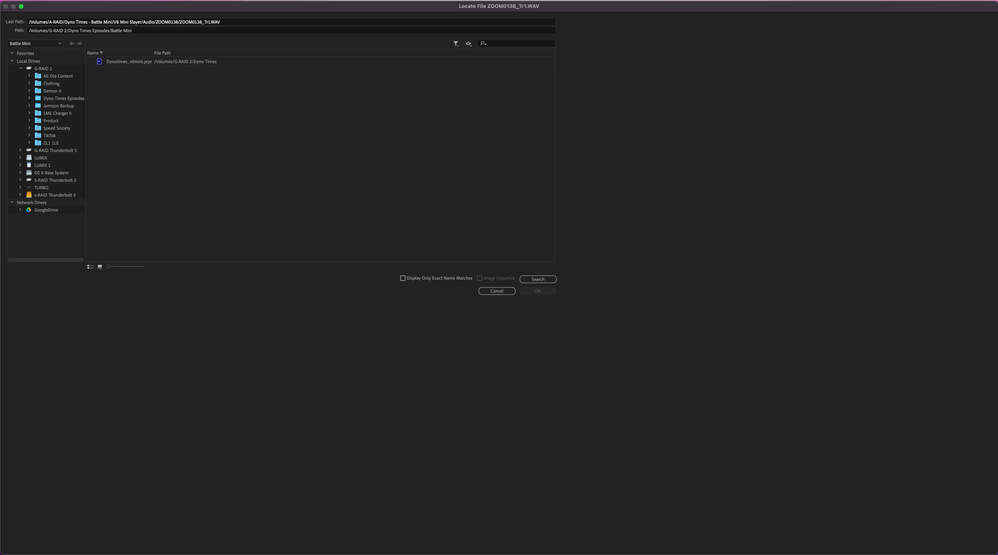
 

Screen Shot 2022-05-04 at 10.30.01 AM.pngScreen Shot 2022-05-04 at 10.29.50 AM.png

Video Editor & Motion Designer // -SamStaudtdotcom

Bug Acknowledged
TOPICS
User experience or interface
2.8K
Translate
Report
Community guidelines
Be kind and respectful, give credit to the original source of content, and search for duplicates before posting. Learn more
community guidelines

correct answers 1 Pinned Reply

Adobe Employee , Sep 03, 2025 Sep 03, 2025

Updating Status to Acknowledged

Status Acknowledged
Translate
23 Comments
Community Beginner ,
May 04, 2022 May 04, 2022

As you can see in the two images, it scales larger when I make the window itself bigger, but there is no way to fill the frame with the search section.

Video Editor & Motion Designer // -SamStaudtdotcom
Translate
Report
New Here ,
May 05, 2022 May 05, 2022

I have the same problem. This is a very annoying bug we've been dealing with for over a year. No amount of reinstalling the software helps. @ADOBE fixes?

Translate
Report
New Here ,
Jul 21, 2022 Jul 21, 2022

Same problem, superduper annoying, hate this thing and didn't find anything that would fix it 😞 Started to have it when I bought Macbook M1 Pro

Translate
Report
New Here ,
Jul 21, 2022 Jul 21, 2022

Exactly same problem. Im on the m1 pro as well.

Translate
Report
New Here ,
Sep 21, 2022 Sep 21, 2022

Same issue here, VERY annoying!!! 

Translate
Report
New Here ,
Oct 18, 2022 Oct 18, 2022

I've got the same issue for some time now. Didn't find a sollution yet... 

Translate
Report
New Here ,
Dec 07, 2022 Dec 07, 2022

I ran into this. It was fine until it wasn't. Something gets corrupted in the User Settings.

On Mac, drag the whole folder that is your Premiere Pro version number to your desktop.
/Users/(your user name)/Documents/Adobe/Premiere Pro/(Premiere Pro version number)
In this case, it would be
/Users/(your user name)/Documents/Adobe/Premiere Pro/22.0

Relaunch Premiere and let it build a new folder. If you try relinking a file, you should have the full window again.
Quit Premiere then drag your Premiere profile folder back into the version number folder in order to preserve your workspaces, keyboard settings, and other cusomtizations easily. If your auto-save folder was in the now-old version of that folder, drag your auto-saves back in too.

Translate
Report
New Here ,
Dec 08, 2022 Dec 08, 2022

This worked for me, thanks!!

Translate
Report
Explorer ,
May 18, 2023 May 18, 2023

Worked for me as well. Thanks!

Translate
Report
New Here ,
Jun 28, 2023 Jun 28, 2023

It work but seriously, can Adobe just fix the bug.  

Translate
Report
Community Beginner ,
Jul 20, 2023 Jul 20, 2023

This worked for me as well, thank you!

Translate
Report
New Here ,
Jun 30, 2024 Jun 30, 2024

This worked, but the second time I had to re-link a graphic it reverted back to the small window. Please get a fix for this Adobe!

Translate
Report
New Here ,
Nov 20, 2024 Nov 20, 2024

2024 and this is still a thing, and this fix still works, thanks!

Translate
Report
Community Beginner ,
Jan 09, 2025 Jan 09, 2025

I had the same problem. But finaly I know what the problem is.

It has to do on which screen the window is positioned. Put it back to your most left screen and it will work again.

Dont know how its behaving when working within seperate spaces.


Translate
Report
New Here ,
Apr 17, 2025 Apr 17, 2025

Exactly the same for me! Been fighting this problem for years.

ADDITIONAL info: if you have 2 screens with the missing Media screen window on the left and Search window on the right), then just drag the Search window to the left screen, then cancel it, then relaunch the Search and it should be fixed... unless you drag it back to the right. In which case, the next time you open the Search window, it will again display on the right and in small again. I believe this is due to using 2 different screens (pixels / ratios / definitions etc)

PR v25.01.0

Translate
Report
Participant ,
May 19, 2025 May 19, 2025

Jump to 2025.  Been having this problem for ages.  Dunno if it had to do with dual monitor setup or what.  (Macbook Pro M1 Max, OS Sonoma).  This hack worked great.  Thank you!!!  (Adobe, please fix this)

Translate
Report
New Here ,
Sep 02, 2025 Sep 02, 2025

PLEASE Adobe, get this fixed! How am I supposed to relink anything in this window?!

Translate
Report
Adobe Employee ,
Sep 03, 2025 Sep 03, 2025

Updating Status to Acknowledged

Status Acknowledged
Translate
Report
Community Beginner ,
Sep 09, 2025 Sep 09, 2025

When relinking offline media, the Link Media dialog box appears and after clicking "Locate" the Locate File dialog appears. Now, that window can't be properely enlarged. Any size I draw, the "active" part stays small and just the inactive grey area enlarges???!!! I can hardly see anything, impossible to work properly. Please see screenshot!


HELP!!


Thx. 

Translate
Report
Adobe Employee ,
Sep 09, 2025 Sep 09, 2025

Hi @Elmar279773436l0l

I'm sorry you're unable to expand your Link Media dialogue.  Can you tell me what version of Premiere you're using and more about your system specs?

Status Needs More Info
Translate
Report
LEGEND ,
Sep 09, 2025 Sep 09, 2025

Especially what is your monitor ... the pixel/pixel and inch width/height data ... and what your OS setting is for scaling.

Translate
Report
Community Beginner ,
Sep 09, 2025 Sep 09, 2025

Premiere 25.4.1 on Mac OS 15.6.1 Apple M2 Ultra 64 GB

Monitor Iiyama PL2792Q at 2560x1440

Translate
Report
Adobe Employee ,
Sep 10, 2025 Sep 10, 2025
LATEST

Hi @Elmar279773436l0l - This is a known issue on mac when you have an external monitors with different resolutions, the locate and media browser dialog box do not scale properly.  I will merge your post with the primary thread so you are notified of updates.  We appreciate your patience while we work on it.

Translate
Report
