Inspiring
October 28, 2023
Answered

Automatic add 'Cross Dissolve' with 2 frames

  • October 28, 2023
  • 1 reply
  • 1092 views

Hi everyone,


I'm currently editing a lot of video material and removing all filler words. After the cuts, I add a 'Cross Dissolve' transition and change the duration from 00:00:01:00 to 00:00:00:02. I find myself doing this step around 100 times per clip. Is there a quicker way?

Perhaps adding a shortcut for this transition with a duration of 00:02 (I'm aware I can add a shortcut for the transition, but it's set to 1 second).


Sven

This topic has been closed for replies.
Correct answer Averdahl
quote

I find myself doing this step around 100 times per clip. Is there a quicker way?


By @svens82


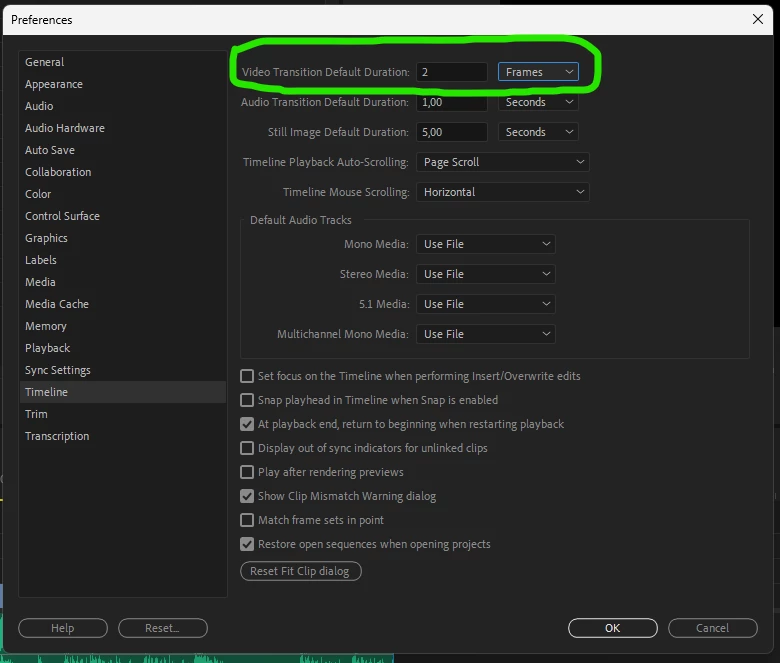
Yes, go to Edit > Preferences > Timeline and change Video Transition Default Duration to 2 Frames and click OK. Now all video transitions you add will be 2 frames.


Ctrl+D will add the transition at the edit point. To add let´s say all transitions in one go, lasso select the clips on the timeline and press Ctrl+D. Depending on the timeline it can be the way to go, but if you already have added transitions that are let´s say one second long they will be changed to 2 frames as well.


1 reply

Averdahl
Community Expert
AverdahlCommunity ExpertCorrect answer
Community Expert
October 28, 2023
quote

I find myself doing this step around 100 times per clip. Is there a quicker way?


By @svens82


Yes, go to Edit > Preferences > Timeline and change Video Transition Default Duration to 2 Frames and click OK. Now all video transitions you add will be 2 frames.


Ctrl+D will add the transition at the edit point. To add let´s say all transitions in one go, lasso select the clips on the timeline and press Ctrl+D. Depending on the timeline it can be the way to go, but if you already have added transitions that are let´s say one second long they will be changed to 2 frames as well.


svens82Author
Inspiring
October 28, 2023

@Averdahl,

You saved my day 🙂

Many thanks. But Ctrl+D works only with the selected clip. This means if nothing is selected, nothing happens (neither at the edit point). If I select a part of the clip, the transition will be added at the beginning and the end.


Averdahl
Community Expert
Community Expert
October 28, 2023
quote

@Averdahl,

You saved my day 🙂

Many thanks. But Ctrl+D works only with the selected clip. This means if nothing is selected, nothing happens (neither at the edit point). If I select a part of the clip, the transition will be added at the beginning and the end.


By @svens82


Make sure that V1, V2, V3, etc is blue in the track header of the timeline. If not, Ctrl+d won´t do anything at the edit point. If all are not selected, hold down Shift and click on V1, or any other of them, to light up all of them. 🙂