



PolkaFever
Inspiring
November 23, 2018
Question

Choppy playback in source preview! Premiere Pro 2019 software issue!

  • November 23, 2018
  • 16 replies
  • 19209 views

When I double click a drone 4K.mov source clip in Premiere Pro 2019 project bin, they always appear choppy during playback previews (Source window).

When I preview same clip in ANY other video application it plays just fine. This is and has been a software problem with Premiere Pro for quite some time. Specially when I use codecs with highly compressed videos (GoPro, Drone etc. recordings).

Its not a hardware issue, its not the codec, its not a cache settings, its not the timeline/sequence/render, its not CUDA, its not my latest Graphic card driver for Nividia Quadra P2000 or a proxy issue.

It has to be a Premiere software issue? Its about how Premiere is set and capable to utilize the computer's power for different videos and codecs. Don't make me convert this Quicktime, MOV -file. That should not be the solution for a Pro editing suite.

VLC and any other video players and editing suites has no problem previewing these files and Premiere Pro shouldn't be any different?

General

Complete name                            : D:\DJI_0010.MOV

Format                                   : MPEG-4

Format profile                           : QuickTime

Codec ID                                 : qt   2011.07 (qt  )

File size                                : 3.81 GiB

Duration                                 : 5 min 28 s

Overall bit rate mode                    : Variable

Overall bit rate                         : 99.9 Mb/s

Encoded date                             : UTC 2018-04-17 15:44:49

Tagged date                              : UTC 2018-04-17 15:44:49

Comment                                  : DE=None, Mode=P, DSW=0001

xyz                                      : +69.850745+18.819847+1.600

xsp                                      : +0.00

ysp                                      : +0.00

zsp                                      : +0.00

fpt                                      : -1.30

fyw                                      : +15.30

frl                                      : +0.20

gpt                                      : -8.70

gyw                                      : +15.90

grl                                      : +0.00

Video

ID                                       : 1

Format                                   : AVC

Format/Info                              : Advanced Video Codec

Format profile                           : High@L5.1

Format settings                          : CABAC / 1 Ref Frames

Format settings, CABAC                   : Yes

Format settings, RefFrames               : 1 frame

Format settings, GOP                     : M=1, N=30

Codec ID                                 : avc1

Codec ID/Info                            : Advanced Video Coding

Duration                                 : 5 min 27 s

Bit rate mode                            : Variable

Bit rate                                 : 100.0 Mb/s

Width                                    : 3 840 pixels

Height                                   : 2 160 pixels

Display aspect ratio                     : 16:9

Frame rate mode                          : Constant

Frame rate                               : 29.970 (30000/1001) FPS

Color space                              : YUV

Chroma subsampling                       : 4:2:0

Bit depth                                : 8 bits

Scan type                                : Progressive

Bits/(Pixel*Frame)                       : 0.402

Stream size                              : 3.81 GiB (100%)

Title                                    : DJI.AVC

Language                                 : English

Encoded date                             : UTC 2018-04-17 15:44:49

Tagged date                              : UTC 2018-04-17 15:44:49

Color range                              : Limited

Color primaries                          : BT.709

Transfer characteristics                 : BT.709

Matrix coefficients                      : BT.709

Codec configuration box                  : avcC

Text

ID                                       : 3

Duration                                 : 5 min 27 s

Bit rate mode                            : Constant

Bit rate                                 : 2 048 b/s

Stream size                              : 81.8 KiB (0%)

Title                                    : DJI.Subtitle

Language                                 : English

Forced                                   : No

Encoded date                             : UTC 2018-04-17 15:44:49

Tagged date                              : UTC 2018-04-17 15:44:49

Other

Type                                     : meta

Duration                                 : 5 min 28 s

Default                                  : No

Bit rate mode                            : VBR
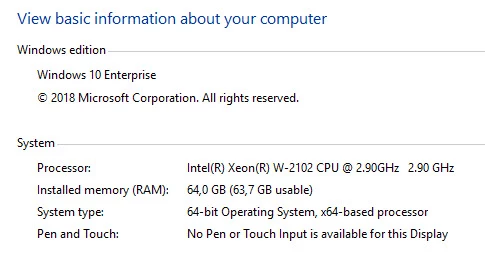
   Please help me find a solution!

This topic has been closed for replies.

16 replies

Kevin-Monahan
Community Manager
Community Manager
January 7, 2019

Polka Fever and others on this thread. Please add your voice and upvote this feature request: Better Support For LongGOP – Adobe video & audio apps

Thanks,
Kevin

Kevin Monahan - Sr. Community & Engagement Strategist – Pro Video and Audio
MyerPj
Community Expert
Community Expert
January 8, 2019

Hi Kevin,

This is a good long gop request here:

better scrubbing and playback performance - 4k avchd/h264 long gop – Adobe video & audio apps

And it has a very good demo video.

PolkaFever
Inspiring
January 8, 2019

Thank you for putting some spotlight to that request, MyerPj​ and also to Kevin-Monahan​​ for his tip.
Both requests have been upvoted and I recommend everyone else stranded here to do the same.

Wes Howell​ I hope you get of that hardware trail and admit this is nothing but a Premiere Pro software glitch somewhere. Look at this video and make some noise about this in the Adobe corridors. I'm working with these applications on a daily basis and long GOP codecs have been around for years. If almost any other NLE out there can do this, even freeware, so can you. That's why you put "Pro" behind Adobe Premiere. We're counting on you guys and we are paying you a fair amount of money to stay on top.

Participant
January 4, 2019

I have the same problem and agree with PolkaFever.

I am experiencing this problem on my desktop in Premiere Pro CC 2019 with video files from multiple (and different format) cameras, 1080 and 4k EVEN after running them through the Media Encoder. This is only since the last two updates (I had hoped the last update would fix the previous one).

I do not experience this anomaly on my 16gb ram laptop in PP CC 2019.

I do not experience this anomaly on my desktop in PP CS6.

These files DO run in everything else I can put my hands on . . .

I have been a Premiere Pro user since the product was first released.  I have never used proxy files and don’t intend to begin using them now.

I'm pretty sure this is a Premiere problem, so don’t go quiet, or recommend work-a-rounds, please just fix it.

My Windows updates and video drivers are up to date (as is everything else).

My equipment:

Windows 10 Pro 64-bit

ASUS X-79 Deluxe

Intel Core i7 3930K @ 3.20GHz

64GB DDR3

Primary drive: Samsung SSD 850 Pro 1TB

NVIDIA GeForce GTX 1060 6GB

Data: (2ea) Hitachi 4TB drives

PolkaFever
Inspiring
January 7, 2019

Thanks for joining in, davidregenthal​. Let's hope Wes Howell​ and his colleagues at Adobe fix this or at least informs us and acknowledge this problem.

Wes Howell
Adobe Employee
Adobe Employee
January 7, 2019

Hello,

Thanks for posting and providing info.  Sorry for the delay.   I've been out of the office over the holidays.

Various formats offer differing performance characteristics. 

If we zero in on a specific example, such as 4k drone footage, there are additional factors that impact performance such as CPU and GPU capabilities.  This can vary by machine, chipset and OS (Platform).   This particular footage type presents more of a challenge for a wide range of software.

In order to resolve these issues, specific details are needed and I'm happy to help here.

If the issue is specifically that drone footage drops frames during playback, these results will vary depending on hardware.

It's a harder format to decode and we have been working on releasing improvements and new features such as hardware accelerated decoding.

We will continue to engineer continued performance increases for decode heavy formats.

Wes

Participant
December 6, 2018

Mine auto-updated from cc2018 to cc2019. Now cc2019 has MAJOR problems with the playback view. It crashes every couple minutes I swear it's SOOOOO ANNOYING to do video editing for work. Anyone know if Adobe is fixing this major flaw? Or if there is a fix? Please.

Peru Bob
Community Expert
Community Expert
December 6, 2018

octalysisprime  wrote

Mine auto-updated from cc2018 to cc2019.

Premiere Pro does not auto update.

PolkaFever
Inspiring
December 6, 2018

You're not helping much Peru Bob Most of us are professionals with a deadline and spending time on these forums is a time thief. I share octalysisprime​ frustration.​
I wish someone could provide a concrete solution, a link to a thread with more info, or an acknowledgement from Adobe confirming this is a known bug? Knowing that they are aware and dealing with it saves me time away from these forums.

kokmanos
Inspiring
December 5, 2018

Make sure you are not using High Quality Playback under both Source Monitor Settings (wrench tool) and Program Settings.

It should not struggle on your machine. If it does, you are affected by a known 13.0.1 bug where it lags for no reason while playing certain codecs, even i-frame ones like cineform. I've made a relevant thread for that.

PolkaFever
Inspiring
December 5, 2018

Thanks for your insights wolfkain​, but HQ playback is checked and the problem is still there. Where is your thread?

Known Participant
December 5, 2018

For what it's worth I've been having these same issues for about a year; still waiting on a fix. Constant dropped frames on 1080p 59.94 footage, no matter what codec or transcode.

Win 10 Pro 64bit | i7 6850K | 32GB Ram | GTX 1080 | Application and cache - Samsung SSD 950 Pro 512GB | Media - Raid 0

PolkaFever
Inspiring
December 5, 2018

Thanks John! Seems like we're a few faithful out there struggling with this.

PolkaFever
Inspiring
December 3, 2018

Anyone with insights on this? I'll really appreciate some help