


- Home
- Premiere Pro
- Discussions
- Re: Error Compiling Movie - Frame Creation Error
- Re: Error Compiling Movie - Frame Creation Error
Error Compiling Movie - Frame Creation Error

Copy link to clipboard
Copied
Hello,
This past week I have been trying to render videos in Premiere Pro and keep getting this error
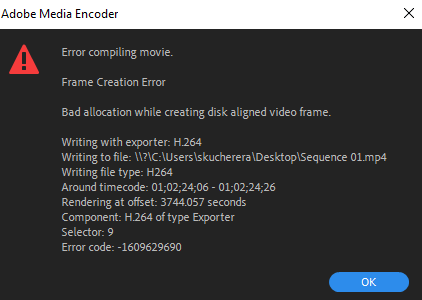
The video I'm trying to render is about 1 hour 30 minutes long but I have rendered longer videos (up to 4 hours) in the past without errors popping up. I rendered a short 2 minute video just to test things out and no error came up. I have already tried the following:
- Rebooting my laptop
- Uninstalling/Reinstalling Premiere Pro
- Using an older version of Premiere Pro
- Creating a new project/sequence
- Nesting the sequence
- Changing between hardware and software encoding
- Changing between VBR 1-2 pass and CBR
- Clearing up space in my hard drive. Internal hard drive has over 150 GB of free space.
- Exporting to an external drive. I used 2 TB hard drive.
So far none of these have worked. My laptop is a Lenovo Yoga C940 with 16GB of RAM. On the sequence timeline the video footage plays out just fine so I don't know what the problem is. Does anyone have a solution?


 1 Pinned Reply


Try turning off Hardware encoding in the Video tab of the export settings.

 6
Replies
6
6
Replies
6


Copy link to clipboard
Copied
What effects are happening at that time code on the timeline.
Copy link to clipboard
Copied
I imported images and moved them in certain positions like this

For the actual video files I change make some color change like this
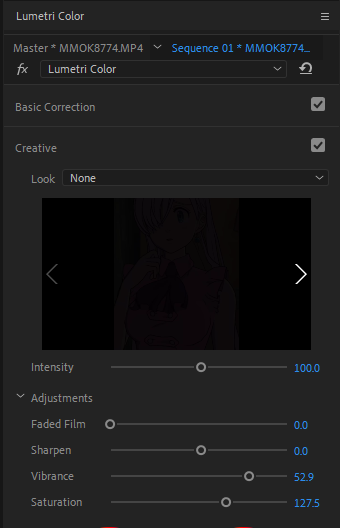
That's about it everything else should whatever the default it. These changes are supposed to be for the whole video. I've used these changes before with no difficulty. Just yesterday I rendered a 30 mintute video with similar edits like these and no error.

Copy link to clipboard
Copied
I am literally having the same error in 1 video. All others, heavy projects are rendering just fine but this 1 has been real pain. I have also tried everything you have mentioned but everytime it gives the same error but just different timestamps. And sometimes the timestamp is literally empty with nothing on it.

Copy link to clipboard
Copied
Hi, please try changing the export folder to somewhere else in your system. This might work.

Copy link to clipboard
Copied
Did you ever figure it out? I've had this same problem and I've been at it fir days. I've tried everything.
Copy link to clipboard
Copied
Try turning off Hardware encoding in the Video tab of the export settings.


Get ready! An upgraded Adobe Community experience is coming in January.
Learn more
 AdChoices