


spanningo82705720
Participating Frequently
September 20, 2017
Question

Exported .srt file contains font formatting, when uploaded to YouTube.

  • September 20, 2017
  • 3 replies
  • 11762 views

Hello Adobe Community,

I have recently been tasked to upload closed captioning SRT files with our company's videos in YouTube.  I set up my video in Premiere Pro with Captioning CEA-708 format.  When I export my video from Premiere Pro, I choose to export with a SideCar file in .srt format.

The file is outputted in the following format:

1

00:00:04,880 --> 00:00:11,440

<font color=#AAAAAAFF>Spanning Backup for Office 365 is an enterprise-grade, backup and recovery solution for Office 365.</font>

2

00:00:11,440 --> 00:00:17,240

<font color=#AAAAAAFF>Spanning provides automated backup and recovery for Mail, Calendar, OneDrive and SharePoint.</font>

Unfortunately, when I upload this .srt file into YouTube, the <font color=#AAAAAAFF> and </font> is included as part of the text.  See below:
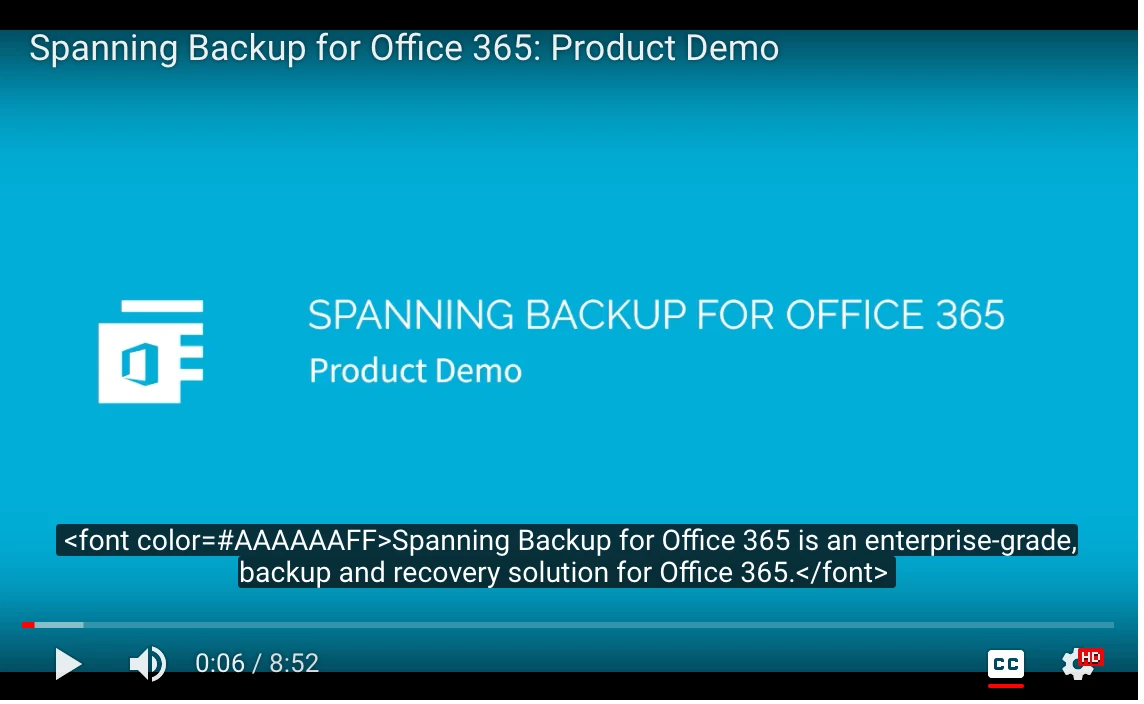
Is this fixable?  Is there another way in which I can export the .srt file from Premiere Pro, so that it won't contain the font formatting?  Or, does anyone know of a way in which YouTube would strip this out?  I know that manually, I can open the .srt file in TextEdit, and manually remove all of the instances of this formatting, but, I imagine there has to be another way.

Thanks in advance for any help!

My Specs:

Mac OSX Yosemite

Macbook Pro, 2015

Adobe Premiere Pro CC 2017.1.2 Release

11.1.2 (22) Build

This topic has been closed for replies.

3 replies

Participating Frequently
August 12, 2021

suprise suprise  August 2021
i Imported, as done several times befor an srt file,
in youtube as CC .
but now i have aproblem as youtube shows me
fint and color within the text.. like:
<font color=#F17532FF>In unserem ersten Teil zum Thema Krebs</font>
<font color=#F17532FF>genauer anschauen.</font>
<font color=#F17532FF>Man erfährt die Diagnose plötzlich,</font>


Does anybody have a workarround .. i have to do several long videos

THANKS to all

Participating Frequently
August 12, 2021

ok i figured something out... (took me 2,5 hours .. grrr)
If you change the CC with color and choose another font .. then the exported SRT containes those
additional data.
Solution;
Delete the CC track , and let PRemiere do it again. Dont change anything .. just export the fresh data as srt
out of the Text -> CC Window

snfff
Participant
October 6, 2023

Nice if auto transcription works for you but I had to do a lot of manual changes and time adjustments already... yes it works with the changes too but never again once you changed ANYTHING in the style, even if you delete THAT. Please Adobe fix this!! I´m sure there is a marker missing YT will recognise.

Richard van den Boogaard
Community Expert
Community Expert
September 20, 2017

Best approach here is to use Notepad (don't know if you have a similar app on Mac) and open the srt file.

Inside, use the Replace feature to "Replace all" segments you want to take out. So, first <font color=#AAAAAAFF> and next do a run with </font>. This should get all the unnecessary text out of the file. Make sure that no option to delete spaces or returns is selected!

Next, re-upload the srt file to YouTube.

Hope this helps.

spanningo82705720
Participating Frequently
September 21, 2017

Thank you both for the replies!

Kevin-Monahan​ - if I use the 'burn in captions' option, it unfortunately permanently burns the captions into the video, and doesn't allow me to toggle on/off when I upload to YouTube.  Additionally, the burn in option seemed to truncate the captions that were on-screen, so, I don't think this option will work for me.

BrandedChannels​ - Yes, this option will work, opening the .srt file in TextEdit (Mac user) and Replacing all of the instances of the font formatting with nothing removes the formatting.  This isn't too painful of a process, as I can replace all instances at once with the 'Replace All' button, but, I'm wondering if there isn't another way to export the captions.

My company has recently moved over hosting our videos on YouTube to Wistia, as it is a more professional video hosting site, but we are still uploading videos to YouTube as well, however, for increased visibility.  When I upload the same .srt file to Wistia, the font formatting is stripped away, and I only see the desired captions.  I'm just surprised that YouTube has this issue, and was wondering if anyone knew of another solution.

Thanks again!

Kevin-Monahan
Community Manager
Community Manager
September 21, 2017

Can you use Open Captions or must they be Closed Captions?

Thanks,
Kevin

Kevin Monahan - Sr. Community &amp; Engagement Strategist – Pro Video and Audio
Kevin-Monahan
Community Manager
Community Manager
September 20, 2017

Can you burn in closed captions without such anomalies?

Thanks,

Kevin

Kevin Monahan - Sr. Community &amp; Engagement Strategist – Pro Video and Audio