Exit
  • Global community
    • Language:
      • Deutsch
      • English
      • Español
      • Français
      • Português
  • 日本語コミュニティ
  • 한국 커뮤니티
2

Extract ALL frames to JPEG

Explorer ,
Jan 11, 2012 Jan 11, 2012

How can I extract all frames from a AVCHD clip to JPEG?

35.0K
Translate
Report
Community guidelines
Be kind and respectful, give credit to the original source of content, and search for duplicates before posting. Learn more
community guidelines

correct answers 1 Correct answer

Community Expert , Jan 11, 2012 Jan 11, 2012

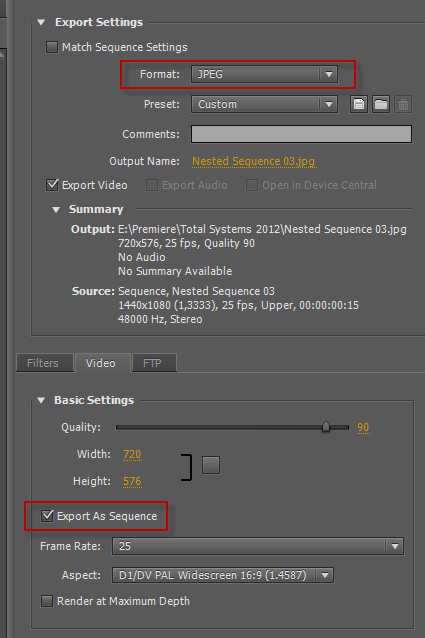
Export all frames in JPEG: works without any problem.
export jpeg sequence.png

Translate
LEGEND ,
Jan 11, 2012 Jan 11, 2012

You are gonna LOVE this: Manually.

Let's just hope your time-line is a bit shorter than say 1 million frames.

Translate
Report
Community guidelines
Be kind and respectful, give credit to the original source of content, and search for duplicates before posting. Learn more
community guidelines
Explorer ,
Jan 11, 2012 Jan 11, 2012

Are you sure?

I heard there are people doing that in order to preciselly control the detail, using than Photoshop for doing so.

Translate
Report
Community guidelines
Be kind and respectful, give credit to the original source of content, and search for duplicates before posting. Learn more
community guidelines
LEGEND ,
Jan 11, 2012 Jan 11, 2012

Yeah.

You could try to export sequential stills, using BMP or TIFF, but not JPEG. I wish you luck with controlling detail in PS with several thousands of still frames or a multitude of that.

Translate
Report
Community guidelines
Be kind and respectful, give credit to the original source of content, and search for duplicates before posting. Learn more
community guidelines
Explorer ,
Jan 11, 2012 Jan 11, 2012

We can use a script for the massive load of work, no problem
So, how do you do that [Export of sequencial stills]? I believe you are talking about an automatic way to export them all at once, right?
I even tried upon [Export media] and then JPEG but it only takes one. Quite ridiculous!

http://content.screencast.com/users/zuzullo/folders/Jing/media/a6dcd249-a874-4a89-b6cd-c3f640e70c3a/2012-01-11_1802.png

Translate
Report
Community guidelines
Be kind and respectful, give credit to the original source of content, and search for duplicates before posting. Learn more
community guidelines
LEGEND ,
Jan 11, 2012 Jan 11, 2012

Windows bitmap or TIFF as a sequence.

JPEG is just too compressed to allow export as a sequence. Quite logical if you ask me.

Translate
Report
Community guidelines
Be kind and respectful, give credit to the original source of content, and search for duplicates before posting. Learn more
community guidelines
Explorer ,
Jan 11, 2012 Jan 11, 2012

http://content.screencast.com/users/zuzullo/folders/Jing/media/69a6301f-612b-4ff4-9ba5-0c253fce7f8c/2012-01-11_1822.png

Translate
Report
Community guidelines
Be kind and respectful, give credit to the original source of content, and search for duplicates before posting. Learn more
community guidelines
LEGEND ,
Jan 11, 2012 Jan 11, 2012

11-1-2012 18-29-17.jpg

Translate
Report
Community guidelines
Be kind and respectful, give credit to the original source of content, and search for duplicates before posting. Learn more
community guidelines
Community Expert ,
Jan 11, 2012 Jan 11, 2012

Export all frames in JPEG: works without any problem.

export jpeg sequence.png

Translate
Report
Community guidelines
Be kind and respectful, give credit to the original source of content, and search for duplicates before posting. Learn more
community guidelines
Explorer ,
Jan 11, 2012 Jan 11, 2012

Thank you. Its just a matter of time now

I am going to edit all the frames in Adobe Lightroom to fix Noise reduction and Lens correction and than import them again into Premiere.

Would there be another way that you can think of?

Translate
Report
Community guidelines
Be kind and respectful, give credit to the original source of content, and search for duplicates before posting. Learn more
community guidelines
LEGEND ,
Jan 11, 2012 Jan 11, 2012

Try it in After Effects with your original source footage .

Translate
Report
Community guidelines
Be kind and respectful, give credit to the original source of content, and search for duplicates before posting. Learn more
community guidelines
LEGEND ,
Jan 11, 2012 Jan 11, 2012

PS Extended will accept video clips in the .mov format and then you can apply any PS filters all at once.
I just did this to a 1920x1080 HD clip that was converted from IMAX, used the lens distortion settings to
reduce the fish-eye look.

Jeff Pulera

Safe Harbor Computers

Translate
Report
Community guidelines
Be kind and respectful, give credit to the original source of content, and search for duplicates before posting. Learn more
community guidelines
Community Beginner ,
May 15, 2017 May 15, 2017

The jpeg format allows a wide range of compression, all the way to lossless. In fact, many camera raw formats are based on lossless jpeg. It is disinformation to make such an inaccurate statement.

Translate
Report
Community guidelines
Be kind and respectful, give credit to the original source of content, and search for duplicates before posting. Learn more
community guidelines
New Here ,
Sep 26, 2017 Sep 26, 2017

hii all

How can I control the amount of images I gonna export

For example I have a video of 1 minute I get 1000 frames who need 1000 frames come on

i need only 32 frames for example

how can i control on it ???

Translate
Report
Community guidelines
Be kind and respectful, give credit to the original source of content, and search for duplicates before posting. Learn more
community guidelines
LEGEND ,
Sep 26, 2017 Sep 26, 2017

In and Out points will determine which parts get exported.

Translate
Report
Community guidelines
Be kind and respectful, give credit to the original source of content, and search for duplicates before posting. Learn more
community guidelines
New Here ,
Sep 26, 2017 Sep 26, 2017

hi jim

tnx for relpy

but i need to extract all video not only part of it

i want to extract all video just by only 32 frames for example, not 1000 frames...

Translate
Report
Community guidelines
Be kind and respectful, give credit to the original source of content, and search for duplicates before posting. Learn more
community guidelines
Community Expert ,
Sep 26, 2017 Sep 26, 2017

Put the in point at the first frame you want and the end point at the last frame you want.

Translate
Report
Community guidelines
Be kind and respectful, give credit to the original source of content, and search for duplicates before posting. Learn more
community guidelines
Community Expert ,
Sep 26, 2017 Sep 26, 2017

Are you saying you want to export one frame for every second of material.

Translate
Report
Community guidelines
Be kind and respectful, give credit to the original source of content, and search for duplicates before posting. Learn more
community guidelines
New Here ,
Jan 06, 2018 Jan 06, 2018

Yes that is what I would like to do, or say every 5 seconds of video export 1 frame.

Translate
Report
Community guidelines
Be kind and respectful, give credit to the original source of content, and search for duplicates before posting. Learn more
community guidelines
LEGEND ,
Sep 26, 2017 Sep 26, 2017

yizid74759554

i want to extract all video just by only 32 frames

That doesn't make sense to me.  Either you want every frame (all video) or you don't (32 frames).

Which is it?

Translate
Report
Community guidelines
Be kind and respectful, give credit to the original source of content, and search for duplicates before posting. Learn more
community guidelines
New Here ,
Sep 26, 2017 Sep 26, 2017

tnx all

i explain i need to upload to my site 360

so i extract frames from video but the plugin aloud me to upload only 32 frames for every video

in james allen dot com u can see example of 360

from my side if i have 0:35 second video i need to divide it to 32 frames only

so how can i control on it?

Translate
Report
Community guidelines
Be kind and respectful, give credit to the original source of content, and search for duplicates before posting. Learn more
community guidelines
New Here ,
Jun 03, 2019 Jun 03, 2019

I have a video of a PowerPoint presentation that had 40 slide. If I export sequential frames, it will give me thousands of images but only 40 unique images and rest all will be duplicates. Is there a way to get only those 40 unique frames?

Translate
Report
Community guidelines
Be kind and respectful, give credit to the original source of content, and search for duplicates before posting. Learn more
community guidelines
Community Expert ,
Jun 03, 2019 Jun 03, 2019

One by one I am afraid.

You can use the export frame option in the source or program monitor.

Translate
Report
Community guidelines
Be kind and respectful, give credit to the original source of content, and search for duplicates before posting. Learn more
community guidelines
New Here ,
Jun 24, 2021 Jun 24, 2021
LATEST

There is an Easy way:
1) Open Photoshop

2) Goto: File > Import > Videoframes to Layers

3) After Import in PS goto: File > Export > Layers to Files

4) Choose your Filetype and Prefix

 ðŸ™‚ et voila!

Translate
Report
Community guidelines
Be kind and respectful, give credit to the original source of content, and search for duplicates before posting. Learn more
community guidelines