


Inspiring
September 8, 2017
Answered

Problem Rendering a sequence with watermark

  • September 8, 2017
  • 4 replies
  • 5341 views

Hello,  I need some help. I am trying to render a short 1080 sequence (5 minutes) on which I have added a logo as watermark. To do so I have used one of the presets in the new  graphic panel (Logo Bug), in which I have inserted my own logo,which is in .png format.

Rendering the sequence without the watermark takes about 5 minutes. With the watermark it seems that it will take several hours and the performances of the computer are critically reduced. (I have interrupted the rendering as I could not use any other program, nor control my mouse).  I also tried to add the watermark with the old titles method, by importing the logo in a title, but the result is the same.

I tried to export directly without rendering via Media encoder, but Media Encoder will crash my computer.

Here is the information on my settings

  • Première Pro CC 2017.1.2
  • All recent updates installed
  • Source footage : Several sources : C4K and UHD from different DSLRs GH4 and Sony Alpha7S2 Codec H264 MOV or MP4 container.
  • Operating system : Windows 7 Pro /Service pack1
  • Computer hardware:
    • Processor - IntelCore i7-4960X CPU@3.60GHz
    • RAM : 64 Go
    • System 64bits
    • HardDrives
      • System (C:\): SSD 512Go
      • 1 Separate internal Video Drive
      • 1 separate internal Data drive

  • Problem Never occurred before, however I have recently erased temporary files from my C drive (Using CC cleaner)
  • Other softwares I am running: mostly the Adobe CC suite plus DaVinci resolve, and some other office related softwares (Word excel etc.)
  • Third-party effects or codecs installed:  Neatvideo, Mercalli, SappireEdge…
  • Using Mercury Playback Engine acceleration
  • Do you still have the issue when choosing Project Settings > General > Renderer > Mercury Playback Engine (Software Only)? I am afraid to lose all the previsualizations in my sequence.

Any help you could provide would be most welcome.
This topic has been closed for replies.
Correct answer Jeff Bugbee

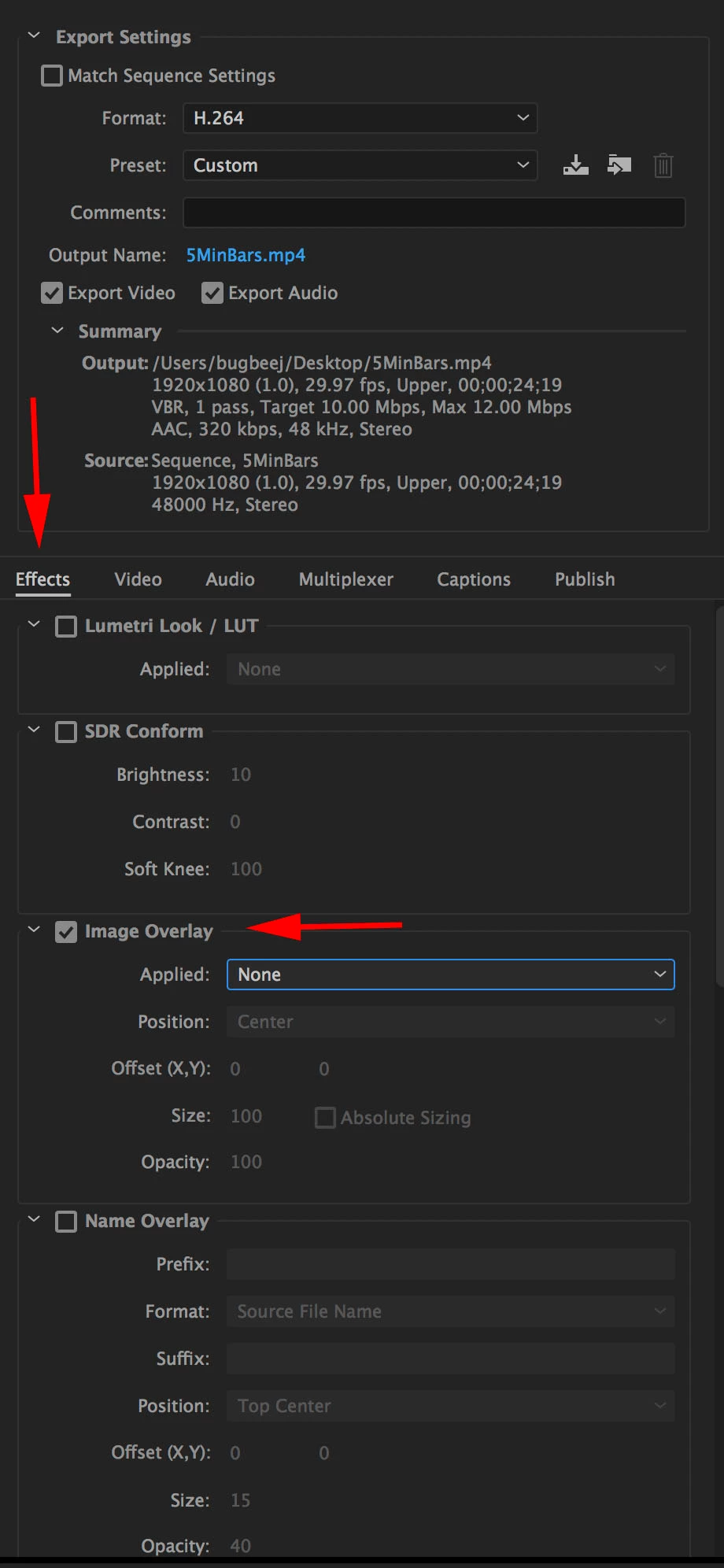
In your export media window, click on effects - image overlay

4 replies

Jeff Bugbee
Community Expert
Community Expert
September 14, 2017

Are you adding a watermark in the render options or are you adding the PNG to a new layer on top of everything else? Can you try whichever option you are not using and see if you still get the long render time?

Participating Frequently
September 14, 2017

What are the dimensions of the watermark graphic, in pixels? I'd go to Photoshop and make a new image to match the Sequence size in Premiere, for instance 1920x1080 or whatever you are working with. Size and place the watermark graphic within that frame exactly where you want it, and add transparency if desired. Now save as .png or .psd with alpha.

Drop that into Premiere timeline. Export. As Premiere does not have to do any scaling or anything to the image, should not add appreciable render time to a timeline that did not have that overlay. The 5-hour thing makes no sense at all.


Thanks

Jeff

300188Author
Inspiring
September 14, 2017

I see your point. I should not scale the graphic in Première. The watermark Graphic in photoshop is 410x426 px and the format is png.

I  want it to be very small on the top corner of the Première sequence which is 1920x1080 px.   So far I have inserted the graphic in a layer created with essential graphics and changed the scale of the logo it in there. I have no idea which size to make it in Photoshop to avoid having to adjust it a little  in Première. I'll try reducing it by half in photoshop. But I may still have to adjust it.  Première is supposed to handle scaled graphics in the titles, maybe the problem is elsewhere.

300188Author
Inspiring
September 14, 2017

Hi everyone, I finally managed to export the sequence with the logo as watermark. It took +/-5 hours.. I think this is not normal. Any help would be welcome.

Jeff Bugbee
Community Expert
Community Expert
September 14, 2017

How big is this PNG?

300188Author
Inspiring
September 14, 2017

Hi,

The PNG is 45Ko

Richard van den Boogaard
Community Expert
Community Expert
September 14, 2017

What type of graphics card (GPU) are you using?

300188Author
Inspiring
September 14, 2017

Hi, thanks for looking into my problem. I have 2 Nvidia GeForce GTX 780