


- Home
- Premiere Pro
- Discussions
- Re: "Software Only" stuck on encode settings panel...
- Re: "Software Only" stuck on encode settings panel...

Copy link to clipboard
Copied
Hi
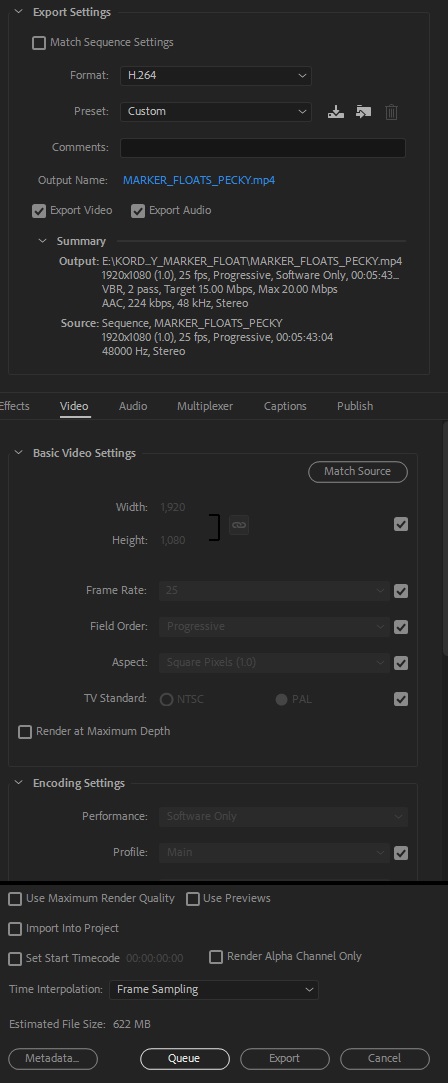
I am currently experiencing another strange bug since running the update to the latest version of PPCC2018. When I go to encode within Premiere I get "Software only" displayed in the summary area and the encoding settings within this panel are greyed out, as can be seen in the attached image. The encode was taking forever so I stopped it and went and checked and CUDA GPU acceleration had been changed to software only in the Project Settings, which I didn't do myself. I changed this back Mercury GPU Playback and the encode went a lot faster, as fast as I would expect when using GPU.
Now my problem is, whatever project I open I get "Software only" displayed in the summary, even though CUDA is enabled in both PP as well as Media Encoder. The project encodes SEEM to be going at GPU speeds but whatever I do the software only message remains. I have noticed that if I change the codec from H264 to MPEG2 for example, the software only message disappears. I am not now 100% sure if my CUDA acceleration is working correctly as the software only message is on every project I open and go to encode within Premiere. If I select to Queue the encode and use Media Encoder, the drop down menu at the bottom of the encode list says CUDA.
Has anyone else been experiencing this?
I have so far:
1. Re-installed PP CC 2018 latest update
2. Installed latest graphics cards drivers as a clean install
3. Tried opening a new project, saving that as CUDA enabled
But nothing has fixed this...
My setup:
Windows 7 Professional x64
Nvidia Quadro K5200
PP CC 2018 fully up to date
Any advice greatly appreciated!


 1 Correct answer

To explain again. It's very simple.
The newest Intel CPU chips have a built-in (therefore "hardware") encoder for H.264.
If you see "hardware" or "software only" in the Export summary box, that is ALL that this refers to. Whether or not the CPU has the new, faster H.264 encoder inside.
It has absolutely nothing to do with the GPU or the use of the GPU as normal in PrPro exports. PERIOD.
Your GPU will still be used for exactly what it is used for, which are those things on the GPU Accelerated list. A
...
 97
Replies
97
97
Replies
97


Copy link to clipboard
Copied
What happened in the 2018 update? I'm getting Software Only in the export settings for H264. Running a 4970K and a 1080ti. Cmon adobe.

Copy link to clipboard
Copied
Yeah its stupid. Some strange intel related explanation that don't cut it for me too. Fix this dammit!
Sent from ProtonMail mobile
Copy link to clipboard
Copied
To explain again. It's very simple.
The newest Intel CPU chips have a built-in (therefore "hardware") encoder for H.264.
If you see "hardware" or "software only" in the Export summary box, that is ALL that this refers to. Whether or not the CPU has the new, faster H.264 encoder inside.
It has absolutely nothing to do with the GPU or the use of the GPU as normal in PrPro exports. PERIOD.
Your GPU will still be used for exactly what it is used for, which are those things on the GPU Accelerated list. And nothing else, as it has been.
There is nothing whatsoever for Adobe to fix.
Neil

Copy link to clipboard
Copied
Is there a page that tells which systems will be hardware accelerated? I have a i9-7920x and it says software only on export...
Copy link to clipboard
Copied
Check with Intel as to whether or not your CPU has the Quiksync feature. And is capable of hardware CPU acceleration for H.264 encoding.
My CPU isn't. So all my exports list software only in the summary.
Which has absolutely nothing to do with whether PrPro uses my GPU for the GPU accelerated effects on my sequences.
I use a lot of Lumetri, sometimes stacked 3 deep.
My GPU is working away on exports.
Now, I'd think all the i9's are new enough they should have QuikSink but that might not be the case. Again, Intel has that information.
Neil
Copy link to clipboard
Copied
I looked on intel, the I9's do not have quick sync.
Copy link to clipboard
Copied
Dang.
Neil

Copy link to clipboard
Copied
I dunno....but here's what I do know (I'm here for this same issue obviously).
A few days ago I was rendering a 4 min video with H.264 and it was taking about five or six minutes and I had the option of selecting software only or CUDA. Yesterday I had to reinstall Premiere and now I'm unable to change from software only and the same video is taking me 30 minutes to render....and I've done nothing different.
I have some longer videos I need to render soon and based on these numbers, they will take days instead of hours.
Something isn't right here 
Copy link to clipboard
Copied
I don't see that you are "here"for the same issue. This thread is NOT about GPU use within PrPro. It's about the new phrase that appears in the Summary section of the Export dialog about hardware or software referring ONLY to whether or not the CPU of that computer has Intel's new Quick Sync feature.
If so, the CPU will be able to supposedly speed encoding of H.264 exports.
Which doesn't have jack to do with PrPro use of the GPU in exports.
Period.
So, if you're having an issue selecting CUDA in the Mercury Acceleration option, that is completely different.
Or if after installing PrPro it's not working properly that's a different issue also.
Neil
Copy link to clipboard
Copied
Im not convinced by any of this intel talk. Get the damn thing working quickly! Its faster in Adobe media encoder and was faster before this damn update. Id like a word from Adobe, not regulars to this forum. Its slow as faaark.
Sent from ProtonMail mobile
Copy link to clipboard
Copied
Sorry if you can't get to the Intel site or elsewhere to learn about this, though it's very easily done.
I can quickly test it. I don't have Quick Sync. So that says "software only" on my exports summary. Yet when I use Lumetri on a full export, my GPU is being used.
Is that clear enough?
Empirical tests.
Neil
Copy link to clipboard
Copied
Yes its clear but not the case for me and a few others by the sounds of it.
Sent from ProtonMail mobile
Copy link to clipboard
Copied
Largely that seems to be a misunderstanding of the GPU use in PrPro, which is another cause of long threads here on a regular basis.
Several of the discussions on this current subject have gone exactly where I suspected ... did they have GPU accelerated effects on the export? They didn't even know. And turned out, they didn't.
So naturally their GPU was NOT being used on the export process because it never would have been for that sequence.
There have also been posts where "it says hardware but my GPU ain't getting used!". Which showed they had an appropriate CPU with the Quick Sync, but a it turned out in the discussion, nothing on the sequence being exported that would use the GPU.
So, again, exactly the behavior that is the real expectation. IF you know how the app actually works.
The GPU is not used for general exporting in H.264 or any other format/codec. It is only used for those sections of a sequence where Lumetri, Warp, major resizing, and a few other things are used. The rest of the same sequence, it won't do a thing.
Also ... when GPU and CPU and RAM are "balanced" in throughput capability, then they can all get used quite extensively according to the needs of the export. But putting a 1080Ti in a slow 4-core CPU rig with low/slow RAM will result in that spendy GPU never working above idle. Having a decent CPU but only 8 or 16GB of RAM, means the CPU and GPU are probably both going to stay at low speed. The GPU can only add 1) IF there are GPU accelerated effects involved and 2) IF the rest of the hardware is good enough to utilize much GPU processing time.
So ... sorting out what is expected use by many users from what is a real normal behavior of the app is the first step. I don't know how many threads we've have here where someone bought a very pricey GPU and was stunned that it didn't speed their exports at flipping all. Enraged. Well ... they didn't use GPU accelerated effects and the CPU/RAM were so minimalist they didn't work fast enough to send enough to that GPU to get it above 5% when they did have something to send to it.
There are a number of other very experienced users for both the app and hardware "around here". You might note they have not popped in to disagree with me. Including folks from the three best computer building shops for video post, who participate regularly here. In fact, when they have, they've said the same thing.
Also, the Support Staff have said the same thing. Kevin, btw, is a rather accomplished editor/colorist in his own right, with many years of experience. He used to teach FCP back about versions 3/4 to other editors in the LA area I think it was. And knows gear pretty dang good. He hasn't gainsaid me either.
So, apparently, my comments seem accurate to some other folks with a ton of experience in hardware & this app in specific.
Which is nice, but I still did empirical testing. I do appreciate the wisdom of the phrase "trust ... but verify". My export tests showed that my CPU always gets "software only" in the summary section. But with a typical export for me with 2/3 layers of Lumetri with all tabs working (including HSL keys) ... my GPU was most certainly working the whole time. My CPU/RAM combo isn't quite up to sending enough to my 1060 to get it above 60% at most any time.
But it definitely is working when it's supposed to be, even though the summary section says "software only".
If your GPU isn't working, the problem is elsewhere.
Neil

Copy link to clipboard
Copied
Whenever i tried to render through Hardware encoding my render got stuck and even i can't cancel. Only Software encoding can be done to render and take lots of time. i am using 2018 and 2020 version of up to date Premiere pro with Red Giant Effects. System Specs: Ryzen 5 3600x, 16gb Ram, Gtx 1050ti. Please help me to find out the solution. Thank you!

Copy link to clipboard
Copied
Which 2020 version of Premiere Pro do you have? 14.0.x, 14.1, 14.2, etc.?
With the 2018 version you cannot have hardware encoding at all if you do not have an Intel CPU that has integrated Intel HD, UHD or Iris Plus Graphics present and enabled. Same goes for all versions of Premiere Pro prior to version 14.2 (aka 2020.2), which added hardware encoding via a compatible Nvidia or AMD GPU.
Copy link to clipboard
Copied
Hello! thanks for the reply,
i am using 2020, version 14.7.0 (Build 23)
Virus-free.
www.avast.com
<#DAB4FAD8-2DD7-40BB-A1B8-4E2AA1F9FDF2>

Copy link to clipboard
Copied
Red Giant put out a memo that certain of their plugins were incompatible with Pr 14. Could that be your issue?
Copy link to clipboard
Copied
To add to that:
Only selected Intel i3, i5 and i7 CPUs (in Socket LGA 115# only) and selected Xeon E3 CPUs support QuickSync - and they MUST have an IGP (Integrated Graphics Processor) embedded in the CPU. CPUs that have the IGP disabled at manufacture also have QuickSync support disabled. So will disabling the IGP at EFI level (either via an EFI setting or by simply leaving the motherboard video ports empty). And LGA 115# Celerons and Pentiums have QuickSync support disabled despite the presence of an enabled IGP.
No Socket LGA 20## CPU ever supported QuickSync at all because the "HEDT" platform requires a discrete GPU to even function at all.


Copy link to clipboard
Copied
Premiere Pro supports hardware-accelerated H.264 encoding on Windows 10 with 6th Generation (or later) Intel® Core™ processors and Intel Graphics enabled, and hardware-accelerated H.264 and HEVC encoding on Mac OS 10.13 systems with supported hardware.
On supported systems, you can select Hardware Encoding in the Encoding Settings section of the Export Settings dialog. If the specified combination of Export Settings is not supported by the hardware, Premiere Pro falls back to Software Encoding.
Hope this helps
Copy link to clipboard
Copied
And just to keep it clear, that is totally separate from any GPU settings or use. This is only about CPU utilization and QuickSync in some newer Intel CPU's versus those without QuickSync equipped chips.
But good clear stating of the options there.
Neil
Copy link to clipboard
Copied
So it just doesn't utilise the GPUs we pay so much for. Thats pretty annoying.
Sent from ProtonMail mobile
Copy link to clipboard
Copied
You either haven't read the above, or are choosing not to think about it.
As stated many times, this has NOTHING whatever to do with GPU use in PrPro. Period. Zip. Nada.
It ONLY has to do with indicating whether your CPU has specific (and new) internal hardware for encoding H.264 video. Called QuickSync by Intel, it is as noted above only on certain newer CPU's.
And has no correlation to or effect on GPU use by PrPro ... period.
PrPro will use the GPU exactly the same either way that shows in the Summary section. As, again, it has nothing to do with PrPro's GPU usage.
Is that clear enough?
As always, the GPU is used by PrPro for major resizing (frame-size changes) and the things on the GPU Accelerated list. Again, no matter how the CPU QuickSync option shows in the Summary section.
Here's the GPU accelerated list ...
GPU Accelerated Effects: https://helpx.adobe.com/premiere-pro/using/effects.html
Neil
Copy link to clipboard
Copied
Surely an i7 8700 processor that I just bought would use quicksync or whatever it is you're on about. It just pisses me off that the ppro can't use hardware in a machine a couple of months old.
Sent from ProtonMail mobile
Copy link to clipboard
Copied
You have to check with Intel, as only certain of their processors have QuickSync, and it's kind of a surprising list for both those that do and those that don't.
IF the QuickSync is there in the CPU, PrPro will use it. If not, it can't. And you need to have the H.264 Acceleration clicked on in the Preferences tab, of course.
Neil

Copy link to clipboard
Copied
why you so mad ? 


Get ready! An upgraded Adobe Community experience is coming in January.
Learn more
 AdChoices